Dec 3, 2025
·
BASICS
·
3 mins

Marketing Lead
You’ve just left an investor meeting. The feedback? "Love the pitch, but your market slide doesn't land. And can you make the competitive section more visual?"
You have another pitch on Thursday. That gives you 48 hours to rework half your deck.
This is the fundraising loop: pitch, get feedback, iterate, repeat. Your deck will go through dozens of versions before you close.
So you try AI to speed things up.
But here's the problem: most AI pitch deck generators are built for generic presentations. You end up with slides that either look bad or make it impossible to iterate fast enough to keep up with your fundraise.
This is why we tested the top 4 AI pitch deck generators on two criteria that actually matter when you're raising:
Design Quality
Iteration Speed
Here’s what we found.
Alai: Built Specifically for Pitch Decks
Premium Design Made for Fundraising
Alai's AI was trained on thousands of successful pitch decks. This means it understands how to turn your content and notes into high-quality slides within the first draft itself.
4 Layout Variants Per Slide
Instead of giving you one generic slide, Alai generates 4 layout options for every slide. This lets you pick the layout that communicates your story the best.
For example, your market size slide might work better as a circular diagram, a pyramid visualization, or a clean text layout.
With Alai, you can see all options and choose rather than being stuck with whatever the AI decided.
Pitch-Specific Visual Elements
Alai includes elements designed specifically for investor presentations:
Venn/Onion Diagrams For Market Share Slides
Compare Two For Competitive Analysis
Timeline to show Customer/Product Growth
Feature Comparison Tables
This means each slide gets conveyed in the most effective way without being repetitive across your deck.

Premium Design Quality
Alai doesn't just place content on slides - it applies real design principles. Proper colour contrast so text is readable. Typographic hierarchy that draws attention to key points. Consistent spacing that keeps slides clean without you adjusting anything.
This leads to slides that look professionally designed.
Fast Iteration After Investor Feedback
Design quality matters, but so does speed. Here's where Alai separates itself from tools that slow you down.
Context-Aware AI
When you ask Alai to rewrite content, you can ensure that the AI rewrites keeping in mind the content of the entire deck not just the current slide
For example, if you introduce your product as an "AI sales co-pilot" on slide one, Alai doesn't start calling it a "sales automation tool" or "CRM assistant" three slides later. Your positioning stays tight throughout.
Convert Feature for Instant Visualization Testing
Want to try a different way to express your content? The Convert feature lets you instantly switch between formats:
List → Timeline
Text block → Comparison matrix
Bullet points → Process diagram
Paragraphs → Feature cards
Plus, Alai stores older variants, so you can always switch back to the previous layout in one click.
AI-Generated Complex Diagrams and Images
When an investor suggests a new visualization - a Venn diagram for market overlap, a quadrant for competitive positioning, you can implement it immediately using AI.
Alai generates complex diagrams and images directly within your deck, no external tools needed.
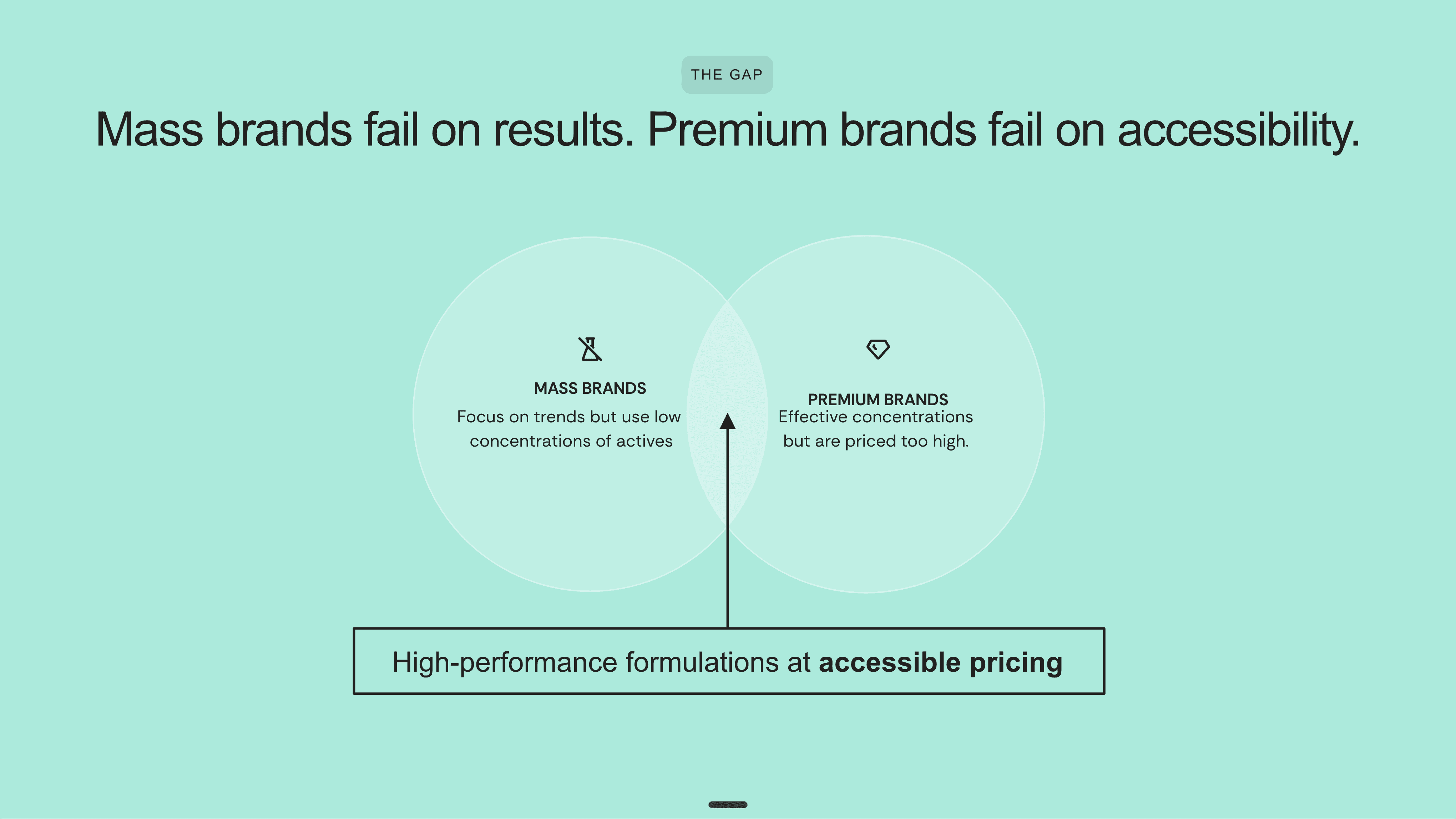
Venn diagram created by AI on Alai
Responsive Canvas with Granular Control
The canvas handles spacing automatically so you're not stuck perfecting alignments. But when you need precision, you get full control over:
Padding and margins
Typography settings
Element positioning
Individual component design
Independent Design and Content Controls
This is a common pain point with other AI tools: changing content breaks design, or adjusting design requires regenerating content. Alai offers separate design and content controls (change source content and change design layout). Adjust one without redoing the other.
Gamma: Built for Documents, Not Pitch Decks
The Document-First Problem
Gamma is built for multiple formats (websites, documents, presentations), not specifically for pitch decks.
Notion-Style Blocks = Document-Like Output
Gamma uses Notion-style blocks that make output look more like documents than investor-ready presentations. The designs tend to feel flat and lack the visual polish investors expect.
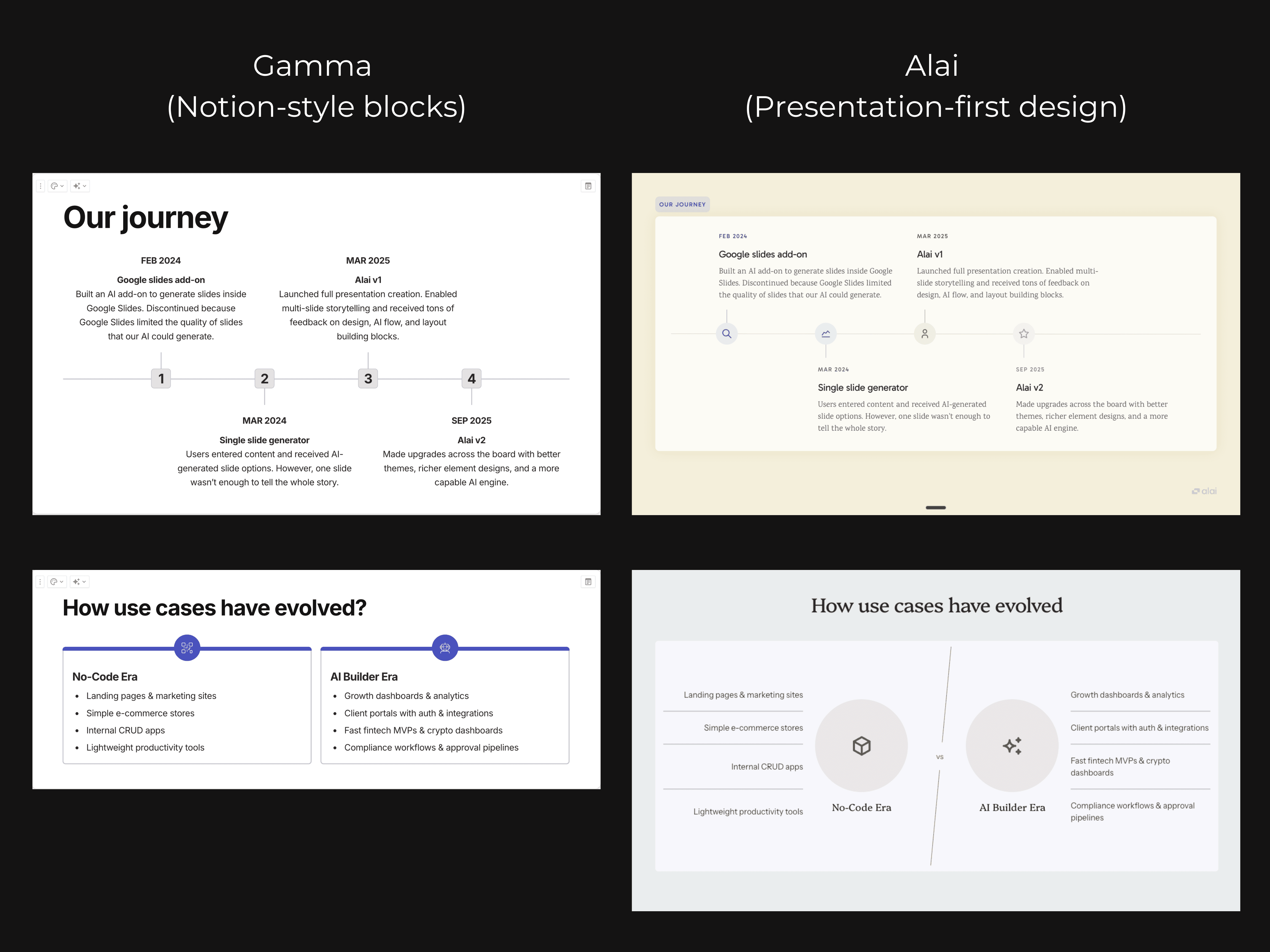
Single Layout Per Slide
You get one layout option per slide. No way to explore different storytelling approaches or see how your market size slide might look as a diagram versus a chart versus text.
Missing Pitch-Specific Elements
Because the AI is trained to create output for websites, documents, AND presentations, first drafts often lack pitch-specific design elements. You'll notice:
Fewer diagrams and visualizations
More text-heavy slides
Missing comparison layouts
Generic formatting that needs manual rework
Iteration Bottlenecks
AI Changes Break Your Flow
You can iterate using Gamma's chat interface, but there are no dedicated AI controls meant to specifically edit design or content. This gives users less control over what might change when you make a request
Example: Ask to "make the text shorter" and the AI might also change your layout or adjust elements you didn't want touched.
Limited Granular Control
You can't easily customize:
Element positioning
Spacing and padding
Individual component styling
Element Switching Requires Prompts
Want to change a text block to a timeline? In Gamma, you need to prompt the AI and hope it understands. You can't directly click and switch from one element type to another like you can in other tools.
Beautiful AI: Dated Design, Limited Control
Design That Lacks Pitch Deck Elements
Beautiful AI is highly dependent on pre-fixed templates that lack pitch deck design principles and make it difficult to iterate between investor feedbacks.
Single Predetermined Template Per Deck
Beautiful AI locks you into one template style for your entire deck. The design principles feel dated - think 2012-era corporate presentations rather than modern start-up aesthetics.
Missing Modern Pitch Elements
The platform lacks visualization options that investors expect in 2025:
No comparison matrices
Limited diagram options
No competitive positioning elements
Basic chart styles only
Fights You When You Need Changes
Limited Element-Specific Controls
Beautiful AI lacks a responsive canvas which makes it super hard to add or change elements. Want to add a circular process diagram to a slide with text boxes? Rather than a simple drag and drop, you would have to manually arrange each element within the slide to ensure both can be incorporated.
Additionally, due to its high dependency on pre-existing templates, most layouts don’t allow addition of new elements or sub-sections.
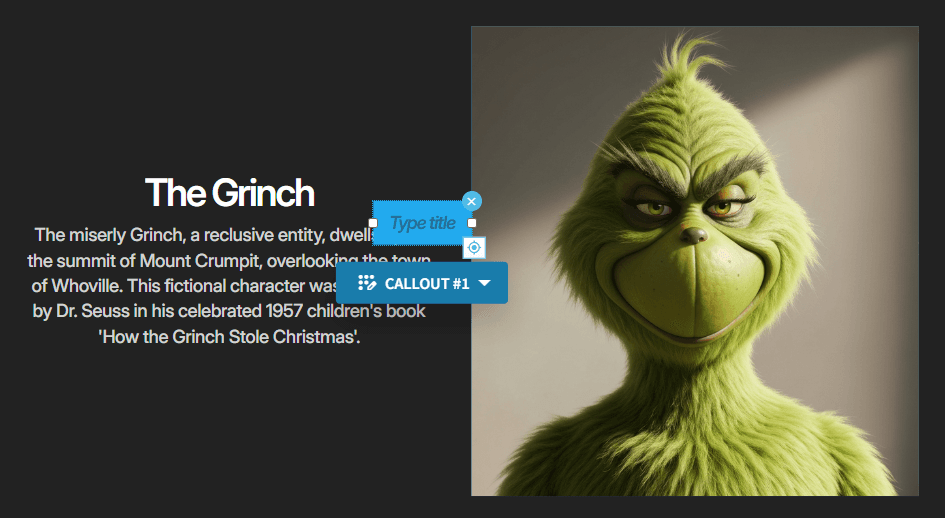
Beautiful AI makes it difficult for users to add new elements by placing them directly on top of existing content requiring manual alignment.
Minimal AI After Generation
AI assistance is mostly limited to:
Design: Smart slides allows you to switch slides from one layout to another
Content: Allows you to generate new content or edit existing ones using quick rewrite options
That's it. When you need substantial changes between investor meetings, you're largely on your own.
Gemini Canvas: More Work, Not Less
Why It Falls Short for Fundraising
Single Variant Per Generation
Gemini Canvas generates one option per slide. No alternatives to compare, no way to explore different approaches.
Output Quality = Prompt Quality
Your results depend entirely on how detailed your prompt was. Without specific instructions, you get basic PowerPoint-style templates that look like they're from 2015.
No Pitch Element Library
There's no library of pitch-specific elements to draw from. Every visualization, every layout, every design choice requires you to describe it in your prompt. For non-designers, this is tedious guesswork.
Zero Editing Controls
This is the dealbreaker for fundraising.
No Visual Editing
No drag-and-drop
No element refinement
No direct manipulation
Every single change - moving an element, adjusting spacing, changing colours requires typing detailed text prompts.
Iteration Headaches
Design and content changes require:
Tedious chat-based feedback, OR
Exporting to Google Slides and editing manually
There's no preview of what your presentation will look like before generation. Unlike Alai, where you can see and pick from 4 variations for each slide, Gemini is a black box until it's done.
Quick Comparison: What Each Tool Delivers
Feature | Alai | Gamma | Beautiful AI | Gemini Canvas |
|---|---|---|---|---|
Layout options per slide | 4 variants | 1 | 1 | 1 |
Pitch-specific elements | ✓ | Limited | Limited | ✗ |
Design quality | Premium, modern | Document-style | Dated templates | Prompt-dependent |
Context-aware AI | ✓ | Partial | ✗ | ✗ |
Responsive canvas | ✓ | ✓ | ✗ | ✗ |
AI image generation | ✓ | ✓ | ✓ | ✓ |
Independent design and content controls | ✓ | ✗ | ✗ | ✗ |
The Bottom Line: What Actually Matters for Fundraising
You'll spend 3-6 months raising. Your pitch deck will evolve with every investor conversation.
The question isn't which tool has AI. It's which tool lets you:
Create a deck that looks like it can help you get funded
Iterate fast enough to implement feedback between meetings
Alai is the only tool built specifically for this:
AI trained on pitch decks, not generic presentations
Premium design quality that matches venture-backed company standards
4 layout variants to explore different storytelling approaches
Full control over spacing and elements when you need precision
Fast AI iteration that keeps pace with your fundraise
Learn how to create a pitch deck that gets you funded →
FAQs
Can ChatGPT create a pitch deck?
Not really. ChatGPT can help you write content or brainstorm ideas, but it can't design slides, create layouts, or generate a presentation file. You'd need to copy-paste everything into another tool and handle all the design yourself. If you want AI that actually creates presentation-ready slides, use a dedicated pitch deck tool like Alai—where AI handles both content and design in one workflow.
Can AI help me write a pitch deck?
AI requires you to provide enough context to create content that can get you funded. Key information around the product, pricing, competition, existing traction and future projections is needed for AI to build a compelling pitch deck.
How do I build a winning pitch deck?
Start with a compelling story: problem, solution, market opportunity, traction, team, and ask. Keep it to 10-12 slides - investors see hundreds of decks and lose attention quickly. Each slide should answer one key question and move your narrative forward. Remove everything that holds no impact for investors.
How many slides should a pitch deck have?
10-12 slides is the sweet spot. Guy Kawasaki's 10/20/30 rule recommends 10 slides, 20 minutes, and no font smaller than 30 points. Essential slides include: problem, solution, market size, business model, traction, team, competition, financials, and your ask.
PAGES
resources