·
BASICS
·
22 min read

Marketing Lead
Enterprise teams are losing hundreds of hours a quarter to presentation production. Professionals spend 8 to 10 hours per deck on layout decisions, formatting passes, and brand guesswork - time that should go into selling, strategy, and client work. At team scale, the problem compounds: brand quality varies wildly depending on who built the slide, personalized proposals stay out of reach because the manual effort per deck makes volume impossible, and the tools that do exist either don't connect to the stack or don't clear procurement.
Solving this requires AI built for how enterprise teams actually work. That means enforcing a full design system on every deck, building layouts from what the content needs rather than slotting it into the nearest template, connecting to existing tech stack and data systems so personalized decks generate at volume without manual rework, and clearing enterprise procurement with a proper security system in place not just a privacy policy.
Most AI presentation tools were built for individuals. This post covers in detail what problems enterprise face and how AI solves them.
TLDR: How AI Is Fixing Presentation Workflows For Enterprises
Problem | How AIai fixes it |
|---|---|
Professionals spend 8 to 10 hours per deck on layout and formatting | AI handles creation and iteration automatically. First draft in 20 to 30 minutes, edits in seconds |
Brand quality varies wildly depending on who built the slide | Full design system built once, enforced on every deck by default |
Personalizing proposals at volume requires too much manual work | AI pulls from CRM data to generate tailored decks automatically, no manual rework |
Presentation tools sit outside the existing stack | API and A2A integration connects deck generation directly to CRM and internal agents |
Consumer tools don't clear enterprise procurement | Executed DPA, documented subprocessors, RBAC, and dedicated tenant isolation standard |
The Problems Enterprise Presentation Workflows Face
Enterprise presentation workflows have a production problem that compounds the bigger the team gets. Here's exactly where it breaks.
Professionals Spend 8 to 10 Hours Building a Single Deck
Every deck built from scratch is time not spent on the actual job. For a sales rep, that's prospects. For a client success manager, that's accounts. Layout decisions, formatting passes, back and forth with design: none of that is the actual work. It's production overhead that lands on the people who should be doing something else. And it doesn't stop at the first draft. Every round of feedback means another formatting pass, another alignment fix, another trip back to design. A deck that should take an hour runs to a full day once iteration is factored in.
One person making those calls for five decks a month is manageable. A 30-person team doing it for 200 is hundreds of hours a quarter that never show up in a report but absolutely show up in what doesn't get done.
Brand Accuracy Falls Apart Across Teams
Most enterprise teams have brand guidelines and a master PowerPoint template. The foundation exists. What breaks down is everything between the template and a finished deck.
Getting a slide right means knowing which font weight applies at that heading level, which gradient works on a dark background, how much padding the text box needs, whether the icon style matches the rest of the deck. None of that lives in the template. It lives in the heads of the two or three people on the design team who built it. Everyone else guesses under deadline pressure: wrong colours, stretched text boxes, slide layouts lifted from decks that predate the last refresh.
The template exists. Applying it correctly, across 40 people at speed, requires design knowledge most people don't have time to develop.
Personalization at Volume Breaks Without Stack Integration
Enterprise sales needs personalized decks at every deal stage. For a team of 20 reps managing 15 to 20 accounts each, that's a continuous production requirement running alongside the actual selling. The "personalized" deck is usually the standard one with a logo swap, because each genuinely tailored proposal requires hours of manual work per account. At any real volume, that math doesn't work.
The deeper problem is that the data needed to personalize already exists. Sales runs Salesforce or HubSpot. Client success has account data across half a dozen systems. Operations has reporting pipelines. But when the presentation tool sits in isolation and needs a human to open it, pull the data, and build the deck every time, none of that data does any work. The bottleneck isn't information. It's the manual step between the data and the deck.
Template-First AI Forces Content Into the Wrong Structure
Most AI presentation tools match content to the nearest available template. The structure gets decided before the content arrives. If the right template exists, the slide looks fine. If it doesn't, the content gets forced into whatever fits closest: a three-point layout stretched to hold five points, a text-heavy structure used for data that needed a chart, a generic title-and-bullets format applied to content that needed something visual.
At enterprise scale, where teams build hundreds of decks across different content types and audiences, the template ceiling becomes a quality problem. The output doesn't just look repetitive. It communicates poorly, because the layout the content needed wasn't in the library.
Switching Tools Means Starting From Scratch
Most AI presentation tools require teams to abandon their existing templates, assets, and slide libraries entirely. There's no migration path. The decks built over years of sales cycles, the slide library the design team spent months building, the approved templates for every use case from QBRs to investor updates: none of it carries over. Teams are expected to start fresh inside a new system, rebuild everything from scratch, and convince 40 people to change how they work overnight.
For enterprise teams, that becomes a huge bottleneck for change. It's a full replacement project. And it's one of the top reasons why most AI presentation tool evaluations stall before they reach rollout: the switching cost looks bigger than the productivity gain.
Consumer AI Tools Don't Pass Enterprise Procurement
A team lead finds something that works. The demo lands well. The team is on board. Then procurement asks for a data processing agreement. Nothing to send. IT asks for RBAC documentation. Nothing to send. The security team asks for a subprocessor list. They get a privacy policy.
The deal stalls. The team goes back to PowerPoint.
Security requirements aren't a nice-to-have for enterprise software. They're the gate. A tool that can't produce an executed DPA, documented data residency, and answers to a standard security questionnaire won't clear procurement at a financial services firm or pharmaceutical company, regardless of how good the slides look.
Why Most AI Presentation Tools Aren't Ready for Enterprise Yet
Before I go ahead and tell you exactly which tool to use for enterprise, here's where the top AI presentations tools land against the requirements above.
Capability | ||||
|---|---|---|---|---|
Brand system depth | Theme and colors only. No workspace-level enforcement | Smart Slides enforce layout consistency. No component-level design system | 35K+ template library. Brand guidelines upload. No full design system build | Full design system: typography casing, surfaces, color rules, spacing, elevation, components, voice |
Content-first AI | No. Card-based template structure | No. Smart Slide templates, content fills slots | No. Storyline-driven templates, content fills structure | Yes. Trained on 1,000+ decks. Builds layout from content signals |
Works with existing templates and decks. | No. New decks only. | No. New decks only. | No. Can restyle within Prezent's template library only. | Yes. Import existing decks and templates, restyle and edit with full design system applied. |
Layout options per prompt | 1 | 1 | 1 | Up to 4 distinct options per idea |
API | Yes, on Pro+ plans. Limited brand enforcement via API | No public API | API introduced 2025. Early-stage. | Yes. Users can create and edit slides via API. |
A2A integration | No | No | No | Yes |
PPTX export fidelity | Known issues. G2/Capterra: overlapping text boxes, missing fonts | Clean | Clean | Clean |
DPA | Not publicly documented on standard plans | Not publicly documented | Yes | Yes |
Dedicated tenant | No | No |
| Yes |
How Alai Enables Enterprises To Move From PowerPoint to AI
Enterprise teams evaluating AI presentation software eventually hit the same wall. The tools that work for individuals break at team scale. Brand enforcement stops at a color palette. APIs don't exist. Security documentation isn't there when procurement asks. Alai is built specifically around those gaps. Here's what that looks like against each problem.
Cutting Deck Creation Time By 80%
Alai cuts deck creation time in two places: creation and iteration. Most tools only address the first. The second is where the hours actually go.
Creation: Paste in raw content. Specify the audience, tone, and length. Alai reads the full content, determines the narrative structure, selects layouts based on what each slide needs, and applies the design system. A complete first draft comes out the other side. No template hunting, no manual alignment, no design decisions left to the person who just needs the deck done. Teams that previously spent three to four hours on a first draft routinely get there in 20 to 30 minutes.
Iteration: A round of feedback usually means a formatting pass, realignment, and a trip back to design. The deck that should take an hour runs to a full day once the back and forth is factored in. Alai handles iteration the same way it handles creation. Paste in new data, ask the agent to update three slides, and the changes come back on-brand, structurally consistent, and formatted correctly without anyone touching a text box. They don't look like edits. They look like the deck was always that way.
That consistency holds because Alai's AI is context-aware across the full presentation, not just the slide being edited. Rewrite a section and the AI considers where it sits in the narrative arc. Add content and the design system applies automatically. Remove a slide and the surrounding flow adjusts.
Additionally, Agent Mode allows iterative editing across the full deck in plain language. Type an instruction and it executes across every relevant slide, on-brand and in context, without touching a single text box manually. "Make the executive summary more concise." "Rewrite this slide for a CFO audience." "Move the case study after pricing." This enables teams to make iterations fast without having to navigate any manual design workflows.
Keeping Every Deck On-Brand Regardless of Who Built It
Every other tool in this category covers the basics: logo upload, colour combinations, font selection. That's where they draw the line. The output looks roughly on-brand at a glance, but the moment someone has to make a real design decision, whether that's which surface color fits a data-heavy slide or how much padding a text box needs at a specific heading level, the tool offers nothing. The decisions get made by guesswork, and guesswork at team scale becomes drift.
With Alai, enterprise customers get a dedicated design system built from the ground up. Here's what that covers:
Typography: fonts, type scale, casing rules (title case versus sentence case, where each applies), heading hierarchy, caption style, body text treatment
Surfaces: how different background types are used across different content contexts. A data-heavy slide gets a different surface treatment than a narrative section opener.
Color: primary, secondary, and accent color definitions, plus the rules governing when each appears. Not just the hex codes but the usage contexts.
Spacing and layout: grid rules, density standards, padding ratios
Border radii and elevation: card depth, shadow behavior, how layered elements interact visually
Cards and buttons: component-level rules for how information containers look and behave
Iconography: style, weight, usage rules. Outline versus filled. When icons appear and when they don't.
Logos: usage rules, clear space standards, placement hierarchy across different slide types
Brand voice: tone, formality level, the language that sounds like the organization rather than generic B2B copy
Slide formats: Header and footer detailing - how much text should be included, what the size should be and which fonts should be used.
This is the same specification depth a design agency would need to build a high quality pitch deck template. It gets built once and lives inside Alai permanently, informing every AI decision every time anyone on the team creates a deck.
After the design system is built, the AI doesn't approximate the brand. It operates inside it. Nobody polices font choices manually. Nobody sends the "please use the correct template" Slack message. The system makes correct decisions before a human sees the output.
Beautiful.ai's Smart Slides and Prezent's template library solve a surface-level problem: they stop people from making visually broken slides. That's useful, but it's not the same as brand accuracy. A visually consistent slide built on the wrong surface color, with the wrong font weight, using an icon style that doesn't match the rest of the deck, still looks off-brand to anyone who knows the brand well. Template-level enforcement catches the obvious errors. Design system enforcement catches everything else.
A hex code tells the AI your brand color. A design system tells the AI what to do with it.
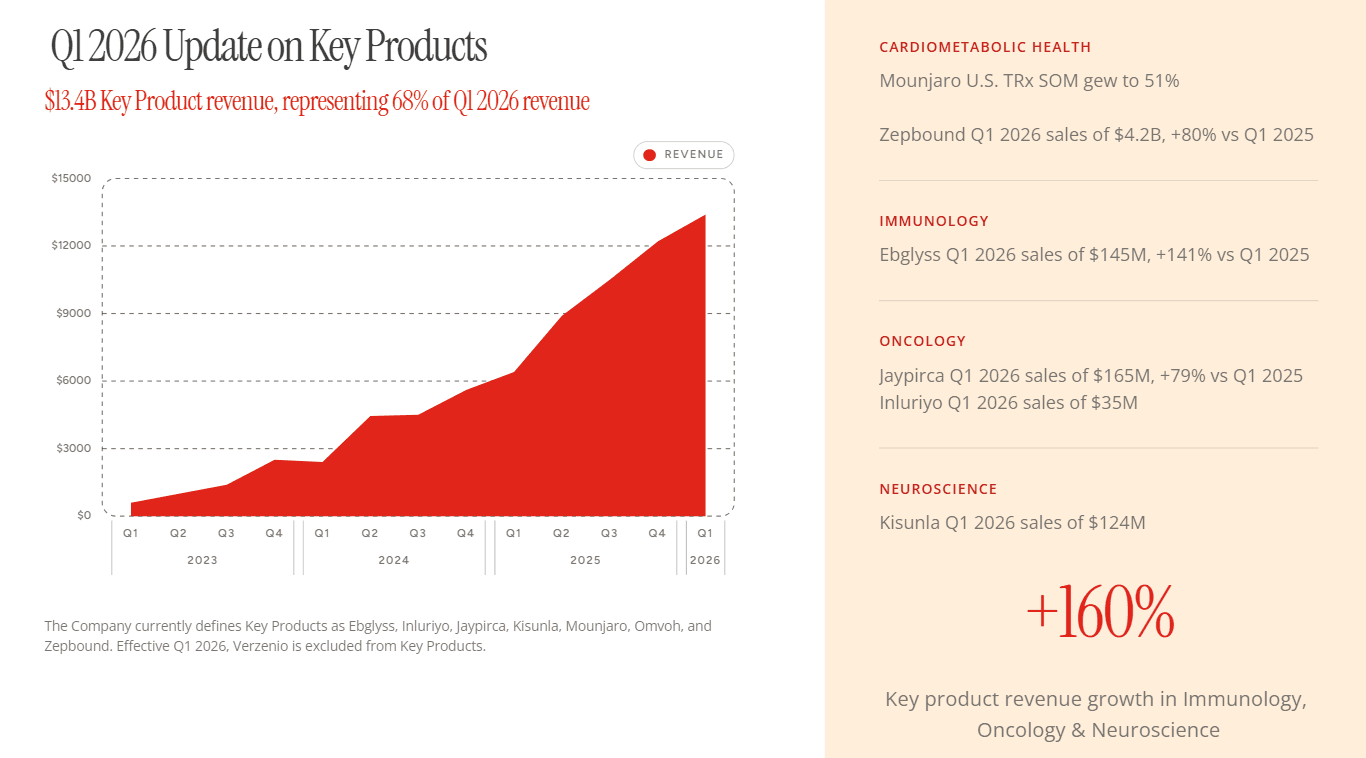
The slide below is a good example of what this looks like in practice. Every element, the revenue chart, the category breakdowns, the +160% callout, the typography hierarchy across headers and body text, follows a consistent set of rules. The red is used the same way across every surface. The spacing between sections is deliberate. The layout didn't come from someone making judgment calls under deadline pressure. It came from a design system that encoded those decisions upfront, so every person building a deck like this one starts from the same foundation.
Personalization at Volume, Without the Manual Work
The personalization problem has two parts: the manual effort required per deck, and the data sitting in systems the presentation tool can't reach. Alai solves both.
For individual deck creation: As covered earlier, Alai's AI and Agent Mode cut deck creation time by 80%. That same speed applies to personalized decks. A rep pastes in account context from the CRM, specifies the audience and use case, and gets a deck built around that account in 20 to 30 minutes. Alai's memory system makes this faster still. Reps can pull slides and assets from previous decks directly into new ones, so the right visual or layout from a past proposal doesn't get rebuilt from scratch every time. The design system applies automatically. The content personalizes. The structure follows the account, not a template.
For high-volume generation: Presentation creation and editing capability is available via Alai's API. A sales team connects Alai to Salesforce. When a rep moves an opportunity to a specific pipeline stage, Alai generates the appropriate deck automatically using that account's data. The rep reviews, adjusts via Agent Mode if needed and sends. Nobody built the deck manually. For a rep producing 80 to 100 personalized decks a month, the API ensures they’re able to actually personalise their decks with data rather than just a logo change.
For enterprises with internal AI agents: A2A integration means Alai becomes a capability those agents can call directly. A client onboarding agent generates the welcome deck. A reporting agent creates the monthly presentation alongside the data it's already compiling. No human handoff required.
Clean PPTX export throughout. Layouts don't break when a client opens the file. Worth naming specifically because it's exactly where other AI ppts makers like Gamma consistently fail in customer reviews.
Building Slides From Content, Not Templates
With most AI ppt tools - the template exists first. The content gets fitted into it. A comparison becomes a table because that's the comparison template. A process becomes bullet points because that's what the content slot expects. The structure is never really about the content. It's about what the template library has available.
Alai flips that. The AI reads the content first and builds the layout around what it actually needs. Trained on more than 1,000 real presentations, it knows what a data-heavy slide needs structurally versus a narrative one, when a five-point process calls for a staged flow versus a list, when a central concept needs a hub and spoke rather than a split layout. The template gets created for the content, not the other way round.
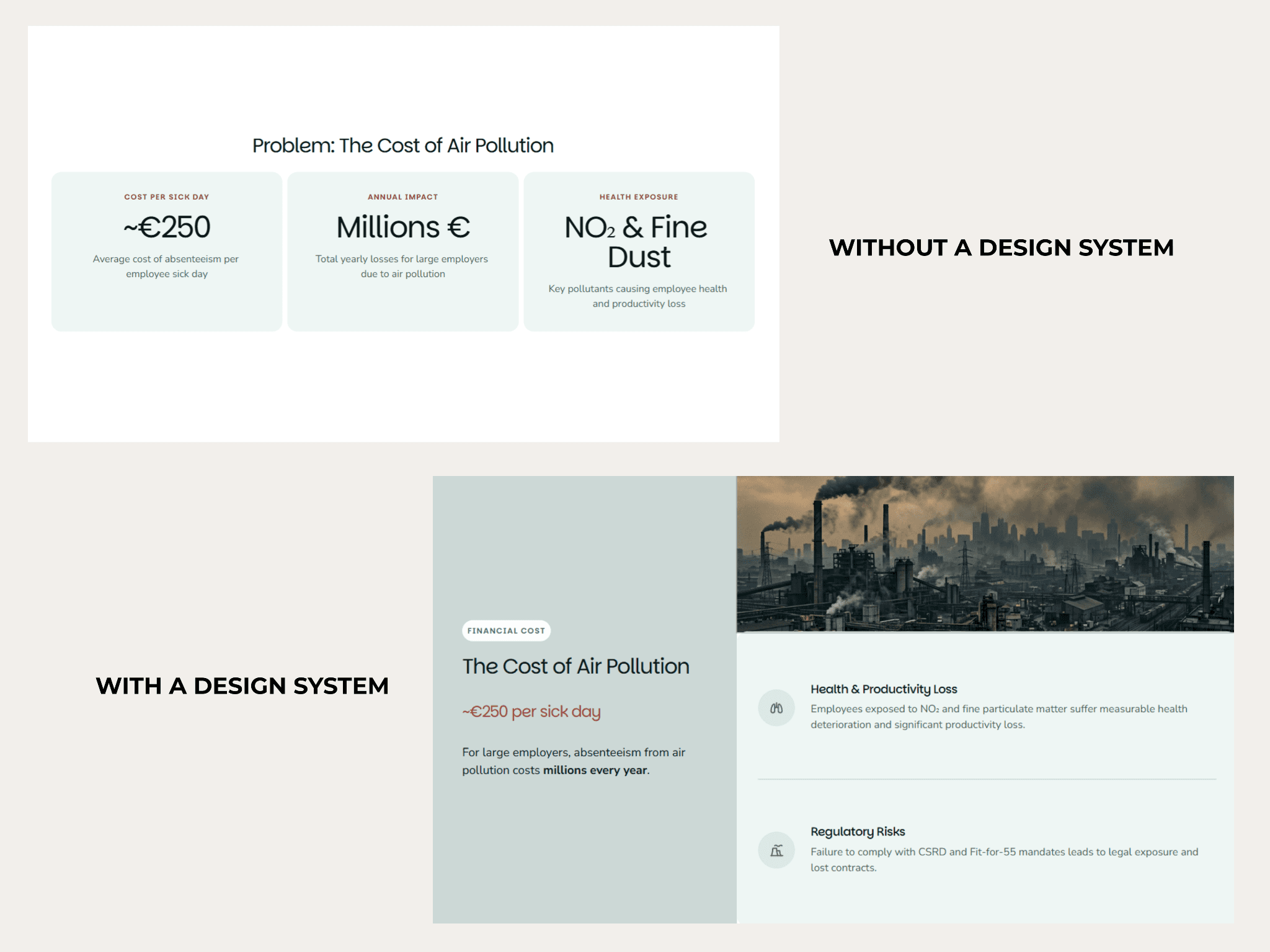
The image above shows the same content built two ways. Without a design system, the AI slots it into the closest available template: three cards, flat layout, no visual hierarchy. With a design system, the same content gets a layout built around what it needs to communicate: a contextual image, an accent color pulling attention to the key stat, iconography reinforcing the categories, a clear separation between the headline number and the supporting detail.
This is what "the template gets created for the content" looks like in practice. The structure isn't chosen from a library. It's built from what the content is trying to say.
At enterprise scale that distinction matters. Decks don't develop the visual repetition that template-first tools produce. Slide 20 looks like it was built with the same intent as slide one, because the same logic applied to both.
Respects Existing Templates and Assets, Pixel by Pixel
Most AI presentation tools ask enterprise teams to start over. Alai doesn't. When a team onboards, Alai ingests existing PowerPoint templates, slide libraries, and brand assets and rebuilds them inside the design system. Not reimported as flat images. Rebuilt to match the original pixel by pixel, so the slides teams have spent years refining become the foundation Alai builds from rather than something they have to recreate.
This matters for adoption as much as it does for quality. One of the biggest reason enterprise AI tool rollouts fail isn't the tool itself. It's the behavioral change required to use it. The reps, CS managers, and marketers who have been working from the same approved deck structures continue working from those same structures. The AI handles the generation, iteration, and brand enforcement on top of what already exists.
Practically, this means:
Existing PowerPoint templates get ingested and rebuilt inside Alai's design system. The layouts, spacing, and component rules that made them work are encoded into the system rather than discarded.
Existing slide libraries carry over. Approved slides from past proposals, case studies, product one-pagers, and presentations can be pulled directly into new decks rather than rebuilt from scratch every time.
Brand assets (logos, imagery, iconography, approved visuals) get loaded into Alai and applied by the design system automatically. No manual uploading per deck.
The result: a team that switches to Alai doesn't lose anything they've already built. They gain a system that enforces brand, generates new content, and handles iteration and improvement on top of the assets and templates they already trust.
Built to Clear Enterprise Security and Procurement
Most AI tools fail the enterprise procurement process quietly. The demo goes well. The team is on board. Then procurement asks for documentation that doesn't exist.
Alai treats security and compliance as a first-class requirement from day one. Full DPA execution, documented subprocessors and RBAC are standard for enterprise customers. No customer data is ever used to train AI models.
Changes the Workflow, Not Just the Speed
Every tool claims to save time. Few actually change the workflow at the structural level that makes those savings measurable and repeatable across a team.
What changes | How |
|---|---|
Brand compliance | Design system enforcement removes the manual policing loop. Every deck starts on-brand by default. |
Deck creation time | Agent-driven creation removes per-deck formatting overhead. First drafts in 20 to 30 minutes instead of 3 to 4 hours. |
Volume generation | REST API removes the human from the generation loop entirely for high-volume use cases. |
Agent workflows | A2A removes the presentation tool from the manual task list for teams with existing agent architectures. |
How Enterprises Are Actually Replacing PowerPoint With AI
How Pharma and Life Sciences Teams Are Replacing PowerPoint With Alai
Pharma teams build some of the most presentation-heavy workflows in any industry. Medical affairs, commercial, and R&D teams each produce high-stakes decks on repeat: advisory board meetings, MSL training materials, launch readiness reviews, national sales meeting presentations. Each one pulls from dense clinical data, needs to meet brand and compliance standards, and gets reviewed by multiple stakeholders before it goes anywhere external. The production cycle is long. The content work gets compressed because the formatting work takes so long.
How pharma teams are making the switch:
Advisory board decks: The medical affairs team pastes in the clinical evidence, disease landscape, and discussion questions. Alai builds the deck around that content, applying the design system automatically. When data updates before the meeting, Agent Mode applies the changes across the full deck without a formatting pass.
MSL training materials: Field teams need training decks that are visually consistent, scientifically accurate, and updated every time the data changes. Alai's API connects to internal data systems so those decks generate at volume without manual production work per update cycle.
Launch readiness reviews: Cross-functional teams pulling data from R&D, commercial, and regulatory all contribute to the same deck. Alai keeps the output visually consistent regardless of how many contributors are involved, with the design system enforcing brand standards at the point of creation.
How Management Consulting Teams Are Replacing PowerPoint With Alai
When 200 consultants across regions build independently, brand quality varies by person. Alai's design system ensures every deck that leaves the firm looks like it came from the same place, regardless of who built it or where.
How consulting teams are making the switch:
Client deliverables: The consultant pastes in the analysis, findings, and recommendations. Alai reads the content and builds the layout around what each section needs. For repetitive weekly and monthly client reports - automated workflows are created using the Alai API which is connected to other data dashboards.
Proposals and pitch decks: Paste in the client context, the problem framing, and the proposed approach. Alai generates a first draft in 20 to 30 minutes. The consultant refines the argument in Agent Mode. The deck that used to take a day takes a morning.
How Marketing and Creative Agencies Are Replacing PowerPoint With Alai
Agencies pitch constantly and report constantly. A mid-sized agency competing for 10 new clients a month while managing 30 active accounts is producing a continuous stream of decks across both workflows. New business pitches need to feel built for that specific prospect. Campaign results decks need to be fast. Both need to look like they came from the same agency. Most don't.
How agencies are making the switch:
New business pitches: Paste in the prospect brief: industry, problem, relevant case studies, proposed approach. Alai builds a deck structured around that specific prospect, not recycled from the last pitch. Total time: 20 to 30 minutes instead of a full production day.
Campaign results and reporting: Connect Alai to reporting dashboards via the API. When a monthly report is due, the deck generates automatically from the latest data. The account manager reviews and sends. No manual data entry, no formatting pass, no designer involved.
How Financial Services Teams Are Replacing PowerPoint With Alai
Wealth managers, private equity teams, and investment bankers build the same high-stakes decks on a regular cycle. Portfolio reviews, deal books, investor presentations, client proposals. Each one needs to reflect specific client data, meet the firm's visual standards, and hold up in front of a sophisticated audience. Built manually, a quarterly portfolio review takes two to three hours per client. For an advisor managing 40 relationships, that's a quarter's worth of production work that adds no advisory value.
How financial services teams are making the switch:
Portfolio reviews: Alai connects to portfolio management systems via the API. When a quarterly review cycle starts, each client's deck generates automatically from their data. The advisor reviews, adjusts the narrative for any relationship context via Agent Mode, and sends. The production work disappears.
Deal books and pitch materials: Paste in the deal data and investment thesis. Alai builds the deck around the transaction type, applying the firm's design system throughout. Edits that used to mean a late night in PowerPoint get handled in minutes.
Investor presentations: CFOs and IR teams produce the same investor narrative across multiple formats and audiences every quarter. Alai generates each version from the same source content, adjusting structure and depth for the specific audience without a rebuild each time.
How Enterprise SaaS and Tech Teams Are Replacing PowerPoint With Alai
A 50-person sales team with 20 accounts each is producing a deck for nearly every stage of every deal. Discovery decks, technical evaluation decks, business cases, executive briefings. Each one should be tailored to the account. Almost none are, because the manual effort required makes that impossible at volume. The personalized deck is usually the standard one with a logo swap.
How SaaS and tech teams are making the switch:
Personalized sales proposals: A rep pastes in account context from the CRM: industry, pain points, use case, stakeholders. Alai builds a deck tailored to that account. A technical buyer gets a different structure than a CFO. A first call deck looks different from a business case. Total time: 15 to 20 minutes instead of two hours.
Automated pipeline decks: Connect Alai to Salesforce or HubSpot via the API. When a rep moves an opportunity to a qualified stage, the appropriate deck generates automatically from that account's data. The rep reviews, refines via Agent Mode, and sends. Nobody built it manually.
QBRs and customer success decks: The CS manager pastes in usage data, key outcomes, open issues, and renewal context. Alai builds the deck around that account. Data sections get data layouts. The executive summary gets its own treatment. When the client sends updated numbers the day before, Agent Mode applies the changes in seconds.
The Three-Stage Transition From PowerPoint to AI
Across all teams, the transition follows the same pattern. Each stage delivers value before the next one starts.
Stage one: Design system build. Send Alai the brand kit. The Alai team builds the full design system: typography, surfaces, color rules, spacing, components, voice. Built once, lives in Alai permanently. Every deck after this point starts on-brand by default.
Stage two: Agent-driven creation replaces manual builds. Teams stop building from blank slides and stale templates. Content in, structured on-brand decks out. The manual production layer disappears without disrupting the expectation of a polished .pptx at the end.
Stage three: API and A2A integration for volume generation. Connecting Alai to existing CRM or data systems moves deck generation from manual to automated. A rep qualifies an opportunity, the deck generates. A QBR is due, the draft is already there. This is where enterprises replace PowerPoint as a workflow, not just as a design environment.
Throughout: dedicated Slack or Teams support channel with Alai, sandbox environment for API testing during pilot, hands-on onboarding for platform, API, and admin setup.
Key Takeaways
Enterprise teams are spending more on AI tools than ever. The workflow isn't changing because most tools were built for individuals and sold to teams.
The six failures that break enterprise presentation workflows: brand accuracy, manual formatting overhead, template-constrained output, stack disconnection, procurement failure, and wrong tool adoption under pressure.
Gamma, Beautiful.ai, and Prezent AI each solve one or two enterprise problems well. None of them were built to solve all six at the same time.
Alai builds a dedicated design system for every enterprise customer, generates content-first layouts trained on 1,000+ real decks, and provides 100% API coverage with A2A integration.
Enterprises replacing PowerPoint with AI don't do it in a single switch. They replace the workflow layer by layer: brand system, then creation, then automation.
The measure of AI productivity isn't which tools got adopted. It's whether deck creation time, brand compliance, and volume without manual intervention actually changed.
Send Alai your brand kit. The team will build the design system and show you what your decks look like before you commit to anything.
FAQs
Can Alai generate presentations automatically via API?
Yes. Alai's capabilities are available via REST API, documented at docs.getalai.com/api/introduction. Sales teams use this to auto-generate personalized prospect decks from CRM data without touching the interface. Alai's A2A capability lets internal AI agents call Alai directly as part of broader automated workflows, with no human in the generation loop.
How does Alai handle brand consistency across large teams?
Alai builds a dedicated design system for every enterprise customer from their existing brand assets. Once built, every deck any team member creates starts from that system automatically. The AI operates inside a set of rules governing every visual and typographic decision. No manual policing. No template reminder messages. The system enforces consistency before a human sees the output.
How long does it take to set up the design system?
The design system build is hands-on and led by the Alai team working directly from the organization's existing brand assets. It's typically completed during the initial onboarding engagement. Most teams are creating on-brand decks within the first week.
We already have internal AI agents. Can they call Alai directly?
Yes. Alai supports A2A (agent-to-agent) integration, which means enterprise organizations that have already built internal AI agents for onboarding, reporting, or proposal workflows can call Alai directly as part of those workflows. The deck generation becomes an output of the existing agent rather than a separate manual task.
SEITEN
Werkzeuge vergleichen
Ressourcen