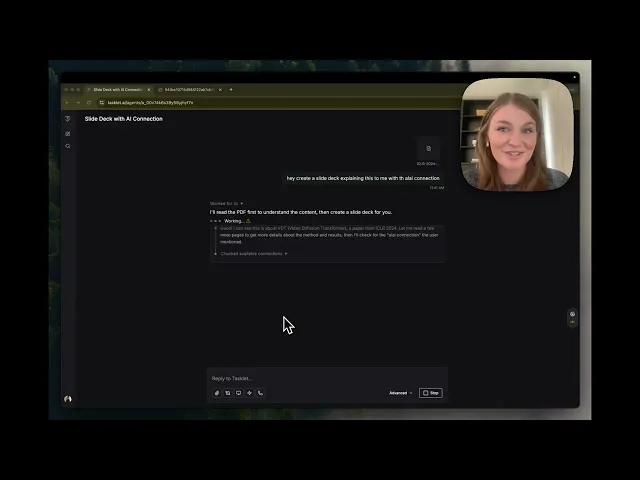

·
CASE STUDY
·
19 min read

Marketing Lead
AI tools have gotten remarkably good at research, writing, and analysis. But presentations? That's still where most people lose hours, wrestling with slide layouts, copy-pasting content between apps, and trying to make things look polished.
With Alai's integration on Tasklet, that gap closes. You can now create, manage, and automate presentations entirely through Tasklet's AI agents. No API keys, no code, no switching between tools. Just describe what you need in plain English, and your Tasklet agent handles the rest using Alai.
If you've read our guide on using Alai's MCP server with AI agents, think of this as the no-code, no-config version. But Tasklet doesn't just make it easier to use Alai through an agent. It also lets you set up automated triggers (on a schedule, via webhook, or based on events like a new email or database entry) so your presentation workflows run on their own without any manual intervention. Tasklet handles the connection for you. You just describe what you want, when it should run, and which tools to pull from.
What is Tasklet?

Tasklet is an AI agent platform built by the team behind Shortwave. Unlike traditional automation tools like Zapier or Make that rely on rigid if-this-then-that workflows, Tasklet uses AI agents that understand natural language instructions, connect to your tools, and execute tasks autonomously.
The key difference: you don't build workflows. You describe what you want done in a chat, and the agent figures out how to do it, including connecting to apps, pulling data from multiple sources, handling errors, and chaining steps together into a logical sequence. Unlike Make or n8n, where you'd need to visually wire together nodes and map data fields between each step, Tasklet lets you describe the entire multi-step workflow in plain English and the AI builds the logic for you, making it far easier to create presentations at scale without any automation expertise.
What is Alai?

Alai is an AI-powered presentation maker built for speed and quality. Alai lets users solve the blank slide problem by turning rough notes, structured text, or a full brief into polished decks in minutes.
What makes Alai stand out:
Four layouts per slide: Every time you generate a slide, Alai gives you four distinct design options so you can choose what fits best.
Responsive canvas: Everything adjusts automatically as you work. No manual resizing or pixel tweaking.
Rich element library: Add Compare Two, Feature Matrix, Funnel, Hub & Spoke, Pie Chart, and other visuals that adapt to your content.
Context-aware AI: Every AI action understands the full deck. When you rewrite, summarize, split or merge slides, or generate visuals, it considers context so everything fits naturally.
Customizable themes:.Use Alai’s existing themes or create customized ones to ensure each deck meets your brand guidelines.
AI image generation: Create or edit images directly inside your deck with model options that fit your visual style.
Nano Banana Pro generation: Generate and edit NBP slides directly in Alai. They're theme-aware and fully editable.
Import and export: Import existing PDFs or PowerPoint decks, restyle them instantly, and export back to PDF or PowerPoint.
Deck analytics: Track engagement on your decks: who viewed them, which slides got the most attention, and where drop-offs happened.
Agent Mode: Make controlled edits to your deck through natural language instructions directly in the Alai editor.
API and MCP: Programmatically create on-brand, high-quality decks for recurring use cases, or connect Alai to your favourite AI agent.
Alai is used by founders building investor pitch decks, sales teams creating personalized proposals, consultants delivering strategy decks, and marketing teams producing campaign recaps and reports. What makes it particularly well suited for automation is that quality doesn't drop when you scale. Because Alai's AI is context-aware and the AI is trained on presentation-specific design principles, a deck created automatically through Tasklet looks just as polished as one you'd build in the editor. That means you can go from producing one deck a week to ten without adding headcount or sacrificing the quality your audience expects.
New to Alai? Our getting started guide walks you through the basics.
No API Keys. No Code. Just Chat.
This is the biggest difference between using Alai on Tasklet versus setting up the Alai MCP server manually.
With MCP, you need to generate an API key, add a JSON configuration snippet to your AI client, and restart the app. It's not hard, but it's a technical setup step. With Tasklet, there's none of that. Alai is a native integration on Tasklet, connected via OAuth. That means you authenticate with your Alai account and grant necessary permissions in a couple of clicks, Tasklet handles the rest. No API key to generate, no configuration file to edit, no terminal to open.
From that point on, the agent can generate decks, add slides, export files, and create shareable links, all through the same chat window where you're already working.
This makes Tasklet the ideal option if you want the power of Alai's API without any of the technical overhead. It's particularly useful for non-technical team members (marketers, founders, consultants, sales reps) who want to automate presentation workflows without involving a developer.
How To Connect Alai to Tasklet
Getting started takes about two minutes:
Step 1: Create your accounts
Sign up at tasklet.ai if you haven't already, and make sure you have an account at app.getalai.com.
Step 2: Add the Alai connection in Tasklet
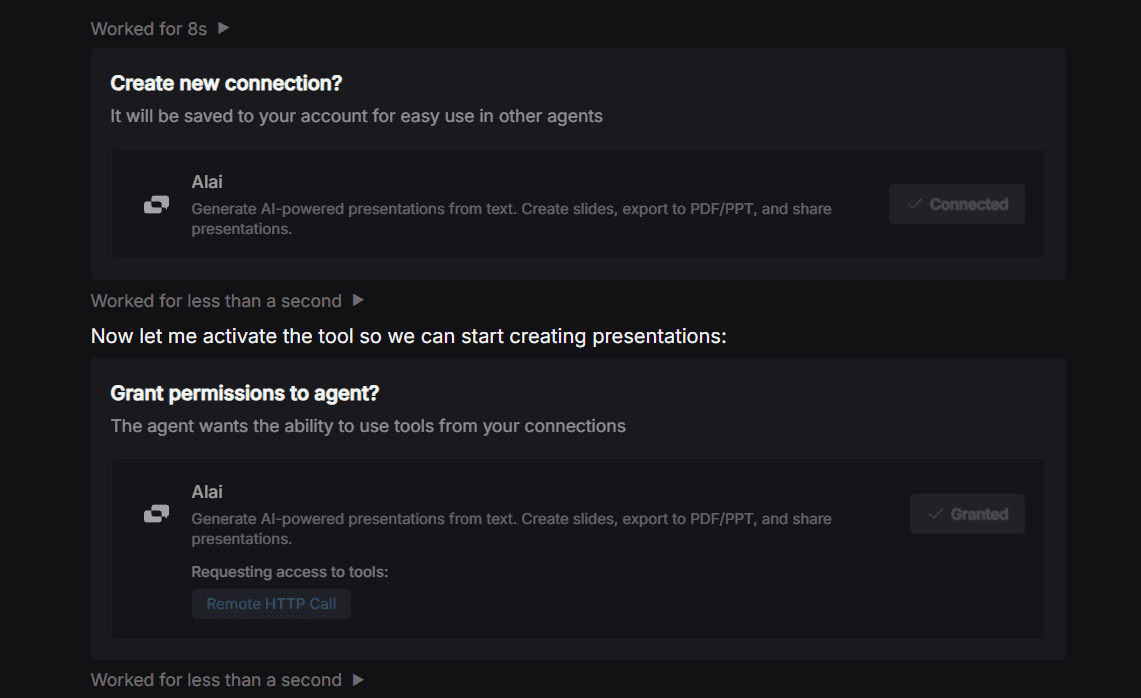
Open Tasklet and start a new agent or chat. Ask the agent to connect with Alai using a prompt similar to: “Help me add Alai the AI presentation maker as a connector”. When you mention creating a presentation with Alai, Tasklet will prompt you to set up the connection. You'll see a screen asking you to create a new connection for Alai. Confirm it, grant the agent permission to use Alai's tools, and you're done. No API key needed, no JSON config, no restart.
Step 3: Start creating
Once connected, just tell your Tasklet agent what you need. The agent can generate full presentations, add or remove individual slides, apply themes, export to PowerPoint or PDF, and create shareable links, all through conversation.
What Can You Do With Alai on Tasklet?
Here's a quick overview of what's possible once the connection is live:
Capability | What to tell your agent |
Generate a full presentation | "Create a 10-slide pitch deck about our product launch using the Midnight Ember theme" |
Add individual slides | "Add a slide about competitive advantages to my deck" |
Delete slides | "Remove the third slide" |
Apply a theme | "Use the Aurora Flux theme for this presentation" |
Generate speaker notes | "Create speaker notes for all slides" |
Export to PowerPoint | "Export my presentation as a .pptx file" |
Export to PDF | "Export my deck as a PDF" |
Create a shareable link | "Generate a tracking link for my presentation" |
List your presentations | "Show me all my presentations" |
Check generation status | "What's the status of my deck?" |
Why Using Alai on Tasklet Changes the Game for Automated Presentation Workflows
The real unlock with Tasklet isn't just creating a single deck. It's building automated, multi-step workflows that combine Alai with your other tools, all through chat-based instructions.
Here's what that means in practice. Say you need a weekly marketing report deck. Without Tasklet, the process looks like this: open Google Sheets, pull the numbers, open Slack, find the highlights, open Notion, check project status, open Alai, paste everything in, generate the deck, export it, email it out. That's six tools and probably an hour of your time, every single week.
With Tasklet, you describe this entire workflow once in a chat: "Every Friday, pull metrics from our Google Sheet, grab highlights from #wins in Slack, check project status in Notion, create a 5-slide report deck in Alai, and email me the link." The agent connects to all those tools, builds the logical sequence, and runs it automatically. You set it up once, and it runs every week without you lifting a finger.
This is fundamentally different from using Alai standalone or even through MCP. Tasklet acts as the orchestration layer that ties multiple tools together into a coherent, automated workflow. And because it's all chat-based, you can iterate on the workflow just by talking to the agent: "Actually, also post the deck link in #marketing on Slack" or "Add a slide comparing this week's metrics to last week's."
5 Automated Presentation Workflows You Can Build With Alai + Tasklet
Here are concrete workflows you can set up today, each combining Alai with other Tasklet connections.
Workflow 1: Convert a Dense PDF Into a Presentation-Ready Deck
Who it's for: Researchers, consultants, marketers, and anyone who needs to make complex documents more accessible for an audience
The multi-tool workflow: You upload a detailed PDF - a research report, a lengthy brief, a whitepaper, or an internal document and Tasklet passes it to Alai, which extracts the key information and structures it into a clean, polished presentation. Dense walls of text become digestible slides your or your audience can actually follow.
How to set it up:
Tell your Tasklet agent: "I'm going to upload a PDF. Read through it and identify the most important points. Create a 10-slide presentation in Alai using the Simple Light theme that summarizes the content clearly and concisely. Keep text minimal on each slide and use visuals where appropriate. Give me a shareable link when it's done."
Upload the PDF directly in the Tasklet chat, and the agent handles the rest - parsing the content, deciding what to keep and what to cut, and generating a deck that's structured for an audience rather than a reader.
Why it matters: PDFs can get tough to read through or present. A 30-page report might contain three key insights you actually need but finding them and pulling them out is a task that can eat up an hour or more. This workflow does it in minutes. It's particularly useful when you're working with lengthy research, client-facing deliverables, or any document that needs to be communicated to stakeholders who won't read the source material themselves.
Workflow 2: Sales Proposal After a Discovery Call
Who it's for: Consultants, agencies, sales teams
The multi-tool workflow: After a discovery call, Tasklet pulls your meeting notes from Notion, Otter or Fireflies, enriches them with prospect details from your CRM (like company size, industry, and deal stage), and grabs your standard pricing tiers and relevant case studies from Notion or Google Drive. It then feeds everything into Alai with your predefined prompt template (tone, slide count, structure, theme) to generate a tailored proposal deck and emails it directly to you or your prospect.
How to set it up:
Tell your Tasklet agent: "Every time I finish a discovery call, pull the transcript from Otter and the prospect's company details from HubSpot. Use our standard proposal structure: their pain points, our proposed solution, timeline, pricing (pull from the 'Pricing Tiers' page in Notion), and the most relevant case study from the 'Customer Stories' folder in Google Drive. Create an 8-slide proposal in Alai using the Royal Blue theme. Keep the tone professional but approachable. Email me the shareable link."
Because the prompt template, data sources, and design preferences stay the same across every deal, your sales team can generate personalized proposals at scale without rebuilding the deck from scratch each time. The content changes with every prospect, but the quality and structure stay consistent. Additionally, setting up an automatic hourly trigger that checks for new meeting notes periodically ensures you get the decks created without opening tasklet or Alai.
Why it matters: Speed matters in sales. Sending a polished, personalized proposal within hours of a call instead of days dramatically increases close rates. And when you're running 15 discovery calls a week, having a repeatable workflow that produces tailored decks without manual assembly is the difference between following up on time and losing momentum. For more on this workflow, read our guide on how to create personalized sales proposals using AI and our review of the best AI sales proposal tools.
Workflow 3: Weekly Report Decks on Autopilot
Who it's for: Marketing leads, ops managers, founders sending investor updates
The multi-tool workflow: Tasklet pulls data from Google Sheets (metrics), Slack (team highlights), and Notion (project status), synthesizes everything into a narrative, generates a polished report deck in Alai, and emails you the shareable link or posts it to a Slack channel. All on a schedule.
How to set it up:
Tell your Tasklet agent: "Every Friday at 4pm, pull this week's marketing metrics from our Google Sheet, the top highlights from the #wins Slack channel, and the project status from our Notion tracker. Create a 5-slide weekly report using Alai with the Simple Light theme and email me the shareable link. Divide the slide into stats on our primary channels - facebook ads, seo, and social media. The last two slides should be a quick comparison in terms of what grew and what didn’t from last week and a prediction of end of month stats based on current performance"
The agent will connect to each tool, figure out the right sequence, and set up a recurring schedule trigger. No flowcharts, no code, just a single chat instruction.
Why it matters: Recurring reports are the most painful kind of busywork. This turns a 2-hour Friday afternoon task into something that happens automatically.
Workflow 4: Pitch Deck From Internal Docs
Who it's for: Founders preparing for fundraising or partnership conversations
The multi-tool workflow: Tasklet pulls from Notion (company overview, roadmap), Google Sheets (financials, traction metrics), and Google Drive (team bios, case studies), structures everything into a standard VC format, and generates the deck in Alai with the right theme and layout.
How to set it up:
Tell your Tasklet agent: "I need to create an investor pitch deck. Pull the company overview from our 'About Us' page in Notion, traction numbers from the 'Metrics' spreadsheet in Google Sheets, and team bios from the 'Team' doc in Google Drive. Create a 10-slide pitch deck in Alai using a professional theme. Follow the standard VC format: problem, solution, market size, business model, traction, team, ask."
The agent chains together data retrieval from three different tools, structures it into a narrative, and sends it all to Alai in one go.
Why it matters: Instead of spending a day gathering content from five different tools and assembling it manually, you get a first draft in minutes that pulls from your actual, up-to-date internal data. For guidance on what makes a great investor deck, read our guide on how to create an investor pitch deck that gets funded, or browse 100+ real pitch deck examples for inspiration.
Workflow 5: Event and Workshop Slide Generation
Who it's for: Speakers, trainers, event organizers
The multi-tool workflow: You add a new page to your "Talks" database in Notion with your outline. Tasklet picks it up, structures it into a presentation flow, generates the deck in Alai with speaker notes, exports both a shareable link and a PowerPoint file, and saves the PowerPoint to your Google Drive.
How to set it up:
Tell your Tasklet agent: "When I add a new page to my 'Talks' database in Notion, take the content and create a presentation in Alai. Generate speaker notes for each slide. Use the Dark Creative Warm theme. Export both a shareable link and a PowerPoint file and save the PowerPoint to my Google Drive in the 'Presentations' folder."
This is a three-tool workflow (Notion → Alai → Google Drive) that the agent chains together automatically based on a single chat instruction.
Why it matters: Preparing talk slides is one of those tasks that always takes longer than expected. This workflow cuts the creation time down to minutes while still giving you a solid first draft to refine. For tips on making your exported PowerPoints look great, check out how to create stunning PowerPoint presentations using Alai.
Workflow 6: Strategy Deck From Research and Client Data
Who it's for: Independent consultants, strategy firms, advisory teams
The multi-tool workflow: After completing your research phase, Tasklet pulls your analysis notes and frameworks from Notion, grabs relevant market data or benchmarks from Google Sheets, and retrieves the client's brief and project scope from Google Drive. It combines everything into a structured strategy recommendation deck in Alai, complete with speaker notes, and saves the exported PowerPoint to your client's shared Drive folder.
How to set it up:
Tell your Tasklet agent: "Pull the competitive analysis and strategic recommendations from the 'Project Meridian' workspace in Notion, the market sizing data from the 'Industry Benchmarks' spreadsheet in Google Sheets, and the original client brief from the 'Meridian' folder in Google Drive. Create a 12-slide strategy presentation in Alai using the Simple Light theme. Structure it based on the content template I’d provided which includes: executive summary, situation assessment, key findings, three strategic options with tradeoffs, recommended path forward, implementation roadmap, and next steps. Generate speaker notes for each slide. Export as PowerPoint and save it to the 'Meridian/Deliverables' folder in Google Drive."
Because the structure and format stay consistent across engagements, you can reuse this workflow for every client by swapping in the right project name and data sources. The agent adapts the content while keeping your deliverable format standardized.
Why it matters: Consultants often spend as much time assembling the deck as they do on the actual analysis. When you're juggling three or four client engagements at once, that assembly time adds up fast. This workflow lets you focus on the thinking and hand off the packaging entirely. For consultants evaluating AI presentation tools more broadly, our guide on AI presentation makers for consultants covers how different tools handle real strategy decks.
How To Write Effective Prompts for AI Presentation Generation
The quality of your presentation, and the workflow around it, depends heavily on how you prompt the agent. Here's what to include for the best results:
1. Specify slide count
"Create a 10-slide presentation" produces a much better result than "create a presentation about X." Giving the agent a concrete number helps it structure the narrative and allocate content across slides.
2. Set design preferences
Tell the agent which theme to use, whether you want AI-generated images, and any layout preferences. For example: "Use the Midnight Ember theme, include AI-generated images on key slides, and keep text minimal."
Available themes include Simple Light, Techy Grey, Aurora Flux, Midnight Ember, Cyberpunk, Royal Blue, Emerald Forest, Desert Bloom, and many more. If you've uploaded a custom brand theme in Alai, you can generate the deck with a built-in theme and switch to your custom theme inside the Alai editor afterward.
3. Define content style and tone
Be explicit about how the agent should handle your input. Options include:
Preserve as-is: Keep the content exactly as you've written it
Condense: Shorten and tighten the messaging
Expand: Add detail and supporting points
Rewrite: Fully rephrase in a different tone (formal, conversational, etc.)
4. Provide the actual content
The more specific your input, the better the output. In case of repetitive creation, adding a detailed content outline that can be used as a template to add information can help ensure results are more consistent.
5. Tell the agent where to pull data from
This is where Tasklet's multi-tool integration really shines. Instead of pasting content manually, point the agent to the right sources: "Pull the executive summary from our Notion doc, the revenue chart from Google Sheets, and the customer quotes from the CRM." The agent retrieves everything and feeds it to Alai in the right order.
6. Iterate before generating
Refine your outline in conversation with the agent first, then generate. It's faster than regenerating entire decks. Ask the agent to propose a slide structure, tweak it, and only then trigger the Alai generation.
Example of a strong prompt
"Create a 10-slide investor pitch deck using the Midnight Ember theme. Pull our company overview from the 'About Alai' page in Notion and traction metrics from the 'Growth Dashboard' in Google Sheets. Keep the content concise, use different layouts that match the content on each slide, and include AI-generated images where appropriate. Follow standard VC format: problem, solution, market, business model, traction, team, ask. Email me the shareable link when it's done."
Example of a weak prompt
"Make me a pitch deck"
The difference in output quality is significant. Invest an extra minute in your prompt and it saves you from multiple rounds of revision.
Tips for Getting the Most Out of Alai + Tasklet
Combine multiple data sources. The real magic is in connecting Alai with your other tools through Tasklet. A pitch deck that pulls live data from Notion, Google Sheets, and your CRM is more powerful and more accurate than one built from memory. Tasklet handles the orchestration. You just tell it where to look.
Use scheduled triggers for recurring decks. If you create the same type of presentation regularly (weekly reports, monthly investor updates), set up a Tasklet agent with a schedule trigger so it runs automatically without you having to think about it. Describe the workflow once, and it repeats on cadence.
Save your best prompts. When you find a prompt that produces great results, save it. You can reuse it next time or use it as the base instruction for a recurring Tasklet agent.
Choose the right export format. Ask for a link if you need to make further edits. Ask for PDF if it's final. Ask for a shareable link if you want to track engagement with Alai's deck analytics (who viewed it, which slides they spent time on, where they dropped off).
Conclusion: From Ideas to Decks, Without the Busywork
Tasklet gives you the ability to build automated, multi-tool workflows through simple chat instructions. No API keys, no code, no flowcharts. Alai turns content into polished presentations. Together, they eliminate the manual work of gathering content from scattered tools, structuring slides, and designing layouts.
Whether you're a founder building pitch decks from internal docs across Notion and Google Sheets, a marketer automating weekly report decks, or a consultant generating client proposals before the prospect forgets the conversation, the Alai + Tasklet combination lets you describe the entire workflow once and let it run.
Get started:
Sign up at tasklet.ai
Create your Alai account at app.getalai.com
Connect Alai inside Tasklet (no API key needed) and start creating
Frequently Asked Questions
How do I connect Alai to Tasklet?
Start a new agent in Tasklet and mention creating a presentation with Alai. Tasklet will prompt you to set up the connection. Just confirm and grant permissions. No API key or configuration file needed. The whole process takes under two minutes.
Do I need technical knowledge or coding skills?
Not at all. This is the key advantage of using Alai through Tasklet rather than setting up the MCP server directly. Everything in Tasklet works through natural language. Describe what you want, and the agent handles the rest, including connecting to tools and building the workflow logic.
Can I build workflows that combine multiple tools?
Yes, and this is where Tasklet shines. You can connect Alai alongside Notion, Google Drive, Google Sheets, Gmail, Slack, and hundreds of other tools. Tell the agent to pull data from multiple sources, create a deck in Alai, and deliver it via email or Slack, all in one chat instruction. The agent figures out the right sequence and handles the execution.
Can I use my custom brand theme?
Alai supports custom themes. Tasklet currently works with Alai's built-in themes, so you can generate the deck with any built-in theme and switch to your custom theme with one click inside the Alai editor.
What export formats are available?
You can export as PowerPoint (.pptx), PDF, or generate a shareable link with engagement tracking.
Can I automate recurring presentations?
Yes. Set up a scheduled trigger (daily, weekly, monthly) and the agent will automatically generate updated presentations on your chosen cadence using the latest data from your connected tools. Describe the workflow once, and it runs on autopilot.
What if my presentation generation fails?
Ask your Tasklet agent "What's the status of my presentation?" to check progress. If something goes wrong, the agent can retry or help you troubleshoot.
How is this different from using Alai's MCP server?
The Alai MCP server requires you to generate an API key, configure a JSON snippet, and set it up in an MCP-compatible client like Claude Desktop or Cursor. Tasklet removes all of that. You connect Alai with a couple of clicks, and the agent manages the integration. Tasklet also adds the ability to build automated, multi-tool workflows with scheduled triggers, which isn't possible with MCP alone.
How many presentations can I create?
Alai allows up to 5 concurrent generations per user. For higher limits, contact support@getalai.com.
SEITEN
Werkzeuge vergleichen
Ressourcen