·
CASE STUDY
·
13 min read

Founder, Alai
Verdict: use Alai Create Design when you need to turn one campaign message into several editable assets - such as a poster, infographic, Instagram carousel, and social post - without treating every format as a separate creative project. Its practical distinction is an agent-first workflow, supported model choice, editable canvases, and starting formats for social and print-oriented work.
That does not make Alai the default choice for every design team. Canva remains stronger for teams that depend on its mature ecosystem, broad template library, connected workflows, and established brand processes. The useful question is whether your team can move from an approved message to reviewable assets with less friction and less brand drift.
First-draft generation is only one part of the work. A campaign still needs an approved message, usable source material, a visual hierarchy suited to each format, factual review, and a record of meaningful revisions. AI can speed up the drafting loop. It cannot decide what your organization is allowed to claim.
This guide explains how to use Alai Create Design for a multi-format campaign: plan the message, select formats deliberately, write an art-direction brief, decide when to use AI changes versus manual edits, and review each asset in the context where people will read it.
Start with the campaign job, not the asset type
"Make a social post" is not enough direction for an AI tool or a designer. It leaves open the audience, intended action, proof behind the claim, what should be noticed first, and what must remain consistent across channels. The result can look finished while carrying no clear message.
Start with a campaign spine: one sentence that should remain true in every asset. Then give every format a different communication job. This prevents a poster from becoming an overcrowded carousel cover, or an infographic from becoming a dense square image with no reading order.
Campaign component | Decision to make | Example |
|---|---|---|
Primary audience | Who should recognize themselves in the message? | Operations leaders at growing B2B companies |
Core claim | What single idea should they remember? | Weekly reporting is consuming time that should go to decisions. |
Proof or substance | What makes the claim credible? | An approved workflow, process steps, or verified internal figures |
Desired action | What should happen after someone sees it? | Register for a workshop or save the post |
Visual rules | What cannot drift between assets? | Logo use, type treatment, colors, voice, and illustration style |
From that spine, build an asset map. A poster needs to earn attention quickly, often from a distance. An infographic needs to make a process, comparison, or relationship legible. A carousel should reward a swipe by unfolding an argument. A single social post should carry one memorable observation. The assets should share a point of view, not necessarily a layout.
What Alai Create Design is for
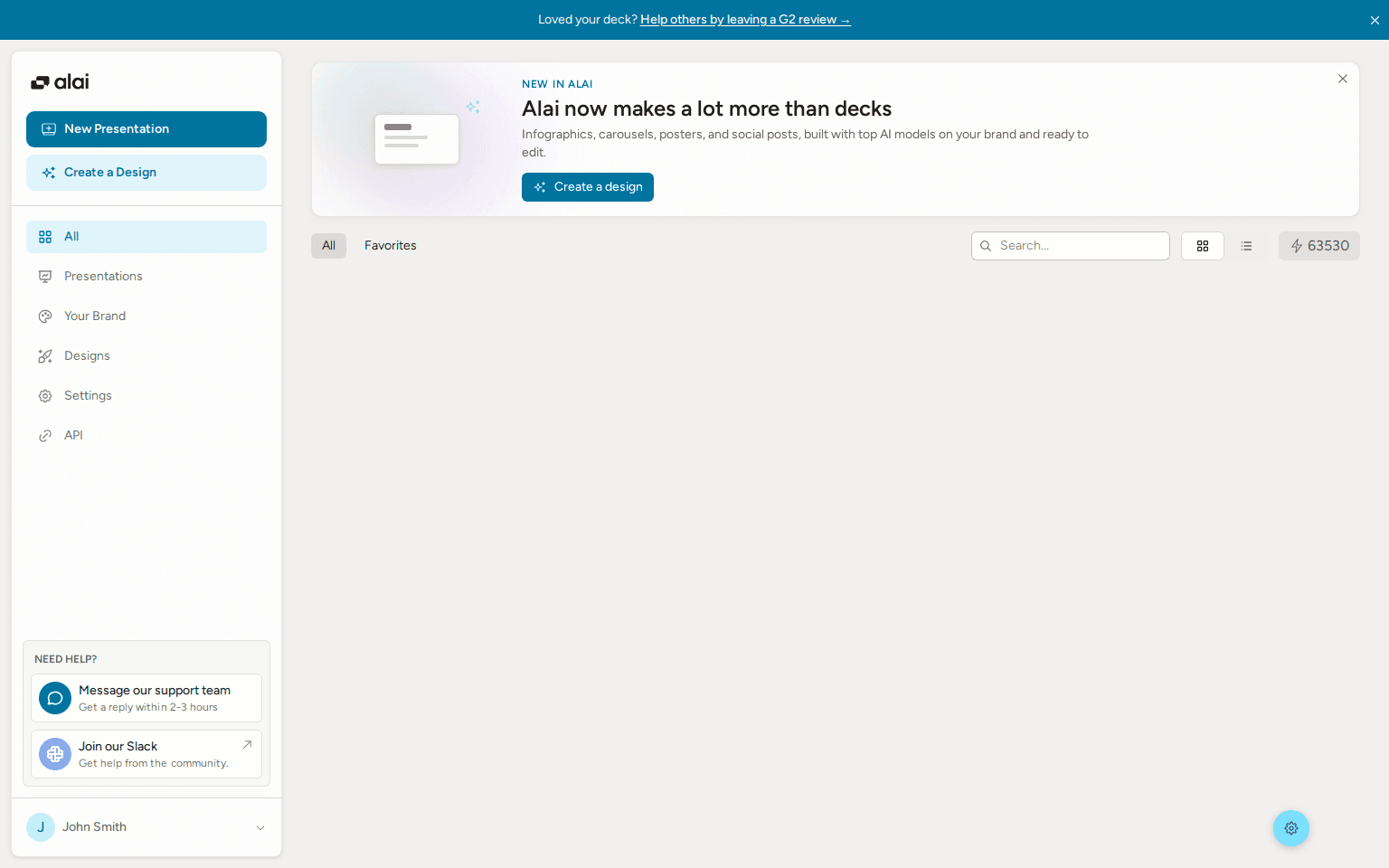
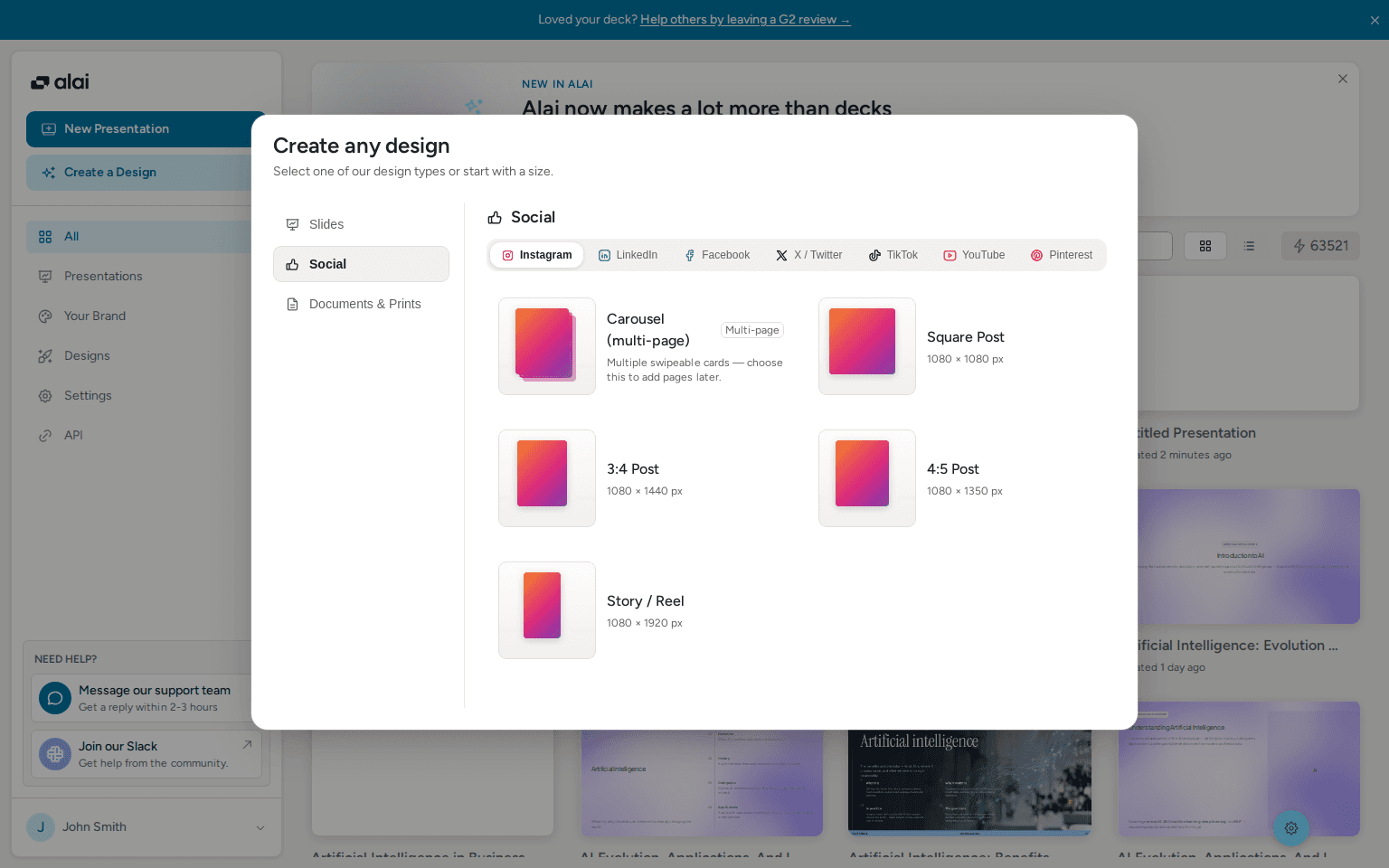
Alai describes Create Design as a workspace for infographics, carousels, posters, and social posts generated with supported AI models, designed to be on brand and ready to edit. In the Alai interface captured from an authenticated account on August 30, 2026, the starting categories were Slides, Social, and Documents & Prints.
The visible social presets include Instagram, LinkedIn, Facebook, X/Twitter, TikTok, YouTube, and Pinterest. The Instagram options shown include multi-page carousels, 1080 by 1080 square posts, 1080 by 1440 3:4 posts, 1080 by 1350 4:5 posts, and 1080 by 1920 stories or reels.
Format is not a cosmetic setting. It affects how much text can survive, where a focal point should sit, the likely reading speed, and whether a sequence can carry the argument. A carousel gives you pages. A story gives you a full-screen moment. A poster must make its case before a viewer decides whether to keep looking.
The working loop is straightforward: choose a design type or size, provide a real brief, generate a starting direction, then combine AI changes with manual editing. Version history is available for revision work. Treat that history as part of production, not as recovery after a mistake.
A worked campaign example: one approved brief, four different assets
Consider a webinar for operations leaders. The campaign message is: reduce reporting busywork so teams can spend more time making decisions. The approved source brief contains the event title, date, time, speakers, registration action, approved language about the session, logo requirements, and brand rules. It does not contain invented statistics, unapproved customer claims, or vague promises of results.
Here is how that same brief should change across four assets:
Format | Communication job | What should lead | What should be secondary |
|---|---|---|---|
Poster | Announce the event quickly | Event title and registration action | Supporting context and speaker detail |
Infographic | Explain the reporting problem or framework | The process, comparison, or takeaway | The webinar invitation |
Carousel | Develop an argument over several pages | A sharp problem statement on page one | Registration action until the closing page |
Single social post | Make one useful point in the feed | One observation or practical insight | Full event detail |
This is the operating model: keep the facts stable, but change the hierarchy and amount of detail to suit the reader's context. Resizing one design into four dimensions is faster in the moment and usually weaker in the feed, in print, and in review.
A practical workflow in Alai
1. Create an approved source brief
Before opening a canvas, put the approved facts in a compact source brief. For a webinar, that may include the title, date and time, target audience, speaker names, landing-page action, logo requirements, brand rules, and claims requiring exact wording.
Keep approved copy distinct from draft copy. If a claim needs legal, product, customer, or executive approval, label it clearly. AI can produce plausible language around a gap in the brief. Plausible is not the same as approved.
Add three editorial priorities:
Message priority: what must be read first?
Proof priority: what makes the message worth believing?
Action priority: what is the one action the audience should take?
For an event poster, the title and registration action may dominate. For an infographic, the insight may lead while the call to action remains secondary. The source material stays consistent; the hierarchy changes with the job.
2. Choose the canvas before generating
In Create Design, start from the format whose reading behavior matches the job. Use a multi-page Instagram carousel when the argument has real steps. Use a 1080 by 1350 post when a vertical feed layout needs more room than a square. Use a 1080 by 1920 story or reel format for a direct, full-screen message. Use a print-oriented design type when the asset must work in physical space rather than only in a feed.
Starting with the right canvas avoids a familiar production failure: trying to rescue an unsuitable structure through tiny type, aggressive cropping, or decorative elements that compete with the message.
3. Write an art-direction brief, not a list of adjectives
Terms such as "modern," "clean," and "premium" are too broad to govern a useful design. Give the system constraints it can act on. A good instruction includes:
The audience and communication goal
Exact approved copy or clearly marked placeholders
Information hierarchy
Visual direction and known brand rules
Format and page count where relevant
Elements to avoid, such as invented statistics, dense paragraphs, or stock-photo cliches
For example: "Create a five-page Instagram carousel for operations leaders. Use the approved headline on page one. Explain the three-step reporting workflow across pages two through four. Reserve page five for the webinar invitation and exact registration call to action. Keep body copy short, make the headline dominant, and use approved brand colors. Do not invent statistics or create charts that imply unverified data."
The useful part of prompting is not clever wording. It is stating the editorial and visual decisions that the first draft needs to respect.
4. Generate a direction, then diagnose the result
Review the first output against the brief before making cosmetic requests. Ask whether it has the right audience, message order, amount of copy, and visual logic. If the premise is wrong, request a broader revision. If the premise is right but a local detail is off, edit that detail manually.
Specific diagnoses are more useful than "make it better." For example:
"Move the event title above the visual and reduce the supporting copy."
"Make page two a comparison rather than a list of five claims."
"Keep the call to action only on the last carousel page."
"Use the approved wording for the product statement and remove the unverified number."
Use AI edits and manual edits for different jobs
AI-driven changes are best suited to systemic work: revising the campaign direction, reducing a carousel from seven pages to five, restructuring a narrative, or changing the overall visual approach. Manual editing is better for local judgment: correcting names, checking dates, moving a line break, assessing contrast, removing distractions, or deciding whether a relationship is actually clear.
If the change is... | Use first | Why |
|---|---|---|
A new campaign direction or major copy rewrite | AI-driven edit | The change affects several elements and needs a coherent new starting draft. |
An exact factual correction | Manual edit and source check | Facts, dates, names, and approved claims should not be left to inference. |
Too much copy in a carousel | AI-driven reduction, then manual review | AI can produce a shorter structure; a person must judge what was lost. |
A weak focal point or awkward line break | Manual edit | These are local visual decisions that need close inspection. |
A visual system that no longer fits the campaign | AI-driven revision, then manual polish | Rework the overall direction before spending time on local fixes. |
Use version history before a major direction change, not only after something goes wrong. Name versions by the decision made: "shorter copy," "event-led opening," or "dark background" is more useful than "final-final-2." That gives reviewers context and makes it easier to compare two legitimate directions.
Brand control needs more than a color palette
Create Design is positioned around editable, on-brand visual output. But a logo and a hex code do not form a complete brand system. A team still needs to define which elements are fixed, which can vary, and which claims need approval.
Review brand control in four layers:
Identity: logo, approved colors, type conventions, and visual motifs.
Voice: how direct, formal, playful, or technical the copy should be.
Hierarchy: what the brand makes easy to notice first and what stays secondary.
Proof discipline: which claims, numbers, customer names, and legal statements need approval.
The most damaging drift is often not color. A graphic can match a palette and still bury the action, overstate a claim, or make the audience work too hard to understand the point. For recurring campaigns, retain the approved source brief outside the canvas as well as the visual rules inside it. One governs appearance; the other governs meaning.
Review each format in its real context
Before debating taste, check whether the asset works at the speed and distance at which it will actually be seen.
Poster review
Can someone identify the subject on a quick glance?
Is the key detail larger than decorative elements?
Is the action clear without reading every line?
Would the design still make sense in a small preview or in print?
Infographic review
Does the structure explain something that paragraphs alone would not?
Are labels, charts, and visual quantities based on approved data?
Is the reading order obvious?
Can a reader state the takeaway after scanning it?
Carousel review
Does page one earn the swipe without trying to explain everything?
Does every page add a distinct step?
Can a middle page make sense if it is shared by itself?
Does the final page offer one clear next step?
When an asset fails review, identify the failure precisely: copy, hierarchy, format, factual accuracy, or a brand rule. That makes the next edit actionable.
Model choice: useful, but not a substitute for a brief
The supplied Alai product context confirms that Create Design supports choice among supported language and image models. This can help teams make deliberate tradeoffs around quality, latency, or cost rather than being locked to one provider.
It does not establish that one model produces the best result for every campaign. It also does not remove the need for factual review, art direction, or manual editing. A weak source brief remains weak regardless of the model behind the first draft.
Alai also offers GLM-5.2 among its model choices for Modern Slides. The supplied evidence does not specifically confirm GLM-5.2 as a Create Design model option, so it should not be assumed to be available in this workflow. Z.AI introduced GLM-5.2 on June 16, 2026, describing it as a flagship model for long-horizon tasks with a 1M-token context and multiple thinking-effort levels. Those are provider claims about the model, not an output-quality benchmark for Alai designs.
The operating rule is simple: use model selection where the product provides it, then judge the actual design, copy, and factual accuracy before publishing.
Alai vs. Canva: choose the workflow, not the slogan
Disclosure: Alai publishes this article. This comparison is limited to the campaign-creation workflow described here. It is not a claim that Alai replaces every Canva use case.
Canva is the relevant established comparison because it covers a broad range of formats, templates, manual editing, and brand workflows. Canva's official help documentation says users can select a design type or custom size before opening the editor and can continue to access templates from the Design tab. Canva's official Canva AI 2.0 announcement describes a conversational, agentic platform with layered editable output, iterative editing, brand intelligence, persistent memory, web research, connectors, and multi-format campaign creation.
Those are meaningful strengths for organizations already embedded in Canva, especially where a team relies on an existing template library, established processes, or Canva-connected tools.
Choose... | When it is a better fit | Tradeoff to accept |
|---|---|---|
Alai Create Design | You want an agent-first route from a campaign brief to editable posters, infographics, carousels, or social assets, with supported model choice, manual editing, and version history. | You still need approved source material, clear brand direction, and a human review process. |
Canva | You rely on a mature ecosystem, broad template availability, established brand workflows, and Canva-connected processes. | A different workflow may fit better if model flexibility and Alai's specific agent-first approach are central requirements. |
Neither as the primary production tool | The work needs bespoke illustration, complex production files, tightly governed enterprise processes, or senior-level original art direction. | AI may still help with concepts or outlines, but should not be positioned as a replacement for specialized production work. |
Choose Alai when its mix of format selection, editable output, model flexibility, and AI-plus-manual revision solves a real workflow problem. Do not switch tools merely because the work includes AI. If your team is already effective inside Canva and the change does not remove a meaningful bottleneck, staying put may be the better operating decision.
For a broader category view, see Canva alternatives.
Keep campaign design connected to the source narrative
Many campaigns start with a presentation, report, workshop, product launch narrative, or internal proposal. Before producing derivative visual assets, make sure the underlying source material is current, approved, and clear enough to support them.
Alai also has resources for presentation workflows, including Claude Design, how to use Claude to create presentations, and making AI slides look designer-made. These links are included for readers working across presentation and campaign-design tasks; this article does not assess their content or make claims about their tools or recommendations.
The four production checks worth keeping
Approved facts: verify dates, names, figures, customer references, product language, and calls to action against the source brief.
Format-specific hierarchy: confirm that the first thing a viewer sees matches the job of that asset.
Versioning: create a named version before changing direction, reducing pages, or revising the visual system.
Context review: inspect the poster, infographic, carousel, or post at the size and pace in which the audience will encounter it.
The goal is not to generate AI content at several dimensions. It is to run one coherent campaign in which every asset does a distinct part of the same job.
Sources and methodology
This article is published by Alai and uses product context supplied on August 30, 2026. Alai interface facts are based on an authenticated UI capture dated August 30, 2026, including the dashboard and Create Design format picker. This was not a systematic output-quality benchmark, and this article does not claim that Alai, Canva, or any AI model produces uniformly better designs.
Canva capability descriptions are linked to Canva's official Desktop App basic how-tos and Canva AI 2.0 announcement, both checked August 30, 2026. GLM-5.2 context comes from Z.AI's GLM-5.2 announcement. Product interfaces and AI capabilities change quickly, so teams should verify current documentation and use their own approval process before adopting any workflow.
Can Alai Create Design make Instagram carousels?
Yes. The visible Create Design picker includes Instagram multi-page carousels, plus square, 3:4, 4:5, and story or reel-oriented Instagram sizes. Use a carousel when the message needs a sequence rather than a single graphic split across pages.
What is the best way to turn one campaign into several social assets?
Start with one approved source brief, then assign each format a distinct job. A poster announces, an infographic explains, a carousel develops an argument, and a single post makes one memorable point. Adapt the hierarchy for each format instead of only resizing the layout.
Should I use AI edits or edit the design manually?
Use AI-driven edits for broad changes such as a new direction, shorter copy, or revised structure. Use manual editing for facts, names, line breaks, contrast, and local hierarchy. Make a version before major changes.
Is GLM-5.2 available in Alai Create Design?
The supplied product evidence confirms that Create Design supports supported language and image model choices, but it does not specifically confirm GLM-5.2 as a Create Design option. GLM-5.2 is confirmed among Alai's model choices for Modern Slides.
Is Alai a replacement for Canva?
Not for every team. Alai is useful when its agent-first creation workflow, editable outputs, supported model choice, and revision loop fit the work. Canva remains strong for teams that depend on its mature ecosystem, broad templates, and established brand processes.
PAGES
Compare Tools
resources