·
CASE STUDY
·
13 min read

Founder, Alai
Verdict: Alai Modern Slides is worth considering when presentations are recurring work, brand consistency matters, and the first AI draft is only the start of the job. Its practical distinction is not simply that it generates slides. Users select a presentation design system before generation, can choose among available models including GLM-5.2, and can combine AI changes with manual editing and version history.
That is useful for teams that repeatedly make sales decks, board updates, client recommendations, product launches, training materials, or investor narratives. Those teams usually do not need another isolated draft. They need a repeatable way to make a deck, revise it when the story changes, and retain a recognizable visual direction.
It does not make Alai the automatic answer for every presentation. A one-time low-stakes deck, a team already committed to another required ecosystem, or a project that needs a broader general-purpose design workspace may be better served elsewhere. The point is to choose for the working loop, not for the promise of instant slides.
This guide covers what Modern Slides is for, how the design-system-first workflow works, what model choice does and does not mean, how it compares with Claude Design based on current primary-source evidence, and where the product is not the right fit. For a wider market view, see our guide to AI presentation makers.
What Modern Slides is designed to solve
AI presentation software is easy to evaluate badly. A short prompt produces a deck, the opening slide looks polished, and the evaluation stops. Real presentation work starts after that moment.
A colleague may change the positioning. A customer may ask for a new proof point. Legal may remove a claim. The founder may need the same narrative adapted for investors, prospects, and recruiting. A presenter may need one dense evidence slide made readable without making the rest of the deck feel unrelated. These are routine revision problems, not unusual exceptions.
That is why first-draft generation is an incomplete buying criterion. A usable deck workflow also needs a coherent visual system, editable output, a way to handle source material, and a sensible revision loop. If any of those break down, fast generation can simply create more material to clean up.
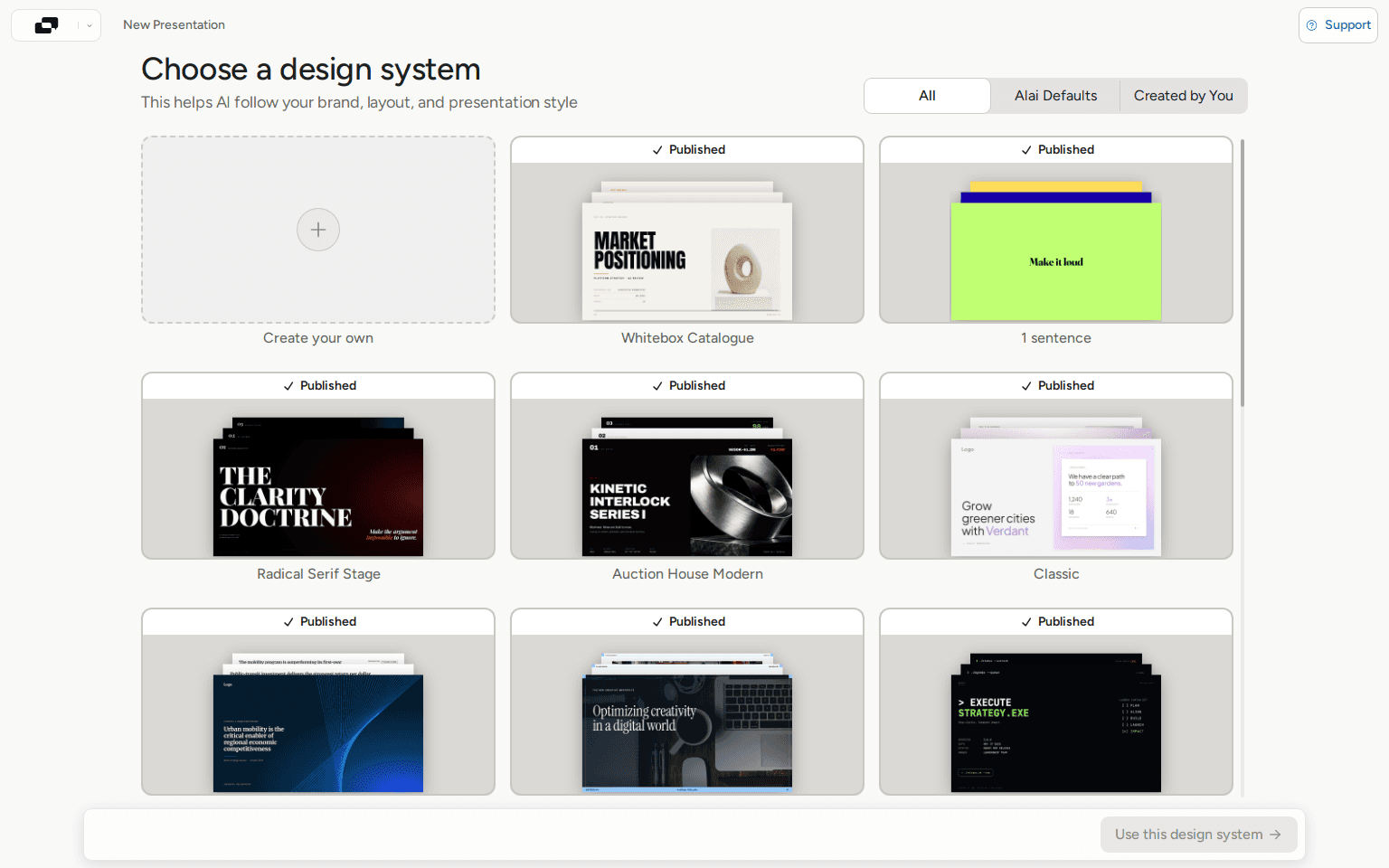
Modern Slides is Alai's presentation-specific workflow. In the live Alai presentation picker, it is described as producing slides that match an exact template or brand style while remaining fully editable with AI. The workflow begins with a design-system selection. The gallery includes Alai defaults, user-created systems, and published styles such as Whitebox Catalogue, Radical Serif Stage, Auction House Modern, Boardroom, Editorial, Gold Standard, Terminal PPTX, and Dark Acid.
This is a meaningful product choice. A slide deck is not a set of unrelated images. It has sequence, recurring slide types, speaker-facing constraints, and a visual rhythm that should survive revisions. A design system gives generation a defined starting constraint instead of asking a model to infer what terms such as "modern," "clean," or "premium" are supposed to mean.
Start with a design system, not a decorative prompt
Prompts such as "make a modern startup deck" are vague in ways that matter. They do not establish hierarchy, typography, spacing, contrast, chart treatment, image behavior, content density, or how a title slide should relate to an evidence slide. A model can make a reasonable guess, but a reasonable guess is not a reusable visual system.
Modern Slides moves that decision earlier. Select a system from the gallery, use a system your team has created, or create a new system rather than beginning with an unspecified visual direction. This is particularly useful for recurring work where the deck must look consistent with other materials without forcing every page into the same layout.
What the system should settle before generation
A design system should not eliminate editorial judgment. It should establish the boundaries within which the team can make that judgment consistently. Before generating, decide what needs to remain stable:
Typography: the relationship between titles, section labels, body copy, numbers, and supporting notes.
Composition: whether the deck relies on sparse statements, editorial layouts, grids, diagrams, charts, or denser evidence slides.
Color and contrast: what receives emphasis, and which colors are reserved for warnings, results, or calls to action.
Image behavior: whether images are full bleed, tightly cropped, framed, used as background texture, or avoided when evidence is the stronger visual.
Recurring modules: how agenda slides, proof points, comparisons, process diagrams, and conclusions should feel related without becoming repetitive.
The practical benefit is not that every slide becomes identical. It is that the team does not need to reinvent the visual language on every page. For recurring deck work, that matters more than producing one unusually attractive opening slide.
Model choice is an operating decision, not a leaderboard claim
Modern Slides can offer multiple model choices, including GLM-5.2. That gives users a way to choose based on their quality, latency, or cost requirements rather than being locked to one provider. It is a real workflow option, but it needs careful interpretation.
Model choice does not prove that one model will always create the best presentation. It does not remove the need to validate numbers, citations, customer claims, legal language, or strategic conclusions. And it should not be reduced to a superficial same-prompt contest, particularly when the quality of the source material and the clarity of the design constraints may matter as much as the selected model.
Z.AI introduced GLM-5.2 on June 16, 2026 as its flagship model for long-horizon tasks. Z.AI says GLM-5.2 supports a 1 million-token context window and multiple thinking-effort levels intended to balance capability, latency, and token use. Z.AI also says the model is MIT-licensed and available through Z.AI as well as open weights. These are provider statements about the model. They are not an Alai slide-generation benchmark, and this article does not claim one.
How to make a model decision without pretending it is magic
Classify the job. Decide whether this is an external narrative, an internal working deck, a redesign, or an exploratory first pass.
Identify the bottleneck. Is the challenge a long source brief, complicated reasoning, a need for quick iteration, or cost control?
Set the design system first. Model selection should not be used to compensate for an unclear visual direction.
Generate a representative section. Include an opening slide, an evidence-heavy middle slide, and a recommendation or next-step slide. Those three pages expose different kinds of problems.
Review the argument before polishing. Fix the sequence, the claim, and the proof before spending time on minor visual adjustments.
Preserve a version before changing direction. A versioned workflow makes it safer to test a different framing without losing a usable deck.
This is less dramatic than declaring a single model the winner. It is also closer to the real decision. For a long, source-heavy brief, context handling may be the key consideration. For a fast internal iteration, latency may matter more. For a high-stakes external deck, every output still requires human review regardless of the model selected.
Modern Slides and Claude Design: different product frames
Claude Design is relevant because both Claude Design and Modern Slides can be used to create presentations. The available evidence supports a more careful comparison than a generic claim that one is better.
Anthropic describes Claude Design as a research-preview product for designs, prototypes, slides, and one-pagers. Anthropic says it can create pitch decks and presentations, export work to PPTX, or send work to Canva. At the time of Anthropic's announcement, Claude Design was powered by Claude Opus 4.7 and available during preview to Pro, Max, Team, and Enterprise subscribers.
Modern Slides is positioned by Alai as AI-native presentation design with presentation-specific design systems, model choice, and editable output. Its live picker describes a workflow for slides that can match an exact template or brand style and remain editable with AI. Alai also documents AI and manual edits alongside version history.
Those are different product frames. Claude Design may suit people who want to work in Claude's broader environment across designs, prototypes, slides, and one-pagers. Modern Slides may suit teams whose recurring requirement is presentation work with reusable design systems and a revision process built around decks. Neither description establishes universal quality superiority, and neither should be read as a full feature-parity audit.
Disclosure: Alai publishes this article. We have retained Claude Design's stated strengths and only describe capabilities supported by the sources listed below. Product details change quickly; confirm current requirements and features directly with the relevant provider. Our guide to Claude Design covers that product in more detail.
Decision criterion | Modern Slides | Claude Design | How to decide |
|---|---|---|---|
Stated focus | AI-native presentation design with design systems, model choice, and editable output | Research-preview product for designs, prototypes, slides, and one-pagers | Choose the product frame that matches the work you repeat. |
Visual starting point | Select a presentation design system before generation | This article does not assess Claude Design's current design-system workflow | Choose Alai when reusable presentation styling is a primary requirement. |
Model approach | Can offer multiple model choices, including GLM-5.2 | Anthropic states Claude Design is powered by Claude Opus 4.7 | Choose Alai if model-provider choice is operationally important. |
Revision path | AI changes, manual editing, and version history | Anthropic states that work can export to PPTX or be sent to Canva | Choose based on where your team needs to revise the work. |
Best-fit question | Do we need repeatable branded presentation production? | Do we want Claude's broader multi-artifact design environment? | Do not decide from a vague claim that one AI is always better. |
A practical workflow for recurring decks
The most reliable way to use AI for a customer-facing or leadership-facing deck is to avoid treating generation as a substitute for the brief. Modern Slides gives users an interface for design-system selection, model choice, editable AI changes, manual edits, and version history. The workflow below maps those product capabilities to the decisions a team still needs to make.
1. Write a deck contract before choosing a style
Write five short lines: audience, decision sought, core claim, approved proof, and next action. For a sales deck, that might mean an operations leader as the audience, agreement to a pilot as the decision, a defined workflow benefit as the claim, approved customer evidence and implementation details as the proof, and a technical review as the next step.
If those five lines are vague, the deck will usually be vague. AI can expand an unclear brief into more slides; it cannot reliably settle an unresolved business decision for the team.
2. Assemble an evidence packet
Collect approved facts, links, metrics, screenshots, customer language, exclusions, and caveats. Mark which statements are confirmed and which are directional. This is more useful than a sprawling request for "a compelling deck" because it creates a reviewable boundary. The team can check whether every meaningful claim in the generated deck is supported by the supplied packet.
3. Choose a design system that can carry the hard slides
Use the Modern Slides design-system gallery to choose a visual constraint that suits the audience and material. An investor update may need restrained hierarchy and legible data. A creative proposal may need image-led composition. A technical recommendation needs room for diagrams, assumptions, and caveats.
Do not choose only for the cover slide. Choose the system that can handle the least glamorous but most important page: a dense evidence slide, a comparison, a roadmap, or an implementation plan. If that slide cannot be made clear inside the chosen direction, the system is not doing its job.
4. Generate and assess narrative blocks
Work in blocks rather than treating the full deck as one indivisible request: context and problem; proposed approach; proof and implementation; decision and next steps. This makes it easier to see whether each section earns its place and localizes revisions. A changed proof point should not require reconstructing every page in the presentation.
The useful Alai-specific sequence is straightforward: select the design system, make the model choice appropriate to the job, create the deck or section, then use AI changes and manual editing to revise it while retaining version history. The system is a constraint at the start, not a decorative cleanup pass after the narrative has already drifted.
5. Run three different reviews
Argument review: Can a skeptical reader explain the deck's core claim after the opening slides? Does each page advance that claim?
Evidence review: Is each factual statement supported, qualified, or removed? Are figures, sources, and labels current?
Design review: Is hierarchy readable at presentation distance? Are repeated elements consistent? Has decoration displaced meaning?
Keeping these reviews separate prevents a common failure: spending time adjusting spacing on a slide whose claim should have been removed. A visually clean unsupported statement remains unsupported.
6. Use AI and manual editing for different kinds of work
Use AI changes when the requested revision is structural or repeatable: reframe a section, shorten a sequence, change the emphasis of several slides, or apply a consistent pattern. Use manual editing when the choice is local and visual: adjust a line break, emphasize a number, change an image crop, or deliberately make one slide quieter than its neighbors.
Modern Slides supports the combination of agent-driven changes, manual editing, and version history. That is a sensible division of labor. The AI can help with repeated or broad changes; the human should retain control of the decisions that depend on context, taste, accuracy, and accountability.
7. Preserve a version before a major narrative change
Version history is useful before a major narrative experiment because it preserves a record of earlier directions. Teams can test a shorter opening, a new recommendation structure, or a different audience framing without pretending the prior direction never existed. This is especially valuable in review-heavy deck work, where the alternative to versioning is often a single increasingly crowded file containing every stakeholder suggestion.
Redesigning an existing PowerPoint with AI
Interest in "redesign PPT with AI" often reflects a valid problem: the content exists, but the deck is dated, inconsistent, too dense, or difficult to update. The wrong response is to apply a new visual skin before identifying the underlying issue.
Start by diagnosing the deck:
If every page is crowded, reduce the number of claims per slide before changing fonts or colors.
If the story repeats itself, combine or remove slides before introducing new layouts.
If the evidence is weak, redesign will not create credibility; return to source material.
If branding is inconsistent, establish the design system before doing slide-by-slide adjustments.
If the structure is sound but the visual treatment is uneven, a presentation design system can provide a useful starting constraint.
Alai's product context states that users can bring existing decks into Alai and create new work while preserving brand style. That does not turn AI redesign into an automatic correctness pass. Review every claim, citation, chart, and confidential detail before sharing a revised deck. For a cleanup starting point, see the Prettify Deck tool, then use the same argument, evidence, and design review sequence.
Where Modern Slides fits - and where it does not
Modern Slides is a strong fit when a team needs recurring presentations that should share a visual system while remaining editable through several rounds of revision. It is also a relevant option when model choice matters operationally and when a deck must move between AI-assisted changes and direct manual control.
It is not automatically the right choice for someone making one low-stakes deck with no need for a reusable style. It may also be the wrong fit if an organization requires a specific external ecosystem, has a locked-down approval process elsewhere, or prioritizes a broad established template and app ecosystem over a presentation-specific agent-first workflow.
Canva remains a relevant option for teams that value its mature ecosystem, broad format coverage, templates, editing, and brand workflows. Alai's Create Design workspace also supports visual outputs beyond decks, but this article is specifically about Modern Slides. A team should select the tool that supports its actual creation and revision loop. For a broader comparison of visual-design options, see our disclosure-led guide to Canva alternatives.
Methodology and source note
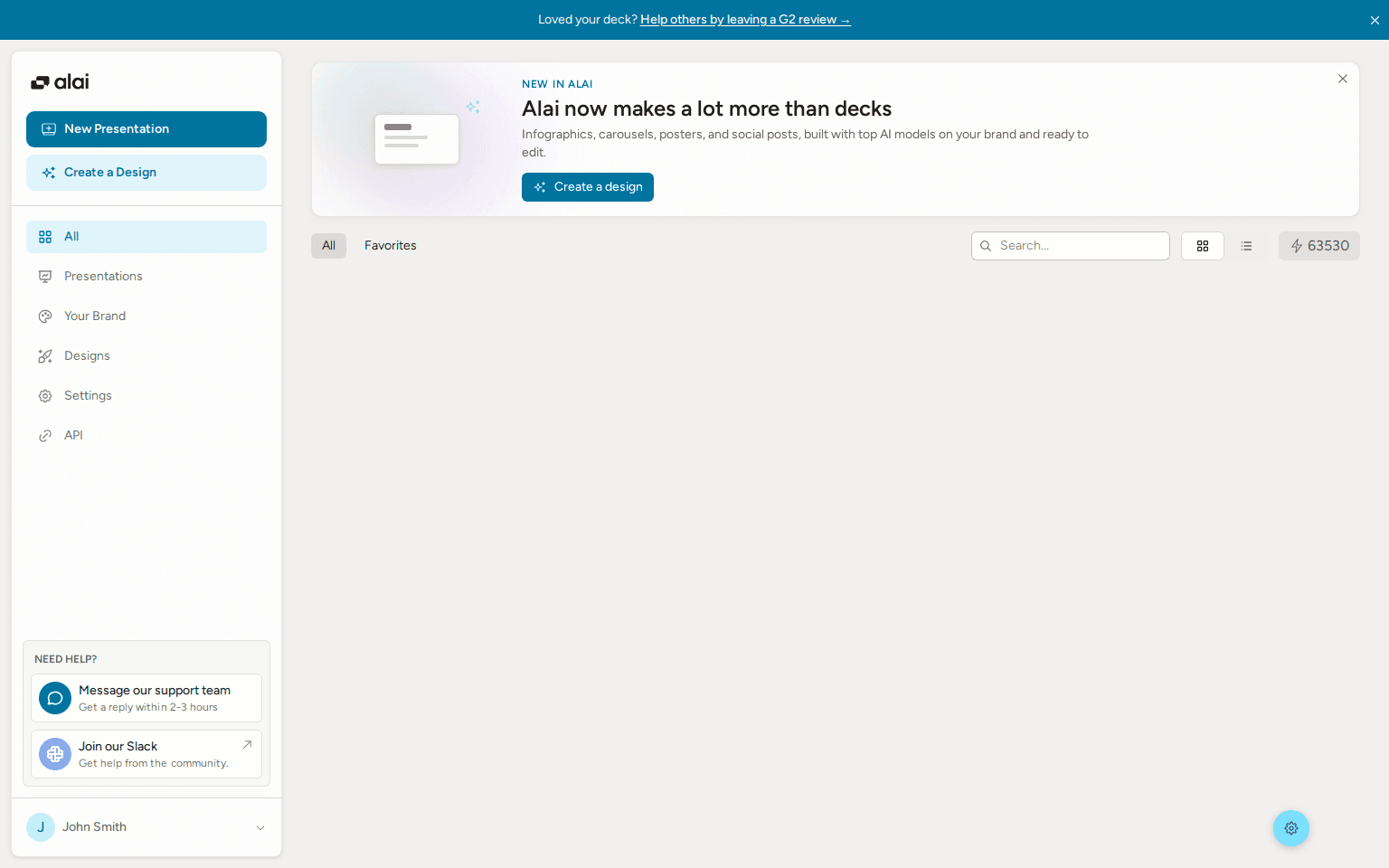
Checked August 30, 2026. Alai product facts in this guide come from an authenticated Alai interface capture on that date, including the dashboard, the Modern Slides design-system gallery, and the documented workflow for editable AI/manual changes, version history, and multiple model choices including GLM-5.2.
We did not run a same-prompt model benchmark, measure generation speed, score visual quality, test exports, or claim that one provider produces universally better decks. Claude Design facts are drawn from Anthropic's primary announcement. GLM-5.2 facts are drawn from Z.AI's primary announcement. Product capabilities may change after publication.
The bottom line: choose Modern Slides when you need repeatable presentation design systems, editable iteration, and model flexibility. Do not choose it merely because AI-generated slides sound convenient. Convenience without a clear narrative, approved evidence, and a visual constraint usually produces a faster version of the same deck problem.
What is Alai Modern Slides?
Modern Slides is Alai's presentation-specific AI workflow. Users select a design system before generation, and the workflow supports editable AI changes, manual editing, version history, and multiple model choices including GLM-5.2.
How is Modern Slides different from Claude Design?
Both can be used to create presentations, but their stated product framing differs. Anthropic describes Claude Design as a research preview for designs, prototypes, slides, and one-pagers. Modern Slides is positioned around presentation design systems, model choice, and editable output. This is not a claim of universal quality superiority or full feature parity.
Can I use Modern Slides to redesign an existing PowerPoint?
Alai's product context says users can bring existing decks into Alai and create new work while preserving brand style. First diagnose whether the core problem is narrative, evidence, density, or inconsistent visual treatment. A new style alone will not solve all of those issues.
Does model choice guarantee better presentation quality?
No. Model choice can help teams choose based on quality, latency, or cost requirements, but it does not guarantee that one model will make the best deck for every prompt. High-stakes decks still require review of claims, sources, narrative structure, and design output.
Who should not choose Alai Modern Slides?
It may not be the best fit for a one-off low-stakes deck, teams committed to another required ecosystem, or people who need a broad established design ecosystem more than a presentation-specific, agent-first workflow.
PAGES
Compare Tools
resources