
·
BASICS
·
Читать 38 мин.

Руководитель отдела маркетинга
TL;DR: Обзор Gamma AI и лучшие альтернативы
Gamma AI (gamma.app) — это веб-инструмент с искусственным интеллектом, который генерирует презентации, документы, веб-сайты и публикации в социальных сетях по текстовому запросу менее чем за 60 секунд. Основанная в 2020 году Грантом Ли, Джеймсом Фоксом и Джоном Нороньей, Gamma обслуживает более 70 миллионов пользователей по состоянию на 2026 год, с годовым доходом в 100 миллионов долларов и оценкой в 2,1 миллиарда долларов. Она лучше всего подходит для быстрых черновых набросков, внутренних обновлений и веб-презентаций, но слабее для презентаций, ориентированных на клиентов, которым требуется чистый экспорт в PowerPoint, поскольку ее веб-архитектура на основе карточек не соответствует фиксированным размерам слайдов 16:9.
Краткий обзор самых сильных альтернатив Gamma:
Альтернатива Gamma | Лучше всего подходит для |
|---|---|
Alai | Качество дизайна и надежный экспорт в PPTX |
Plus AI | Пользователей Google Slides |
Canva | Разнообразие шаблонов и универсальный дизайн |
Pitch | Отделов продаж, которым нужна аналитика вовлеченности |
Chronicle | Презентаций, ориентированных на повествование |
Я подробно рассмотрю все десять альтернатив далее, но прежде чем это сделать — вот что именно Gamma делает правильно, где она не дотягивает, и почему я вообще начал искать альтернативы.
Gamma AI действительно впечатляет тем, как она превращает идеи во что-то визуальное. Вы добавляете запрос, документ или заметки, и через несколько минут у вас есть презентация Gamma AI: отформатированная, организованная и готовая к просмотру. Для мозгового штурма или внутренних документов трудно превзойти такую скорость.
Но чем больше я использовал Gamma, тем больше стали проявляться недостатки. Я запросил стандартную презентацию 16:9 и получил слайды, которые были квадратными или высокими, совершенно несовместимыми с PowerPoint. Экспорт Gamma AI PPT тоже не помог: текст смещался, макеты ломались, и я тратил больше времени на исправления, чем на презентацию.
С точки зрения дизайна, Gamma AI выдавала приличные первые черновики, но результат часто больше походил на документ, чем на презентацию. Слайды с большим количеством текста, изображения, которые не всегда соответствовали содержанию, и макеты, которые выглядели как блоки в стиле Notion, а не как отполированные слайды.
Это имеет смысл, если учесть, что Gamma — это многоформатный инструмент, созданный для документов, веб-страниц и слайдов с использованием одной и той же системы дизайна. Отлично подходит для гибкости, но именно поэтому результат часто больше похож на хорошо отформатированный документ, чем на профессиональную презентацию.
Именно эти ограничения подтолкнули меня к поиску альтернатив Gamma.
Если вы впервые изучаете создателей презентаций с ИИ, этот обзор поможет вам понять, в чем Gamma AI превосходит, где она не дотягивает, и какая альтернатива лучше всего подходит для вашего рабочего процесса.
Что нового в Gamma AI (апрель 2026)
Прежде чем углубляться в полный обзор, вот что недавно изменилось в Gamma AI:
AI-анимации (январь 2026): Gamma теперь позволяет генерировать презентации с AI-анимациями вместо статичных изображений. Доступно на тарифах Ultra и Business.
Градиентные фоны карточек (январь 2026): Новые градиентные опции для фонов карточек, настраиваемые в редакторе тем.
Адаптивные логотипы тем (декабрь 2025): Загружайте светлые и темные версии вашего логотипа. Gamma автоматически переключается в зависимости от цвета фона карточки.
Индексация сайтов Google (декабрь 2025): Опубликованные сайты Gamma теперь могут быть проиндексированы Google для видимости в поиске.
Nano Banana Pro HD в режиме Studio (ноябрь 2025): Режим Studio обновлен с улучшенным рендерингом текста, выбором художественного стиля и лучшим соответствием темам.
Генерация презентаций с помощью API (ноябрь 2025): Полный доступ к API для пользователей Pro и выше, с интеграцией Make.com и опцией «Создать из шаблона» (бета).
Новый ценовой уровень Ultra: Четвертый тарифный план за $90/месяц (годовая подписка) или $100/месяц (ежемесячная подписка), с самыми передовыми моделями ИИ, презентациями до 75 карточек и ранним доступом к функциям. Тариф Plus также снижен до $8/месяц (годовая подписка), а Pro до $15/месяц (годовая подписка).
Отзывы пользователей (март 2026): Gamma имеет оценку 4.3/5 в Microsoft Store, но 2.0/5 на TrustPilot и 3.7 на Capterra. Большинство жалоб касаются проблем с экспортом в PowerPoint и повторяющихся дизайнов.
Запуск Gamma 3.0 (16 сентября 2025): Gamma перепозиционирована с «AI-слайдов» на полноценную платформу визуального сторителлинга, охватывающую презентации, документы, веб-сайты и публикации в социальных сетях. Слоган изменен на «Вам больше не нужны презентации или документы — у вас есть gammas».
Gamma Agent (сентябрь 2025): Главная функция 3.0. AI-партнер по дизайну, который исследует веб с цитатами, уточняет контент, переоформляет целые презентации и предоставляет обратную связь по дизайну через разговор на естественном языке. Доступно на уровнях Business, Enterprise, Education и Nonprofit.
Gamma Imagine (17 марта 2026): Новый продукт для генерации изображений с помощью ИИ для маркетинговых материалов — диаграмм, визуализаций, графики для социальных сетей, инфографики. Напрямую конкурирует с Canva и креативными инструментами Adobe.
Сертификация SOC 2 Type II (октябрь 2025): Соответствие требованиям безопасности для предприятий. Контент не используется для обучения ИИ на тарифах Team и Business.
Примечание автора: Я буду ежемесячно обновлять этот раздел новыми функциями Gamma AI и изменениями в ценах.
Что такое Gamma AI? Все, что вам нужно знать
Gamma AI (gamma.app) — это бесплатный инструмент для создания презентаций, документов и веб-страниц на базе ИИ, который генерирует слайды из текстовых запросов менее чем за минуту. Запущенное в 2020 году Грантом Ли, Джеймсом Фоксом и Джоном Нороньей в Gamma Tech, Inc., приложение Gamma быстро завоевало популярность как один из самых быстрых доступных инструментов для создания AI-презентаций.
Gamma AI позиционирует себя как быстрый, ориентированный на визуализацию AI-конструктор презентаций. Его основная сила заключается в том, насколько быстро он превращает идеи в нечто презентабельное. Пользователи могут вводить текстовые запросы, заметки или файлы и получать структурированную презентацию Gamma AI без принятия множества дизайнерских решений. Макеты, визуальная иерархия и поток в значительной степени обрабатываются автоматически приложением Gamma.
С точки зрения удобства использования, Gamma AI снижает раннюю когнитивную нагрузку. Нет особого давления при принятии решения о том, как должен быть структурирован контент. Система берет на себя ответственность за превращение входных данных в слайды, которые выглядят целостно. Для коротких презентаций или ранних черновиков это может быть эффективно.
Однако привлекательность Gamma тесно связана с этой непосредственностью. Она снижает барьер входа для людей, которые хотят быстро создавать слайды, не задумываясь о дизайне или структуре. Как пользователь, я почувствовал, что Gamma AI отдает приоритет скорости и простоте над гибкостью — дизайнерский выбор, который объясняет как то, в чем Gamma преуспевает, так и то, где позже начинают проявляться ее ограничения.
Деталь | Информация |
|---|---|
Продукт | Gamma AI |
Компания | Gamma Tech, Inc. |
Основана | 2020 |
Основатели | Грант Ли, Джеймс Фокс, Джон Норонья |
URL | gamma.app |
Бесплатный план | 400 кредитов (~10 презентаций) |
Платные планы | Plus $8/мес, Pro $15/мес, Ultra (вводный) |
Форматы вывода | Слайды, документы, веб-страницы |
Модель ИИ для изображений | Nano Banana 2 (режим Studio) |
Рейтинг TrustPilot | 2.0/5 |
Рейтинг Capterra | 3.7/5 |
Примечание: Gamma AI иногда ошибочно пишут как gaama.ai или gamma .ai. Правильный URL — gamma.app
Как использовать Gamma AI: Пошаговое руководство
Gamma AI работает, преобразуя запрос, документ или URL в колоду на основе карточек, используя ИИ как для контента, так и для макета. Рабочий процесс состоит из трех шагов: ввод, просмотр структуры и генерация.
Шаг 1: Зарегистрируйтесь на Gamma.app
Посетите gamma.app и зарегистрируйтесь, используя аккаунт Google или электронную почту. Новые пользователи получают 400 бесплатных кредитов, которые расходуются при создании презентаций Gamma AI, использовании функций ИИ или создании изображений. На панели управления нажмите «Создать новый», чтобы начать новую презентацию Gamma.
Шаг 2: Выберите режим создания
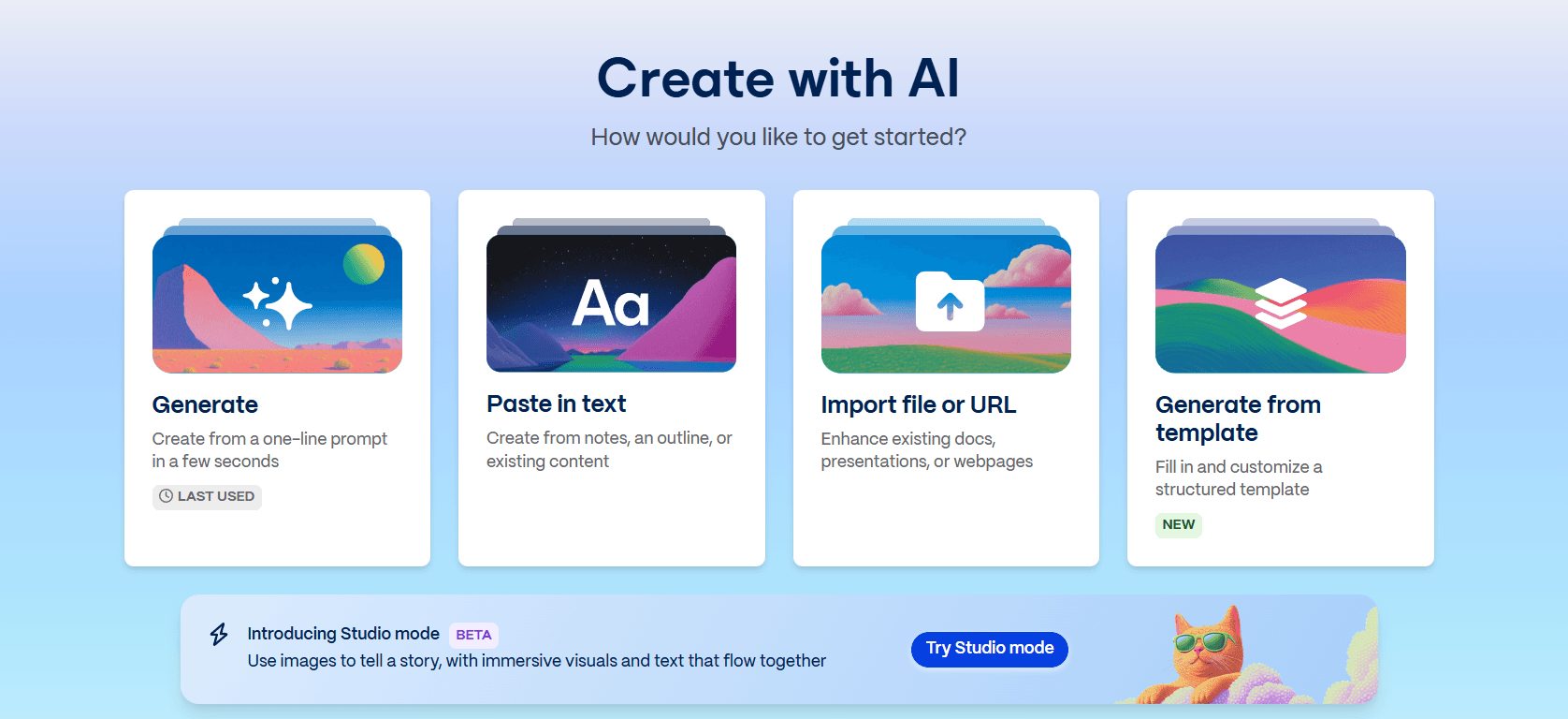
Gamma предлагает несколько способов начать:
Генерировать: Создайте презентацию Gamma AI из однострочного запроса за несколько секунд. Это самый популярный вариант для быстрого создания слайдов Gamma.
Вставить текст: Создайте из заметок, плана или существующего контента. Gamma отформатирует и структурирует его в слайды.
Импортировать файл или URL: Улучшите существующие документы, презентации или веб-страницы, преобразовав их в формат Gamma.
Генерировать из шаблона: Заполните и настройте структурированный шаблон для конкретных случаев использования.
Режим Studio: Работает на базе Nano Banana 2, модели ИИ, которая генерирует слайды Gamma на основе изображений с характерным визуальным стилем. Примечание: Слайды режима Studio нельзя смешивать с обычными слайдами Gamma в одной презентации. Вы должны выбрать один подход для всей колоды.
Шаг 3: Настройте структуру
Если используется опция «Генерировать», Gamma AI создает структуру на основе вашего запроса. Перед генерацией вы можете настроить:
Как генерировать текст (генерировать или сохранять исходный текст)
Сколько текста генерировать
Целевая аудитория и тон
Язык вывода
Количество слайдов и структуру разделов
Шаг 4: Выберите тему
Gamma предлагает ряд визуальных тем, которые контролируют цвета, шрифты и общий стиль дизайна. Вы также можете загрузить фирменную презентацию, чтобы Gamma следовала ее цветовой схеме и стилю.
Шаг 5: Сгенерируйте презентацию Gamma AI
После подтверждения настроек Gamma генерирует полную колоду за 30-60 секунд. Слайды Gamma появляются с автоматически примененным текстом, изображениями и макетами.
Шаг 6: Редактирование и доработка
После генерации вы можете редактировать текст, менять изображения, настраивать макеты и изменять цвета с помощью карточного редактора Gamma или ИИ-агента. Вы можете добавлять слайды с помощью пустой карточки, генерации ИИ или шаблонов, а также использовать слэш-команды в стиле Notion, ИИ-чат-бота и мини-меню.
Однако более глубокие структурные изменения, такие как корректировка интервалов или изменение логики макета, могут быть затруднительными. Gamma лучше всего работает, когда изменения остаются близкими к исходной структуре.
Шаг 7: Презентация, публикация или экспорт
Когда презентация Gamma AI готова:
Презентация: Запуск слайдов Gamma в полноэкранном режиме
Поделиться: Сгенерировать публичную ссылку или пригласить соавторов
Экспорт: Скачать в формате PDF, PowerPoint или изображений PNG
Преобразовать в веб-сайт: Поделиться контентом как полностью функциональной веб-страницей
Что такое Gamma Agent? Новый ИИ-редактор в Gamma 3.0
Прежде чем перейти к фактическому обзору, я должен рассказать о Gamma Agent — слое ИИ-редактирования Gamma, представленном с Gamma 3.0 в сентябре 2025 года. Вместо того чтобы нажимать на каждый слайд для внесения изменений, вы просто говорите Агенту, что хотите. «Сделайте слайд 5 более наглядным». «Переделайте эту колоду, чтобы она выглядела более корпоративной». «Добавьте раздел сравнения конкурентов». Он обновляет колоду по всем направлениям.
Это настоящий шаг вперед по сравнению с редактированием с помощью слэш-команд, которое Gamma использовала раньше. Для любого, кому когда-либо приходилось вручную настраивать 12 слайдов, чтобы они соответствовали новой палитре бренда, это действительно полезный инструмент.
Что может Gamma Agent
Исследовать веб с цитатами. Загрузите черновые заметки или дайте ему тему, и Агент будет искать в Интернете, извлекать факты и цитировать источники внутри колоды. Полезно для колод, требующих много исследований, на которые в противном случае вы потратили бы час.
Переделывать целые колоды. «Сделать это более профессиональным» или «соответствовать цветам нашего бренда» применяет изменения ко всем слайдам сразу. Больше не нужно обновлять слайды по одному.
Уточнять контент из входных данных. Вставляйте ссылки, скриншоты или заметки, и Агент включит их в нужные слайды. Удивительно хорошо работает для документов, которые вы хотите превратить в колоду.
Давать отзывы о дизайне. Спросите «что не так с этой колодой?», и Агент отметит конкретные слайды и предложит исправления. Это работает не всегда. Отзывы чаще всего носят общий характер.
Gamma Agent против старого редактора Gamma
Задача | Старая Gamma (до 3.0) | Gamma Agent (3.0+) |
|---|---|---|
Редактировать один слайд | Слэш-команды и ручное редактирование | Естественный язык |
Переделать всю колоду | Изменить тему вручную | «Сделать ее более корпоративной» |
Добавить исследование на слайд | Искать извне, затем вставлять | Агент делает это с цитатами |
Исправить визуальные несоответствия | Слайд за слайдом | Агент идентифицирует и применяет по всей колоде |
Сгенерировать изображение | Один вариант, случайный | С подсказкой и большим контекстом |
Где Gamma Agent не справляется
Более сложная проблема с Gamma Agent не в том, чего он не может сделать. А в том, что он делает без спроса.
Вы настраиваете один слайд, и что-то меняется на слайде, которым вы были довольны. Заголовок, над которым вы долго работали, «улучшается». Цветовой акцент на слайде 3 смещается, чтобы соответствовать изменению, которое вы хотели только на слайде 8. Изображение, которое вы специально выбрали, заменяется, потому что Агент решил, что другое подходит лучше. Запросы на изменение стиля проникают в контент. Межслайдовые изменения чрезмерно корректируются. Отмена не всегда все исправляет, и нет предварительного просмотра, показывающего, что именно изменится.
Кроме того, основные ограничения Gamma не изменились. Один макет на генерацию. Карточная архитектура, которая по-прежнему ломается при экспорте в PPTX. Каждая презентация по-прежнему выглядит как любая другая презентация Gamma, только в разных цветах.
Gamma Agent ускоряет редактирование. Он не исправляет базовую систему дизайна и создает новую проблему: доверие к тому, что он изменил только то, что вы просили. Для быстрых черновиков это приемлемый компромисс. Для клиентских презентаций вы столкнетесь с тем же потолком, что и всегда. В этот момент такие инструменты, как Alai (с контекстно-зависимым ИИ, который ограничивает редактирование тем, что вы действительно просили, плюс 4 варианта макета на слайд), дают более сильный результат.
Как на самом деле выглядят слайды Gamma AI?
Слайды Gamma AI следуют карточной, веб-ориентированной эстетике, которая выглядит современно в браузере, но часто ломается при экспорте в PowerPoint. Кроме того, типичная презентация Gamma AI имеет отчетливый визуальный стиль, который сразу узнаваем. Вот что ожидать, когда вы сгенерируете свою первую презентацию.
Визуально целостные презентации
Приложение Gamma автоматически применяет единую цветовую палитру ко всем слайдам, включая изображения, сгенерированные ИИ. Это обеспечивает визуальную целостность презентаций без ручного оформления. ИИ использует различные типы макетов (временные шкалы, сетки иконок, галереи изображений, маркированные списки) и варьирует структуру слайдов Gamma, чтобы предотвратить монотонность.
Карточный, прокручиваемый формат
В отличие от традиционных инструментов для слайдов, Gamma организует контент в модульные блоки на основе карточек, которые располагаются вертикально, подобно Notion или хорошо структурированной записи в блоге. Результат получается чистым и легко сканируемым, но иногда может больше напоминать документ, чем презентацию. Слайды Gamma также предназначены для просмотра в браузере, поэтому они часто выходят за рамки традиционных размеров 16:9 (как показано ниже). Это хорошо подходит для онлайн-обмена и просмотра по ссылкам, но становится проблемой, когда вам нужно экспортировать стандартную презентацию PowerPoint.

Повторяющиеся макеты и структуры блоков
Визуальный стиль хорошо работает при первом использовании Gamma. Проблема проявляется после третьей или четвертой презентации. Элементы Gamma имеют фиксированный язык дизайна с минимальными вариациями. Он повторно использует одни и те же структуры блоков для каждой презентации, только в разных цветах. Карточный формат, который делает Gamma быстрой, также делает каждую презентацию похожей на созданную по одному шаблону.
Для внутренних документов или быстрых мозговых штурмов это не имеет значения. Но для клиентских презентаций, питчей для инвесторов или любой презентации, где ваши слайды должны отличаться от последней отправленной, Gamma AI начинает казаться шаблонной. Это одна из основных причин, по которой пользователи начинают искать альтернативы Gamma после нескольких месяцев использования.
Плюсы: Что Gamma AI делает хорошо
Скорость: Приложение Gamma генерирует полную презентацию за считанные минуты. Для презентаций в последнюю минуту или быстрых мозговых штурмов это само по себе стоит попробовать.
Последовательное оформление: Как только вы выбираете тему, приложение Gamma применяет ее ко всем слайдам: фонам, тексту, иконкам и даже изображениям, сгенерированным ИИ. Вам не нужно беспокоиться о несоответствии цветов.
Разнообразие форматов: Приложение Gamma не просто вываливает маркированные списки на каждый слайд. Оно использует различные типы макетов (временные шкалы для процессов, сетки иконок для функций, галереи изображений для визуального контента, сравнительные карточки для вариантов).
Низкий порог входа: Вам не нужны навыки дизайна или часы опыта работы с PowerPoint. Введите запрос, выберите тему, и Gamma позаботится о структуре, макете и стиле.
Хорошо для итераций: Gamma хорошо работает как инструмент для первого черновика. Даже если результат не готов к презентации, он дает вам основу для дальнейшей работы.
Несколько вариантов обмена: Делитесь презентациями из приложения Gamma по ссылке, загружайте в формате PDF или PowerPoint или конвертируйте в веб-сайт.
Минусы: В чем Gamma AI не дотягивает для профессиональных презентаций
Ограничения Gamma обычно проявляются не сразу. Они становятся заметны, когда презентация переходит от первого черновика к окончательной версии, или когда пользователи пытаются экспортировать свою работу в стандартные инструменты, такие как PowerPoint или Google Slides.
Многоформатный дизайн приводит к универсальному результату: Gamma создана для создания документов, веб-страниц и презентаций с использованием одних и тех же строительных блоков. Поскольку ее компоненты должны работать во всех форматах, она опирается на простые блоки в стиле Notion, которые могут выглядеть плоско и универсально. Из-за этого многие презентации Gamma AI больше похожи на отформатированные документы, чем на настоящие слайды.
Повторяющиеся макеты с ограниченным разнообразием: Элементы Gamma имеют фиксированный стиль с минимальными вариациями. Она повторно использует одни и те же дизайны для каждой колоды, просто в разных цветах. Со временем слайды Gamma начинают выглядеть однообразно, особенно для пользователей, которые создают несколько колод.
Несоответствия форматирования: Мелкие проблемы накапливаются: изменения текста могут неожиданно влиять на интервалы, изображения могут обрезаться за текстовыми полями, размеры шрифтов могут различаться на слайдах Gamma, даже если они установлены в одном стиле, а слайды, запрошенные в формате 16:9, иногда отображаются как квадратные или высокие.
Одноразовая генерация с ограниченной итерацией: Gamma генерирует всю презентацию за один раз с ограниченными возможностями для итерации. Редактирование ИИ может неожиданно изменить несвязанные части слайда. Такие функции, как «Сохранить» и «Переписать», работают как черные ящики.
ИИ работает без контекста презентации: ИИ Gamma обрабатывает слайды Gamma изолированно. Он не учитывает, как изменения влияют на более широкий нарратив или визуальный ритм во всей презентации Gamma AI.
Проблемы с экспортом и совместимостью (самая большая проблема): Экспорт Gamma AI в PowerPoint или Google Slides часто приводит к отсутствию шрифтов, смещению макетов, неправильному расположению текстовых полей и слайдам, не соответствующим формату 16:9. Я подробно рассматриваю это в разделе экспорта Gamma AI PPT ниже.
Случайные изображения ИИ: Поскольку Gamma генерирует только один вариант на слайд, она часто создает случайные изображения ИИ, которые не соответствуют сообщению.
Экспорт Gamma AI в PowerPoint: почему ваши слайды ломаются (и как это исправить)
Колоды Gamma ломаются при экспорте в PowerPoint, потому что Gamma использует веб-ориентированный, карточный движок макета, который не соответствует архитектуре слайдов PowerPoint с фиксированными размерами.
Моя основная причина для добавления этого как отдельного раздела заключается в том, что это самое большое разочарование, которое я слышу от пользователей Gamma. В этом разделе я подробно описал проблему, почему она возникает и как ее решить.
Что происходит при экспорте Gamma AI в PPT
Когда вы загружаете презентацию Gamma AI в виде файла PowerPoint, результат часто не соответствует тому, что вы видите в редакторе Gamma:
Нестандартные размеры: Слайды Gamma AI часто отображаются как квадратные или высокие карточки, а не как стандартные 16:9. Когда они открываются в PowerPoint, они не соответствуют размеру слайда по умолчанию.
Смещение текста: Текстовые поля перемещаются со своих исходных позиций. Заголовки накладываются на основной текст или полностью выходят за пределы слайда.
Отсутствующие шрифты: Gamma использует веб-шрифты, которых нет в PowerPoint. Результатом является замена шрифтов, которая меняет весь вид вашей колоды.
Разрушение макета: Карточные блоки Gamma не отображаются чисто в структуре слайдов PowerPoint. Многоколоночные макеты могут располагаться вертикально, разрушая визуальный дизайн.
Почему это происходит
Основная причина — архитектурная. Презентации Gamma AI создаются как веб-ориентированный контент с использованием карточных блоков (по сути, прокручиваемой веб-страницы). PowerPoint использует совершенно другой движок макета с фиксированными размерами слайдов. Преобразование между этими форматами затруднено, что делает экспорт Gamma AI PPT жертвой.
Обходные пути
Экспортируйте в PDF, если вам просто нужно поделиться (без редактирования, но с сохранением форматирования)
Всегда открывайте экспортированный из Gamma PPT в PowerPoint за день до важной встречи: я усвоил это на горьком опыте, когда текстовые поля смещались прямо во время презентации
Заложите 20-30 минут на ручные исправления любой экспортированной из Gamma AI презентации
Или используйте альтернативу, которая экспортирует без проблем: экспорты PowerPoint от Alai точно соответствуют редактору, а Plus AI работает нативно в Google Slides
Цены на Gamma AI в 2026 году: бесплатный план, система кредитов и реальная стоимость
Цены на приложение Gamma начинаются с 0 долларов США за бесплатный план (400 одноразовых кредитов), 8 долларов США в месяц за Plus (годовая подписка), 15 долларов США в месяц за Pro (годовая подписка) и 90 долларов США в месяц за Ultra (годовая подписка). Цены на командные и бизнес-места доступны для крупных организаций.
Планы Gamma AI
План | Цена (годовая) | Цена (ежемесячная) | Что вы получаете |
|---|---|---|---|
Бесплатный | $0 | $0 | 400 кредитов (одноразово) при регистрации (~10 презентаций), брендинг Gamma |
Plus | $8/месяц | $10/месяц | Неограниченное количество генераций ИИ, удаление брендинга, продвинутые модели изображений |
Pro | $15/месяц | $20/месяц | Премиальные модели ИИ, пользовательский брендинг, аналитика, доступ к API, до 60 слайдов/колода |
Ultra | $90/месяц | $100/месяц | Самые продвинутые модели ИИ, колоды из 75 карточек, 4K Nano Banana Pro HD, ранний доступ к функциям |
Как работают кредиты Gamma AI (скрытая математика)
Система кредитов Gamma расходуется быстрее, чем большинство людей ожидает:
Создание одной презентации ИИ (примерно 10 слайдов) = 40 кредитов (таким образом, 400 бесплатных кредитов = ровно 10 колод)
Каждое редактирование ИИ, переписывание или взаимодействие с чат-ботом = ~5-10 кредитов
Если вы создаете колоду, а затем делаете 4 редактирования ИИ, вы использовали 20-80 кредитов
Реальная стоимость: Если вы создаете 5 презентаций Gamma AI в месяц и делаете 3-5 редактирований ИИ для каждой, вы израсходуете примерно 350 кредитов в месяц, превысив бесплатные кредиты в течение первого месяца. Вам понадобится как минимум план Plus за 8 долларов в месяц (годовая подписка) или 10 долларов в месяц (ежемесячная подписка), чтобы продолжить, так как бесплатные кредиты не возобновляются.
Я указываю на это только потому, что по сравнению с другими альтернативами, ценообразование Gamma кажется низким, но если учесть фактическое потребление кредитов и стоимость итераций — затраты быстро растут, тем более что первые черновики Gamma часто требуют нескольких раундов итераций (для сравнения, стоимость создания одного слайда в Alai составляет 2 кредита, если пользователь выбирает только 1 вариант на слайд — это 20 кредитов за колоду из 10 слайдов против 40 кредитов Gamma)
Gamma AI бесплатна?
Gamma предлагает бесплатный план с 400 кредитами, но это скорее пробная версия, чем постоянный бесплатный уровень. Большинство активных пользователей исчерпывают кредиты в течение 2-3 недель.
Что не входит в бесплатный план: Совместное редактирование (только платные планы), пользовательские шрифты (только Pro), аналитика презентаций (только Pro), AI Agent (Pro и выше), брендированные колоды (для удаления водяного знака Gamma требуется Plus), доступ к API (Pro и выше).
Как цены Gamma соотносятся с альтернативами
Инструмент | Бесплатный тариф | Начальная цена платного тарифа | Лучшее соотношение цены и качества |
|---|---|---|---|
Gamma | 400 кредитов (~10 презентаций) | $8/месяц (годовая подписка) | Быстрые черновики |
Alai | 300 кредитов | $16/месяц | Качество дизайна |
Beautiful.ai | Нет | $12/месяц | Шаблоны |
Plus AI | Ограничено | $15/месяц | Google Slides |
Canva | Щедрый бесплатный тариф | $15/месяц | Все в одном |
SlidesAI | 3 презентации/месяц | $10/месяц | Бюджет |
Лучшие альтернативы Gamma AI в 2026 году
Лучшей альтернативой Gamma в 2026 году является Alai за качество дизайна и экспорт в PPTX, а Plus AI, Canva, Pitch и Chronicle являются лидерами в своих категориях.
Но прежде чем углубляться в альтернативы, позвольте мне поделиться своими критериями тестирования.
Как я тестировал эти альтернативы Gamma
Качество дизайна: Выглядит ли результат профессионально или очевидно сгенерирован ИИ? Можете ли вы представить его клиентам без смущения?
Скорость получения готовой презентации: Сколько времени проходит от запроса до чего-то, что вы действительно представите? Это включает регенерацию, ручные исправления и время экспорта.
Надежность экспорта: Соответствует ли экспорт в PowerPoint или PDF тому, что вы видите в редакторе? Это был самый большой фактор после моего опыта с Gamma.
Цены и ценность: Что вы на самом деле получаете за эту цену? Как быстро заканчиваются бесплатные кредиты?
Соответствие экосистеме: Работает ли инструмент там, где ваша команда уже работает, будь то Google Slides, PowerPoint или отдельная платформа?
Для кого он на самом деле: У каждого инструмента есть своя ниша. Я постарался определить, для какого случая использования каждый из них действительно подходит лучше всего, а не ранжировать их все по одной шкале.
Краткое резюме: Лучшие альтернативы Gamma с первого взгляда
Инструмент | Лучше всего подходит для | Ключевое преимущество |
Alai | Дизайн и скорость | Дизайн, ориентированный на презентации, 4 варианта макета, контекстно-зависимый ИИ, интеграция Nano Banana Pro |
Plus AI | Пользователи Google Slides | Нативная интеграция, отсутствие проблем с экспортом |
Beautiful.ai | Шаблонный дизайн | Обширная библиотека шаблонов, набор для брендинга |
Canva | Разнообразие шаблонов | Тысячи шаблонов, универсальный дизайн |
Pitch | Отделы продаж | Аналитика презентаций, запись видео, интеграции с CRM |
Prezi | Нелинейные презентации | Масштабируемый холст, уникальный формат повествования |
SlidesAI | Бюджетный вариант | 10 долларов в месяц, нативная интеграция с Google Slides |
PowerPoint Copilot | Пользователи Microsoft 365 | Нативный PowerPoint, преобразование Word в презентацию |
Gemini Canvas | Google Workspace | Входит в Workspace, кросс-приложениевый интеллект |
Chronicle | Повествование | Структура повествования, умный холст, интерактивные виджеты |
1. Alai – Лучшая альтернатива Gamma для дизайна и скорости

После моего разочарования в Gamma, Alai стал одним из первых инструментов, который действительно ощущался как обновление, а не как равноценная замена. Его дизайн, ориентированный на презентации, контекстно-зависимый ИИ и такие функции, как 4 макета на слайд, значительно упростили создание окончательного варианта.
Основное различие между Alai и Gamma AI заключается в фокусе. Gamma — это многоформатный инструмент, созданный для документов, веб-страниц и презентаций. Alai создан специально для дизайна слайдов и повествования. Это различие определяет все, что следует далее.
Ключевые особенности
Дизайн, ориентированный на презентации: ИИ Alai понимает теорию цвета, баланс макета и визуальную иерархию. В результате получается результат, который выглядит так, будто его создал дизайнер, а не инструмент для документов.
4 варианта макета на слайд: Каждый запрос генерирует четыре различных варианта дизайна. Вместо того чтобы надеяться, что первый единственный результат сработает (как в Gamma), вы выбираете вариант, наиболее близкий к вашему окончательному видению. Эта функция экономит кредиты на регенерацию и значительно увеличивает вероятность сильной отправной точки.
Контекстно-зависимый ИИ: В отличие от изолированной генерации слайдов в Gamma, ИИ Alai сохраняет контекст всей вашей колоды. Изменения остаются согласованными с вашей темой, содержанием и дизайном. Когда я попросил его отредактировать слайд 8, он не забыл, что я установил в слайдах 1-7. Это предотвращает тонкие несоответствия, которые преследуют колоды Gamma.
Элементы, специфичные для презентаций: Alai включает специализированные элементы, которых полностью нет в Gamma:
Сравнение двух
Матрица функций
Потоки процессов
Воронкообразные диаграммы
Временные шкалы
Точный контроль дизайна и интервалов: Пространство — один из основных параметров, используемых дизайнерами для создания иерархии, ритма и визуальной идентичности. Gamma не предоставляет пользователям значимого контроля над интервалами, ее элементы имеют фиксированный стиль с минимальными вариациями. Alai позволяет точно настраивать:
Настраивайте макет, интервалы, иерархию текста, визуальный размер и положение подэлементов
Настраивайте поля между элементами в соответствии с визуальным стилем вашего бренда. Это невозможно в инструментах, которые навязывают интервалы по умолчанию.

Например: Слайд с минимальными полями со всех четырех сторон создает смелый, от края до края вид, который поддерживает определенные идентичности бренда, такие как эстетика бенто-бокса.
Добавляйте пользовательские отступы между элементами для свободного пространства

Карточка с текстом и изображение справа имеют пользовательские отступы между ними, а слайд выглядит более воздушным с полями по всему периметру
Используйте автоматические интервалы, которые регулируются по мере увеличения или уменьшения содержимого (в случае Gamma любое увеличение содержимого приводит к уменьшению размера шрифта, что снижает видимость и приводит к плохому визуальному восприятию)
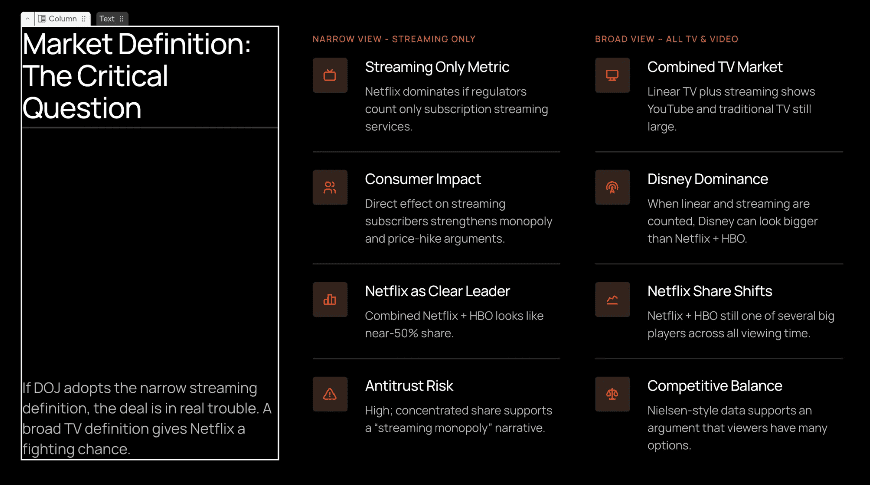
Как видно выше, в Колонке 1 есть автопробел между двумя текстовыми полями, поэтому по мере добавления текста в нижнее текстовое поле пробел между двумя автоматически регулируется, не заставляя увеличивать высоту слайда или перекрывать текстовые поля
Превосходная генерация изображений с помощью ИИ: Поскольку Gamma генерирует только один вариант на слайд, она часто создает случайные изображения ИИ, которые не соответствуют содержимому. Alai генерирует четыре варианта на слайд, показывая версии с изображениями и без них. Ее ИИ обучен на более чем 1000 презентациях и имеет лучшую логику для принятия решений о том, когда генерировать релевантные изображения.
Интеграция с Nano Banana Pro: Alai позволяет использовать Nano Banana Pro для создания редактируемых, соответствующих теме слайдов либо во время генерации (включено в 4 варианта макета), либо для улучшения существующих слайдов с использованием определенных предустановок дизайна. Кроме того, в отличие от режима Studio в Gamma, вы можете смешивать как обычные слайды, так и слайды Nano Banana Pro в одной презентации.
Чистый экспорт: Экспорт в PDF и PowerPoint, который не нарушает ваш дизайн. После форматирования в Gamma это казалось откровением.
Отслеживание вовлеченности: Общие ссылки позволяют отслеживать просмотры, время вовлеченности и точки оттока. Для коммерческих презентаций или презентаций для инвесторов знание того, что находит отклик, бесценно.
Доступ к API: Для команд, которым необходимо создавать фирменные презентации в масштабе, Alai предлагает программный доступ для создания масштабируемых автоматизаций.
Плюсы
Качество дизайна заметно лучше, чем у Gamma. Слайды выглядят профессионально разработанными без ручной доработки, современная эстетика, сбалансированные макеты, изысканное использование цвета.
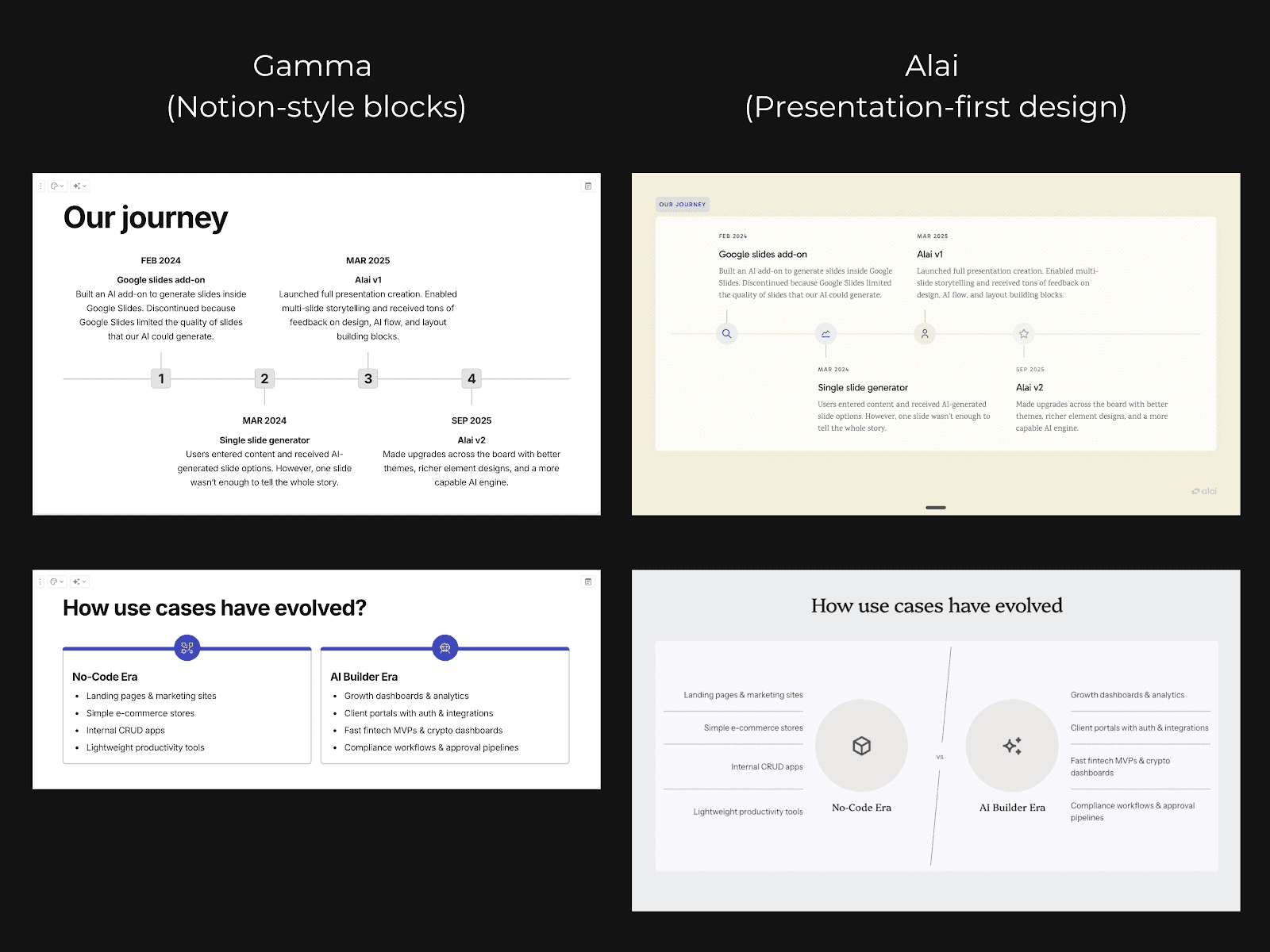
Система из 4 макетов экономит реальное время и деньги. Я перестал генерировать слайды в надежде на что-то лучшее. Четыре варианта означают, что один из них почти всегда подходит.
Контекстно-зависимый ИИ предотвращает несогласованность. Изменения на слайде 10 случайно не конфликтуют со стилем, установленным на слайде 2.
Экспорт действительно работает. Десятки экспортов в PowerPoint, ноль проблем с форматированием.
Предустановки Nano Banana Pro для мгновенной доработки. Визуально эффектные слайды, которые автоматически соответствуют теме вашей презентации, с возможностью смешивать стандартные и улучшенные слайды.
Встроенное отслеживание вовлеченности. Смотрите, кто просматривал вашу презентацию, на каких слайдах они задерживались и где они прекратили просмотр.
Контроль интервалов приближает вас к профессиональному дизайнеру. Настраивайте поля, отступы и расположение элементов для по-настоящему индивидуальных макетов.
Минусы
Использование ограничено презентациями. В отличие от Gamma, Alai предназначен только для презентаций и не поддерживает несколько форматов.
Цены на Alai
Бесплатно: 300 кредитов для изучения платформы
Плюс: $16/месяц, неограниченное количество презентаций, премиум-шаблоны
Про: $25/месяц, расширенные функции, приоритетная поддержка, командная работа
Почему стоит выбрать Alai вместо Gamma
Если вы используете Gamma для быстрых внутренних черновиков или мозгового штурма, он справляется с задачей. Но если ваши презентации действительно важны — презентации для клиентов, инвесторов, заседания совета директоров — Alai является лучшим инструментом.
Одно только качество дизайна оправдывает переход: плоские блоки Gamma выглядят как отформатированные документы, в то время как результат Alai выглядит так, будто его сделал дизайнер. Система из 4 макетов означает, что вы перестанете тратить время и кредиты на перегенерацию. Контекстно-зависимый ИИ означает, что вы не тратите время на ручное редактирование. И экспорт действительно работает.
Выбирайте Alai, если:
Качество презентации важно для вашего случая использования
Вам нужны презентации, которые развиваются в ходе нескольких доработок
Вы хотите 4 варианта макета вместо 1
Вы хотите смешивать слайды Nano Banana Pro с обычными
Надежность экспорта в PowerPoint важна
Вам нужны специализированные элементы презентации (Матрица функций, Сравнение двух и т. д.)
Оставайтесь с Gamma, если:
Скорость — ваш единственный приоритет
Вам нужны быстрые, одноразовые черновики, которые не будут меняться
Важен многоформатный вывод (документы, веб-страницы)
2. Plus AI – Лучшая альтернатива Gamma для пользователей Google Slides

Я тестировал Plus AI для нашей команды продаж, которая активно использовала Google Slides. Привлекательность очевидна: вместо того, чтобы генерировать в Gamma AI, экспортировать, импортировать в Google и наблюдать, как форматирование нарушается на каждом шагу, Plus AI просто работает внутри Slides с самого начала.
Возможности
Нативная интеграция с Google Slides: Plus AI работает как надстройка непосредственно в Google Slides. Никакого переключения платформ, никакого экспорта, никакой рулетки форматирования. Вы создаете, редактируете и сотрудничаете в одном месте.
Генерация слайдов с помощью ИИ: Основная функциональность схожа с Gamma — вы описываете, что хотите, и ИИ создает слайды. Качество вывода приличное, хотя и менее отточенное, чем у Alai.
Ремикширование контента: Вы можете взять существующие слайды и попросить ИИ перестроить или переписать их. Это полезно для повторного использования старых презентаций, с чем Gamma справляется не очень хорошо.
Импорт PDF и документов: Загрузите PDF или документ, и Plus AI попытается преобразовать его в слайды. Результат может быть непредсказуемым в зависимости от исходного форматирования, но полезно, когда это работает.
Плюсы
Интеграция с Google Slides безупречна. Если ваша команда работает в Google Workspace, это значительно снижает трение.
Никаких проблем с экспортом, что видите, то и получаете, и это уже в Slides.
Сотрудничество нативное. Несколько человек могут работать над слайдами, созданными ИИ, в режиме реального времени.
Привычный интерфейс означает практически отсутствие кривой обучения для существующих пользователей Slides.
Минусы
Вы привязаны к экосистеме Google. Нет поддержки PowerPoint, нет отдельного приложения.
Варианты дизайна кажутся более ограниченными, чем у Gamma или Alai. Слайды функциональны, но редко впечатляют.
Как и в Gamma, вы по-прежнему получаете только один вариант макета на каждую генерацию, без выбора, только результат.
Цена выше, чем у Gamma, за, казалось бы, меньшее количество функций.
Цены
Бесплатно: Ограниченные возможности
Pro: 15 долларов в месяц
Team: 25 долларов за пользователя в месяц
Почему стоит выбрать Plus AI вместо Gamma
Выбирайте Plus AI, если ваша команда работает в Google Workspace и вам нужна генерация ИИ, не выходя из Slides. Это полностью устраняет проблемы с экспортом презентаций Gamma AI. Но если качество дизайна имеет значение, Alai по-прежнему является лучшим выбором.
3. Beautiful AI – Лучшая альтернатива Gamma для шаблонного дизайна
Я использовал Beautiful.ai пару месяцев, прежде чем появилась Gamma. Их библиотека шаблонов огромна, предлагая множество тем для экспериментов, но по сравнению с Gamma AI, ИИ менее развит, а дизайн может казаться менее современным.
Возможности
Огромная библиотека шаблонов: Beautiful AI имеет обширную библиотеку шаблонов, из которых можно выбирать, что позволяет экспериментировать с различными макетами.
Дизайн ИИ: Их ИИ может генерировать слайды по запросам, аналогично Gamma. Результат отточен, но соответствует ограничениям дизайна Beautiful AI, поэтому вариаций меньше.
Бренд-кит: Загрузите свои шрифты, цвета и логотип, и Beautiful.ai применит их единообразно ко всем презентациям. Более надежно, чем варианты тем в Gamma.
Аналитика презентаций: Отслеживайте, кто просматривал вашу презентацию и на каких слайдах они проводили время. Полезно для отделов продаж, хотя и не так подробно, как в Pitch.
Плюсы
Отлично подходит для недизайнеров, которым нужна отточенность без изучения принципов дизайна.
Бренд-кит обеспечивает единообразие корпоративных презентаций во всех командах.
Обширная библиотека шаблонов позволяет экспериментировать с различными темами дизайна, особенно если вы все еще ищете свой бренд.
Минусы
Умные шаблоны могут показаться ограничивающими. Иногда хочется выйти за рамки сетки, но Beautiful AI этому сопротивляется.
Меньше гибкости, чем у Gamma, и гораздо меньше, чем у Alai. Вы работаете в их системе, а не создаете свободно.
Генерация ИИ менее сложна, чем у специализированных инструментов; это скорее инструмент для шаблонов с прикрученным ИИ.
Цены значительно возрастают для командных функций — 40 долларов за пользователя в месяц — это дорого.
Цены
Pro: 12 долларов в месяц (годовая оплата)
Team: 40 долларов за пользователя в месяц
Почему стоит выбрать Beautiful AI вместо Gamma
Выбирайте Beautiful.ai, если согласованность бренда и дизайна является вашим главным приоритетом, и у вас есть выделенные ресурсы для его использования. Для скорости, основанной на ИИ, вам лучше подойдут Gamma AI или Alai.
4. Canva — лучшая альтернатива Gamma для разнообразия шаблонов
Как маркетолог, я годами использовал Canva для графики в социальных сетях, одностраничных документов, быстрых дизайнов. Тестирование ее для презентаций показалось естественным, хотя это другой рабочий процесс, чем у Gamma AI. Меньше «ИИ генерирует все», и больше «выберите шаблон, настройте с помощью ИИ-помощника».
Возможности
Огромная библиотека шаблонов: Количество шаблонов презентаций Canva исчисляется тысячами. Какой бы стиль вы ни представляли, для него, вероятно, найдется шаблон. Это затмевает ограниченный выбор тем Gamma.
Magic Studio AI: Набор ИИ-инструментов Canva включает генерацию текста, создание изображений и предложения по дизайну. Он новее и менее ориентирован на презентации, чем Gamma, но быстро совершенствуется.
Набор для бренда: Загрузите свои фирменные активы, и Canva применит их ко всем дизайнам. Хорошо подходит для команд, которым нужна согласованность в презентациях и других маркетинговых материалах.
Экспорт в нескольких форматах: PDF, PPTX, видео, изображения — Canva надежно экспортирует практически во что угодно. У меня никогда не было проблем с экспортом из Canva, как это бывает с экспортом из Gamma.
Библиотека стоковых медиа: Миллионы фотографий, видео, графики и иконок включены. Не нужно искать внешние активы.
Плюсы
Разнообразие шаблонов не имеет себе равных. Если вы знаете, какой вид вам нужен, Canva, вероятно, его имеет.
Бесплатный уровень действительно полезен, более щедрый, чем кредитная система Gamma.
Экспорт надежен. Файлы PowerPoint открываются правильно каждый раз.
Платформа «все в одном» означает, что вы можете создавать презентации наряду с публикациями в социальных сетях, документами и другими материалами.
Минусы
Не ориентирована на презентации в первую очередь. Canva — это универсальный инструмент для дизайна, и функции ИИ отражают это, они менее сложны именно для слайдов.
Может показаться подавляющей. Огромное количество опций приводит к параличу принятия решений.
Генерация ИИ не так безупречна, как у Gamma или Alai. Она лучше подходит для «улучшения этого шаблона», чем для «создания с нуля».
Нет нескольких вариантов макета, вы выбираете шаблон и настраиваете его, вместо того чтобы ИИ генерировал варианты.
Цены
Бесплатно: Щедрый бесплатный уровень с базовыми функциями
Pro: 15 долларов в месяц
Teams: 10 долларов за пользователя в месяц (минимум 3 пользователя)
Почему стоит выбрать Canva вместо Gamma
Выбирайте Canva, если вам нужно огромное разнообразие шаблонов и вы работаете над презентациями наряду с другими дизайнерскими задачами. Экспорт более надежен, чем у Gamma AI. Но если вы хотите, чтобы ИИ генерировал презентации с нуля, Gamma AI или Alai подойдут лучше.
5. Pitch – лучшая альтернатива Gamma AI для отделов продаж

Я тестировал Pitch с основной целью найти что-то, что наша команда продаж также могла бы использовать для асинхронных презентаций, аналитики и совместной работы с маркетингом.
Функции
Аналитика презентаций: Смотрите, кто открыл вашу колоду, какие слайды просматривал и сколько времени провел на каждом. Эти данные бесценны для последующих продаж.
Запись видео: Записывайте себя, представляя слайды для асинхронных презентаций. Вы можете отправить персонализированный обзор без назначения встречи.
Интеграции с CRM: Подключайтесь к Salesforce, HubSpot и другим CRM. Данные о взаимодействии с презентациями поступают непосредственно в ваш канал продаж.
Генерация слайдов с помощью ИИ: Pitch предлагает создание слайдов с помощью ИИ, аналогично Gamma. Качество хорошее, хотя и не такое ориентированное на дизайн, как Alai.
Совместная работа в реальном времени: Несколько членов команды могут работать над колодами одновременно с комментированием и историей версий.
Плюсы
Аналитика действительно действенна. Мы обнаружили, что потенциальные клиенты тратили 80% своего времени на 3 слайда, поэтому мы их оптимизировали.
Запись видео плавная и профессиональная. Отлично подходит для персонализированного охвата в масштабе.
Интеграция с CRM означает, что данные презентаций не хранятся изолированно.
Современные, чистые шаблоны, которые выглядят профессионально без особой настройки.
Минусы
Избыточен для случаев использования, не связанных с продажами. Если вам просто нужна презентация, функции Pitch добавляют сложность, которую вы не будете использовать.
Кривая обучения круче, чем у Gamma. Дополнительные функции требуют времени для освоения.
Ценообразование отражает ориентацию на продажи — $25/пользователь/месяц труднее оправдать для частных лиц.
Генерация ИИ хороша, но не великолепна. Сильная сторона Pitch — это то, что происходит после создания колоды, а не само создание.
Цены
Бесплатно: Базовые функции
Pro: $25/пользователь/месяц
Business: Индивидуальные цены
Почему стоит выбрать Pitch вместо Gamma
Pitch — это ИИ-конструктор презентаций, который больше предназначен для проведения презентаций и аналитики, чем для создания самой презентации. Хотя такие функции, как подробная аналитика, видеозаписи и совместная работа в реальном времени, делают инструмент очень полезным для любой команды продаж, если создание важнее, чем процесс после создания, другие ИИ-конструкторы презентаций, такие как Alai или Gamma AI, показывают лучшие результаты.
6. Prezi – Лучшая альтернатива Gamma для нелинейных презентаций

Prezi — это "темная лошадка" в этом списке. В то время как все остальные инструменты создают слайды в стиле Gamma, Prezi создает масштабируемые холсты. Я использовал его для выступления на конференции и получил комплименты за то, насколько необычно это выглядело.
Функции
Масштабируемый холст: Вместо линейных слайдов Prezi позволяет создавать визуальную карту, которая увеличивает и уменьшает масштаб контента. Это действительно уникально и запоминается, если сделано хорошо.
Prezi Video: Накладывайте презентацию на изображение с веб-камеры для виртуальных встреч. Ваши слайды появляются рядом или позади вас во время презентации.
Создание с помощью ИИ: Prezi добавила функции ИИ для помощи в генерации контента, хотя они не так развиты, как у Gamma или Alai.
Многоразовые шаблоны: Начинайте с готовых структур и настраивайте их. Шаблоны варьируются от бизнес-ориентированных до креативных.
Автономный режим: Проводите презентации без доступа к Интернету — полезно для конференций с ненадежным Wi-Fi.
Плюсы
Презентации действительно выделяются. Никто не спутает Prezi с PowerPoint.
Формат с масштабированием отлично подходит для рассказывания историй и объяснения сложных взаимосвязей.
Prezi Video — это инновация: слайды, появляющиеся рядом с вами, ощущаются более лично, чем демонстрация экрана.
Цены разумные, особенно тариф Standard за $7 в месяц.
Минусы
Масштабирование может вызывать дискомфорт у некоторых зрителей. Я видел, как люди чувствовали себя неважно во время презентаций Prezi.
Более крутая кривая обучения, чем у инструментов на основе слайдов. Пространственный холст требует времени для освоения.
Не подходит для презентаций с большим объемом данных — формат лучше работает для концепций, чем для диаграмм.
Плохо экспортируется в традиционные форматы. Если кто-то хочет PDF или PPTX, вы в тупике.
Цены
Basic: Бесплатно (ограниченные возможности)
Standard: $7/месяц
Plus: $12/месяц
Premium: $16/месяц
Почему стоит выбрать Prezi вместо Gamma
Выбирайте Prezi, чтобы полностью отойти от традиционного формата слайдов. Он запоминается для рассказывания историй и креативных презентаций, где линейные блоки Gamma выглядели бы скучно. Для стандартных бизнес-презентаций придерживайтесь Alai или Gamma AI.
7. SlidesAI – Более дешевая альтернатива Gamma
SlidesAI — это вариант без излишеств в этом списке. Он делает одно: превращает текст в слайды по самой низкой цене. Я тестировал его, когда искал самую дешевую жизнеспособную альтернативу Gamma.
Возможности
ИИ для преобразования текста в слайды: Вставьте текст или опишите свою тему, и SlidesAI сгенерирует презентацию. Основная функциональность соответствует Gamma, хотя и менее отполирована.
Интеграция с Google Slides: Работает как надстройка Google Slides, поэтому вывод идет непосредственно в Slides без проблем с экспортом.
Генерация на основе темы: Просто введите тему, и SlidesAI исследует и сгенерирует контент — полезно для быстрых черновиков по незнакомым темам.
Многоязычная поддержка: Создавайте презентации на разных языках. Полезно для международных команд.
Плюсы
Самый доступный вариант в этом списке. Уровень $10/месяц соответствует ценам Gamma с нативным выводом Google.
Бесплатный уровень предсказуем: 3 презентации в месяц вместо кредитной системы Gamma, которая расходуется быстрее, чем ожидалось.
Интеграция с Google Slides означает отсутствие проблем с экспортом. То, что вы генерируете, то и получаете.
Простой интерфейс практически без кривой обучения.
Минусы
Качество дизайна заметно ниже, чем у Gamma или Alai. Слайды функциональны, но не впечатляют.
Ограниченные возможности настройки. Вы работаете с базовыми макетами и минимальным контролем стиля.
Как и в Gamma, вы получаете один результат за одну генерацию — без выбора макета.
Набор функций скуден по сравнению с конкурентами. Это действительно ситуация «вы получаете то, за что платите».
Цены
Бесплатно: 3 презентации/месяц
Basic: $10/месяц
Pro: $20/месяц
Почему стоит выбрать SlidesAI вместо Gamma
Выбирайте SlidesAI, если бюджет является вашим основным приоритетом, и вы работаете в Google Slides. Его цена соответствует цене Gamma с дополнительным преимуществом нативного вывода Google — никаких проблем с экспортом. Но если качество дизайна имеет значение для вашего случая использования, Alai стоит дополнительных затрат. SlidesAI — это Honda Civic среди инструментов для презентаций с ИИ: надежный, доступный, без излишеств.
8. Microsoft Copilot – Лучший выбор для пользователей Microsoft 365

Для команд, использующих Microsoft 365, Copilot привносит ИИ в стиле Gamma непосредственно в PowerPoint. Никаких экспортов, никаких новых инструментов для изучения — просто генерация ИИ внутри приложения, которое вы уже используете.
Возможности
Нативная интеграция с PowerPoint: Copilot работает внутри PowerPoint, поэтому сгенерированные слайды изначально являются нативными файлами .pptx. Никаких преобразований, никаких нарушений форматирования.
Преобразование документов Word: Вставьте документ Word или план, и Copilot превратит его в презентацию. Это работало впечатляюще хорошо в моих тестах — наш квартальный отчет стал слайд-деком за считанные секунды.
Предложения по дизайну: Copilot может анализировать слайды и предлагать улучшения — лучшие макеты, более четкие визуальные элементы, более лаконичный текст.
Суммирование презентаций: Загрузите длинную презентацию, и Copilot создаст ее краткую версию для руководителей. Полезно для сокращения подробных презентаций.
Соответствие корпоративным стандартам: Для организаций со строгими политиками в отношении данных Copilot работает в рамках системы безопасности Microsoft.
Плюсы
Отсутствие проблем с экспортом. Вы работаете в PowerPoint нативно, поэтому то, что вы создаете, то и представляете.
Преобразование Word в PowerPoint действительно полезно. Превращение документов в презентации происходит быстрее, чем с любым другим инструментом, который я тестировал.
Не нужно изучать новый интерфейс. Если вы знаете PowerPoint, вы знаете, где что находится.
Безопасность корпоративного уровня удовлетворяет ИТ-отделы, которые отказались бы от облачных инструментов.
Минусы
Дорого. Вам нужен Microsoft 365 плюс лицензия Copilot — 20 долларов в месяц в дополнение к вашей существующей подписке.
Возможности ИИ все еще развиваются. Генерация Copilot не так сложна, как у специализированных инструментов, таких как Alai.
Имеет смысл только в том случае, если вы уже находитесь в экосистеме Microsoft. В качестве отдельной покупки стоимость трудно оправдать.
Ограничен возможностями дизайна PowerPoint — нет расширенных макетов, таких как Feature Matrix или Compare Two elements от Alai.
Цены
Copilot Pro: 20 долларов в месяц (требуется подписка на Microsoft 365)
Copilot для Microsoft 365 Business: 30 долларов США за пользователя в месяц
Почему стоит выбрать Microsoft Copilot вместо Gamma
Выбирайте Copilot, если вы уже платите за Microsoft 365 и хотите получить помощь ИИ, не выходя из PowerPoint. Полностью устраняет проблемы с экспортом Gamma AI PPT. Но если вы не привязаны к Microsoft, Alai предлагает лучшую генерацию ИИ при меньшей общей стоимости.
Подходит ли Microsoft Copilot для создания презентаций?
9. Gemini Canvas – Лучший выбор для интеграции с Google Workspace
Google Gemini — новейший участник этого списка, предоставляющий возможности ИИ-презентаций пользователям Google Workspace. Он еще не так развит, как Gamma, но для команд, уже оплачивающих Workspace, он фактически бесплатен.
Возможности
Интеграция с Google Workspace: Gemini работает в Документах, Таблицах и Презентациях. Вы можете создать план презентации в Документах и легко преобразовать его в Презентации.
Генерация слайдов с помощью ИИ: Опишите, что вы хотите, и Gemini создаст слайды в Google Презентациях. Качество быстро улучшается с каждым обновлением.
Генерация изображений: Gemini может создавать пользовательские изображения для ваших слайдов — это полезно для уникальных визуальных эффектов без поиска стоковых фотографий.
Межприложенный интеллект: Поскольку Gemini имеет доступ к вашему контенту Workspace, он может извлекать соответствующую информацию с вашего Диска при создании презентаций.
Плюсы
Включено в подписки Google Workspace — без дополнительных затрат за то, что конкурирует с основными функциями Gamma.
Глубокая интеграция со всеми приложениями Google создает бесшовный рабочий процесс.
Google быстро развивается. То, что сегодня кажется базовым, может стать конкурентоспособным с специализированными инструментами в течение года.
Нет проблем с экспортом, так как вы работаете в нативных Google Презентациях.
Минусы
Все еще развивается. Качество ИИ пока не на уровне Gamma и значительно ниже Alai.
Ограничено Google Workspace — если вы работаете в PowerPoint, это не для вас.
Меньше шаблонов и вариантов дизайна, чем у специализированных инструментов для презентаций.
Параметры настройки и управления базовые по сравнению с функциями точности Alai.
Цены
Business Starter: $7.20/пользователь/месяц (включает Gemini)
Business Standard: $14.40/пользователь/месяц
Почему стоит выбрать Gemini вместо Gamma
Выбирайте Gemini, если вы уже платите за Google Workspace и хотите использовать функции ИИ для презентаций без дополнительной подписки. Это «бесплатно», если вы уже находитесь в экосистеме, и это устраняет проблемы с экспортом, которые создает Gamma, когда вам нужны слайды в Google. Но если качество презентации имеет значение, Alai остается лучшим специализированным вариантом.
Является ли Gemini лучшим способом создания презентаций с помощью ИИ?
10. Chronicle – Лучшая альтернатива Gamma для сторителлинга и интерактивных презентаций
Chronicle использует иной подход, чем большинство инструментов в этом списке. В то время как Gamma и другие сосредоточены на скорости, Chronicle фокусируется на структуре и вовлеченности, помогая вам создавать презентации, которые действительно рассказывают историю, а не просто отображают информацию.
Функции
Структура повествования: Это выдающаяся особенность Chronicle. Она организует контент в логические последовательности — завязка, проблема, решение, доказательство — вместо того, чтобы просто генерировать слайд за слайдом. Презентации ощущаются как развивающееся повествование, а не просто перечисление информации.
Согласованность бренда: Загрузите свои шрифты, цвета и логотипы один раз, и Chronicle автоматически применит их ко всем слайдам. Более надежно, чем базовое тематическое оформление Gamma, все остается в рамках бренда без ручных настроек.
Интерактивные виджеты: Элементы с поддержкой движения, такие как эффекты масштабирования, выделения и анимированные переходы, делают презентации более увлекательными. Полезно для презентаций, которые должны удерживать внимание, а не просто передавать информацию.
Умный холст: Гибкое, свободное рабочее пространство, где вы можете свободно перетаскивать элементы, а затем одним щелчком приводить их в аккуратные макеты. Больше творческой свободы, чем жесткие блоки Gamma.
Совместная работа в реальном времени: Совместное редактирование, комментарии и режим живой презентации для командных проектов. Несколько человек могут работать над одной и той же колодой одновременно.
Вывод, оптимизированный для мобильных устройств: Презентации созданы так, чтобы хорошо выглядеть на любом устройстве — компактные, доступные для обмена форматы, которые работают на телефонах и планшетах, а не только на экранах ноутбуков.
Рабочий процесс, ориентированный на клавиатуру: Сочетания клавиш почти для всего, что значительно ускоряет создание слайдов, как только вы их освоите. Опытные пользователи оценят это; Gamma не предлагает такого уровня управления с клавиатуры.
Плюсы
Структура повествования действительно полезна. Фреймворк «завязка-проблема-решение-доказательство» помог мне создать питч-дек, который действительно логично развивался. Gamma просто генерирует слайды; Chronicle помогает продумать повествование.
Интерактивные виджеты повышают вовлеченность. Эффекты масштабирования и выделения сделали мою презентацию демонстрации продукта более динамичной, чем все, что я создавал в Gamma или PowerPoint.
Умный холст предлагает творческую гибкость. Свободно перетаскивайте элементы, экспериментируйте с макетами, а затем выравнивайте все одним щелчком. Это лучшее из свободного и структурированного дизайна.
Согласованность бренда экономит время команд. Настройте свой бренд-кит один раз и забудьте о нем. Каждая презентация автоматически выглядит в соответствии с брендом.
Вывод, ориентированный на мобильные устройства, становится все более актуальным. Все больше заинтересованных сторон просматривают презентации на телефонах. Мобильно-оптимизированный формат Chronicle означает, что презентации не разваливаются на маленьких экранах.
Минусы
Более крутая кривая обучения, чем у Gamma. Функции повествования и умный холст требуют времени для освоения. Это не так просто, как «напечатай и сгенерируй», как в Gamma.
Избыточно для простых презентаций. Если вам просто нужно быстрое внутреннее обновление, подход Chronicle, ориентированный на структуру, добавляет ненужную сложность.
Меньшая библиотека шаблонов. Меньше отправных точек, чем у Canva или даже Gamma. Ожидается, что вы будете создавать больше с нуля.
Меньше внимания к чистой генерации ИИ. ИИ Chronicle хорош, но он не является главной звездой шоу — повествование и интерактивность важнее. Если вам нужен самый быстрый вывод ИИ, Alai или Gamma быстрее.
Цены
Бесплатно: Ограниченные возможности
Pro: 15 долларов в месяц
Team: Индивидуальные цены
Почему стоит выбрать Chronicle вместо Gamma
Выбирайте Chronicle, если ваши презентации должны рассказывать историю, а не просто отображать информацию. Gamma AI быстро генерирует слайды, но не помогает структурировать повествование. Для быстрых внутренних черновиков Gamma быстрее. Для презентаций, где важны структура и вовлеченность, Chronicle стоит того, чтобы потратить время на обучение.
Окончательный вердикт: Какую альтернативу Gamma выбрать?
После трех месяцев тестирования всех основных альтернатив Gamma, вот моя честная рекомендация:
Для лучшего дизайна и скорости: Выберите Alai: ее система из 4 макетов, контекстно-зависимый ИИ и чистый экспорт решают три самые большие проблемы Gamma AI.
Для пользователей Google Slides: Plus AI или SlidesAI для нативной интеграции без проблем с экспортом Gamma.
Для отделов продаж: Pitch для аналитики, которой не хватает Gamma.
Для пользователей с ограниченным бюджетом: SlidesAI соответствует ценам Gamma с интеграцией Google.
Для презентаций с повествованием: Chronicle для нарративной структуры, которую Gamma не может обеспечить.
Суть в следующем: Gamma AI хороша для быстрых черновиков, но альтернативы Gamma превзошли ее для профессионального использования. Если вы чувствовали себя ограниченными тем, что Gamma предлагает только один вариант дизайна, были разочарованы проблемами экспорта PPT из Gamma AI или сталкивались с проблемой «все презентации выглядят одинаково», то альтернативы предоставляют то, что Gamma обещала, но так и не достигла.
Ищете ли вы лучший генератор AI-презентаций для питч-деков или просто лучший инструмент для AI-презентаций, теперь у вас есть варианты, с которыми Gamma не может сравниться.
Готовы обновиться с Gamma? Начните бесплатно с Alai и оцените 4 варианта макета на слайд, контекстно-зависимый ИИ и контроль над дизайном, который Gamma AI никогда не предлагала.
Основные выводы
Gamma AI сильна скоростью, слаба надежностью экспорта. Полная презентация менее чем за 60 секунд; испорченная презентация при экспорте в PowerPoint.
Gamma 3.0 запущена в сентябре 2025 года, представив Gamma Agent — редактирование презентаций на естественном языке, которое заменяет рабочие процессы с использованием слэш-команд.
Gamma Imagine запущена в марте 2026 года, расширяя Gamma на создание маркетинговых материалов с помощью ИИ (графики, социальные изображения, инфографика).
Лучшей общей альтернативой Gamma в 2026 году является Alai, потому что она решает три самые большие проблемы Gamma: единственный вариант макета, некачественный экспорт PPT и общий дизайн.
Система кредитов Gamma сжигает ~350 кредитов/месяц для активных пользователей, что делает план Plus ($8/мес. при годовой оплате) практическим минимумом. Кредиты бесплатного уровня не продлеваются.
Gamma лучше всего подходит для: внутренних презентаций, мозговых штурмов, многоформатного контента и веб-страниц.
Gamma не подходит для: инвесторских питчей, презентаций для клиентов или любых презентаций, которые должны быть представлены в формате PowerPoint.
70 миллионов пользователей Gamma, $100 млн годового дохода и оценка в $2,1 млрд делают ее лидером рынка инструментов для AI-презентаций по состоянию на 2026 год, но лидерство на рынке не означает лучшего в своем классе для каждого случая использования.
Похожие статьи
Часто задаваемые вопросы о Gamma AI
Что такое Gamma AI?
Gamma AI (gamma.app) — это инструмент на базе искусственного интеллекта, который генерирует презентации, документы и веб-страницы из текстовых подсказок. Основанная в 2020 году Грантом Ли, Джеймсом Фоксом и Джоном Нороньей, Gamma быстро стала одним из самых популярных создателей AI-презентаций. Пользователи вводят подсказку, и Gamma AI создает полную колоду слайдов менее чем за минуту. Инструмент лучше всего подходит для быстрых черновиков и внутренних презентаций, хотя профессиональные варианты использования часто требуют большей доработки, чем предоставляет Gamma AI.
Gamma AI бесплатна?
Gamma предлагает бесплатный план с 400 кредитами, которых достаточно примерно для 10 презентаций, сгенерированных ИИ (каждая колода стоит 40 кредитов, плюс 10 кредитов за каждое редактирование ИИ). После того как бесплатные кредиты закончатся, цена Gamma начинается от 8 долларов в месяц (годовая подписка) за план Plus с неограниченным количеством генераций ИИ. Бесплатный план не включает совместное редактирование, пользовательские шрифты, аналитику, AI Agent или доступ к API. Для этого требуются платные планы Gamma.
Сколько стоит Gamma AI?
Тарифы Gamma включают четыре уровня: Free (0 $, 400 кредитов), Plus (8 $/месяц при годовой оплате или 10 $/месяц при ежемесячной, безлимитный ИИ, удаление брендинга), Pro (15 $/месяц при годовой оплате или 20 $/месяц при ежемесячной, настраиваемый брендинг, аналитика, доступ к API, до 60 слайдов) и Ultra (90 $/месяц при годовой оплате или 100 $/месяц при ежемесячной, самые продвинутые модели ИИ, до 75 карточек). Если вы создаете 5 презентаций в месяц с 3 ИИ-редактированиями каждая, вам понадобится как минимум план Plus. Совместное редактирование требует платного плана, что может быть дорого для больших команд.
Какие лучшие альтернативы Gamma в 2026 году?
Лучшие альтернативы Gamma зависят от ваших потребностей: Alai для качества дизайна и чистого экспорта, Plus AI для пользователей Google Slides, Beautiful.ai для разнообразия шаблонов, Canva для универсального дизайна, Pitch для отделов продаж, которым нужна аналитика. Alai является сильнейшей общей альтернативой Gamma, потому что она решает три самые большие проблемы Gamma: один вариант макета, неработающий экспорт PPT и общий дизайн.
Экспортирует ли Gamma AI в PowerPoint?
Да, Gamma предлагает экспорт в PowerPoint, но при конвертации часто нарушается форматирование: отсутствуют шрифты, смещаются макеты, неправильно размещаются текстовые поля и используются нестандартные размеры слайдов. Это самая частая жалоба в отзывах о Gamma AI. Для надежного экспорта в PowerPoint Alai предлагает чистые файлы PPTX, которые соответствуют редактору, а PowerPoint Copilot полностью устраняет проблему, работая непосредственно в PowerPoint.
Подходит ли Gamma AI для презентаций?
Gamma хороша для быстрых черновиков и внутренних презентаций, где качество дизайна не критично. Для работы с клиентами, инвесторских презентаций или любых презентаций, где важна визуальная составляющая, ограничения Gamma AI становятся очевидными: общие макеты, повторяющиеся дизайны и проблемы с экспортом. Альтернативы, такие как Alai, предлагают значительно лучшее качество дизайна для профессионального использования.
Сколько презентаций я могу создать по бесплатному плану Gamma?
Имея 400 бесплатных кредитов и при стоимости каждой презентации, сгенерированной ИИ, в 40 кредитов, вы можете создать ровно 10 презентаций Gamma AI на бесплатном тарифе, при условии, что вы не используете никаких дополнительных функций ИИ. Каждое редактирование ИИ (переписывание, чат-бот, генерация изображений) стоит 10 кредитов, поэтому практическое использование обычно составляет 7-8 колод, если вы дорабатываете свои слайды.
Почему слайды Gamma AI выглядят иначе в PowerPoint?
Gamma создает презентации как веб-ориентированный контент, используя блочные карточки (по сути, прокручиваемую веб-страницу). PowerPoint использует совершенно другой движок макета с фиксированными размерами слайдов. При экспорте Gamma AI в PPT веб-макет не переносится чисто: текст смещается, шрифты меняются, а нестандартные размеры (не 16:9) не вписываются в стандартные слайды. Это архитектурное ограничение, а не ошибка.
Могу ли я использовать Gamma AI для питч-деков?
Вы можете создавать питч-деки с помощью Gamma, но результаты обычно лучше подходят для ранних черновиков, чем для финальных презентаций. Общие макеты Gamma, один результат на каждую генерацию и проблемы с экспортом делают ее менее идеальной для презентаций инвесторам, где важны дизайн и надежность. Специально для питч-деков 4-макетная система Alai и специализированные элементы (матрица функций, сравнение двух, воронкообразные диаграммы) дают более профессиональные результаты. Сравните с нашими примерами питч-деков.
PAGES
Compare Tools
resources