·
CASE STUDY
·
29 min read

Marketing Lead
Chronicle is the first AI presentation tool I've tested where the output doesn't immediately look like a prompt was typed in and something generic came out the other side. The slides look clean. The layouts feel intentional. And that's genuinely rare in a category where most tools, even ones marketed as the best AI presentation tool for professional work, produce the same text and image output with different color palettes.
But "looks good" isn't enough to pick or switch tools. There are real trade-offs with Chronicle: repetitive first drafts, a token system that surprises you mid-project, and a PowerPoint export situation that was still catching up as of early 2026 and .
I've used Chronicle across several real decks, tested five alternatives against the same brief, and put together everything you need to make the call. This Chronicle HQ review covers how the tool actually works, what you get at each pricing tier, the specific drawbacks nobody tends to warn you about, and the five best Chronicle alternatives ranked by use case. If you want a broader view of the category first, our best AI presentation makers guide covers 10+ tools with full rankings.
TL;DR: Chronicle Review at a Glance
Short on time? This section is for you. If you don't need the full breakdown of how Chronicle works, everything you need to make a direction decision is right here. Read this, pick a tool, and scroll to the detailed section only if you need specifics.
Compared to most tools out there, Chronicle does a genuinely good job on design, if not the best. The output is narrative-first, layouts are intentional, and the first generation gives you a solid starting point that's cleaner than what most AI presentation tools produce.
Where it costs you: PPT export still rolling out through 2026, first drafts that come out flat without gradients or shadows and require substantial rework, and limited design controls: no padding, spacing, or element-level adjustments once you're in the canvas.
If I were to recommend Chronicle, it would be for teams that want a good starting point and are okay with spending time post generation on making the deck look better.
Chronicle: Feature Overview
Feature | Chronicle | Verdict |
Ease of use | Structured 4-step flow: prompt, outline, basic iteration features, canvas, export | Easy to start, difficult to iterate |
Design quality | Clean structure and spacing; themes are color-led | Solid first draft clarity; flat without shadows/gradients (in the first draft) |
Layout variety | Card-based and image/text layouts dominate | Can get repetitive on longer decks |
Editing | Text, images, backgrounds; basic-to-adequate controls | Covers daily edits; limited for granular design work |
Pricing | Free (100 tokens/mo), Pro: $12/mo, Plus: $25/mo | Free plan is honest; tokens need monitoring on Pro |
PPT export | Rolling out through 2026, not universal yet | Try exports out before committing, quality is highly dependent on design |
Best for | Presentations where you’re okay with doing a lot of post-generation iteration | Not ideal for fast turnaround or if you’re looking to create a final draft directly through AI |
Quick Alternatives Comparison
Tool | Best For | Free Plan | Starting Price | My Suggestion If... |
Better and more controlled design and seamless iteration at faster speed | Yes (300 credits) | $16/mo (annual) | You want professional design without the 4-6 hour learning curve | |
Async decks and multi-format doc creation | Yes (400 credits) | $8/mo (annual) | You need an internal or async deck/document | |
Brand-consistent team decks | 14-day trial | $12/mo (annual) | Your team needs every deck to look identical, no exceptions | |
Collaborative decks with post-send analytics | Yes | $8/mo (annual) | You pitch frequently and need to know exactly who viewed which slide | |
AI inside Google Slides/ PowerPoint - no platform switch | No | $15/mo | Your team lives in Google Slides/PowerPoint and switching isn't on the table |
Now let's get into the detailed review.
What Is Chronicle? (And Who Built It)
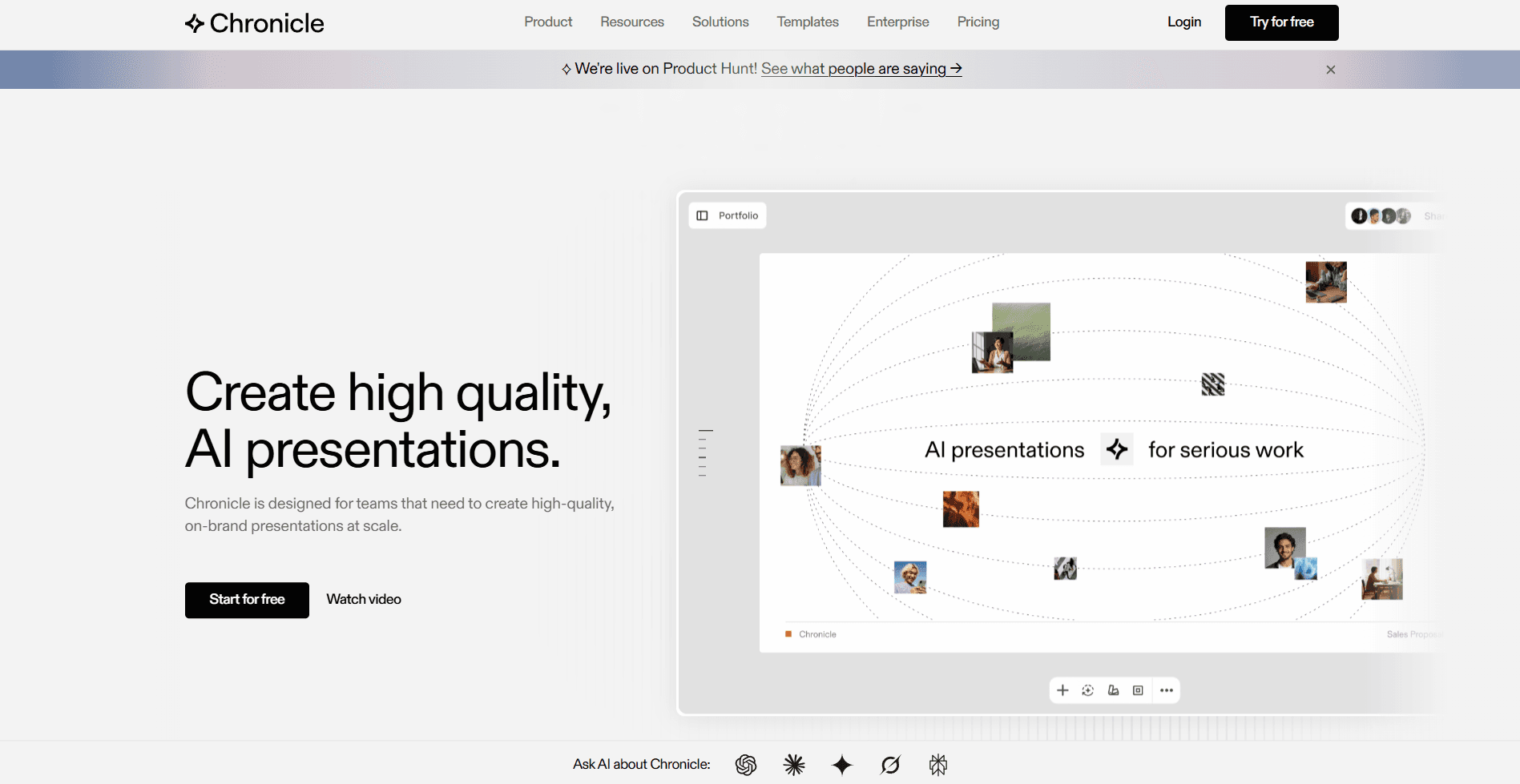
Chronicle is an AI-powered presentation tool built on a freeform canvas with a story-first approach to generation. The core idea is that AI should structure your narrative before it touches layout - so you get slides that serve a coherent arc rather than slides that just contain your content in different boxes.
The company was founded by Mayuresh Patole and Tejas Gawande. The team brings backgrounds from McKinsey, BCG, and Apple. Chronicle launched publicly in June 2025 after building a 100,000-person waitlist, has raised $7.5M from investors including Accel and Square Peg, and is used by 5,000+ teams at companies including OpenAI, Apple, Ramp, Notion, and Figma.
Its positioning is direct: this is the tool for high-stakes presentations where design quality and narrative precision matter more than generation speed. If you've ever sent a Gamma deck to an investor and quietly hoped they'd focus on the content rather than the slides, Chronicle is built for the opposite of that situation.
What Chronicle HQ Officially Documents—and What to Verify
For readers searching for Chronicle HQ, Chronicle AI, or a Chronicle presentation tool, the most useful starting point is the company’s own description of the product rather than a feature checklist alone. Chronicle’s product page says the product can turn notes, documents, data, and existing decks into editable, on-brand presentations. The same page describes a freeform canvas, real-time collaboration, presenting, publishing presentations as websites, and PDF export.
That documentation establishes the core workflow Chronicle is designed to support: bring in source material, work on an editable presentation, and share or present it from Chronicle. It does not answer every implementation question a team may have, however. The practical decision is less about whether an AI tool can generate an initial deck and more about whether its editing, sharing, automation, and final-delivery paths match the way your team actually works.
Use the documented workflow as an evaluation checklist
Workflow need | What Chronicle documents | What to validate yourself |
|---|---|---|
Starting from existing material | Chronicle says users can bring notes, documents, data, and existing decks into editable, on-brand presentations. | Use a representative brief or source file, then assess whether the resulting structure and editable presentation suit the intended audience. |
Collaborative creation and sharing | Chronicle’s product page describes real-time collaboration, presenting, and publishing presentations as websites. | Try the review, sharing, and presentation flow with the colleagues or recipients who will use the deck. |
Final file handoff | The Chronicle product-page evidence used in this review documents PDF export. | Confirm the exact export format, account access, and editing path required for your own delivery workflow before adopting the product. |
Automated presentation creation | Chronicle’s developer documentation describes API capabilities for template-based creation, prompt generation, retrieving presentations, listing templates, and updating metadata. | Review the documented endpoints and test the exact template, generation, retrieval, and authentication flow your system needs. |
API and MCP are separate documented paths
Chronicle’s developer documentation distinguishes API integrations and backend automations from MCP-based workflows for AI agents. The documentation also notes that presentation generation can be asynchronous. In practical terms, an automated implementation may need to create a presentation and retrieve it after generation rather than handle deck creation as an immediate response.
This is useful context for teams considering Chronicle as part of a repeatable presentation process. It confirms that Chronicle documents routes for template-driven and prompt-driven automation, but it is still important to test the specific workflow your team plans to run. Check which templates are appropriate, how generated presentations are retrieved, who can access the resulting deck, and how the finished presentation will be delivered to its audience.
If you are comparing Chronicle’s approach with other AI deck workflows, see our best AI presentation makers guide. For teams evaluating agent-assisted presentation creation more broadly, our guide on using Claude to create presentations covers the workflow decisions to make before connecting an AI assistant to presentation software.
Bottom line: Chronicle’s own materials document an editable presentation workflow built around source material, collaboration, presenting, website publishing, and PDF export. Treat any workflow-specific requirement—particularly the final handoff format and automation setup—as something to verify directly in the relevant Chronicle product experience and documentation before making it a deciding factor.
How To Create A Presentation On Chronicle
Chronicle's workflow is more structured than most AI presentation tools. There are four clear steps, and the order matters: you can't jump straight to the canvas without going through the outline stage first.
Step 1: Add your prompt. Start by entering your topic, brief, or raw content. Chronicle accepts a typed prompt, pasted notes, a PDF upload, an existing PowerPoint file, or a URL. Once you've added your source material, Chronicle asks a few clarifying questions (presentation type, intended audience, tone) to shape how the AI structures the content before generating anything.
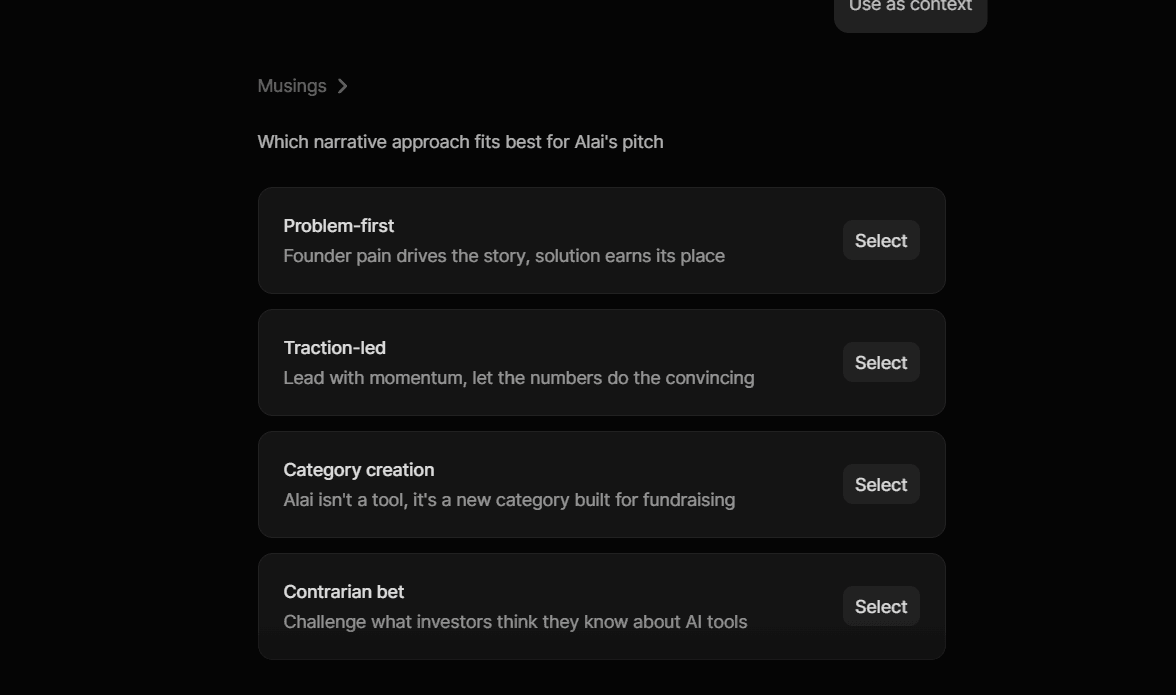
Step 2: Review and edit the outline. Before any slides are created, Chronicle produces a storyline: a structured outline of the deck's narrative arc. This is where you can intervene early by instructing the AI to restructure sections, change the order, cut a section, or reframe the angle. You also choose a theme at this stage, which determines the visual direction of the final deck. Getting the outline right here saves significant editing time later.
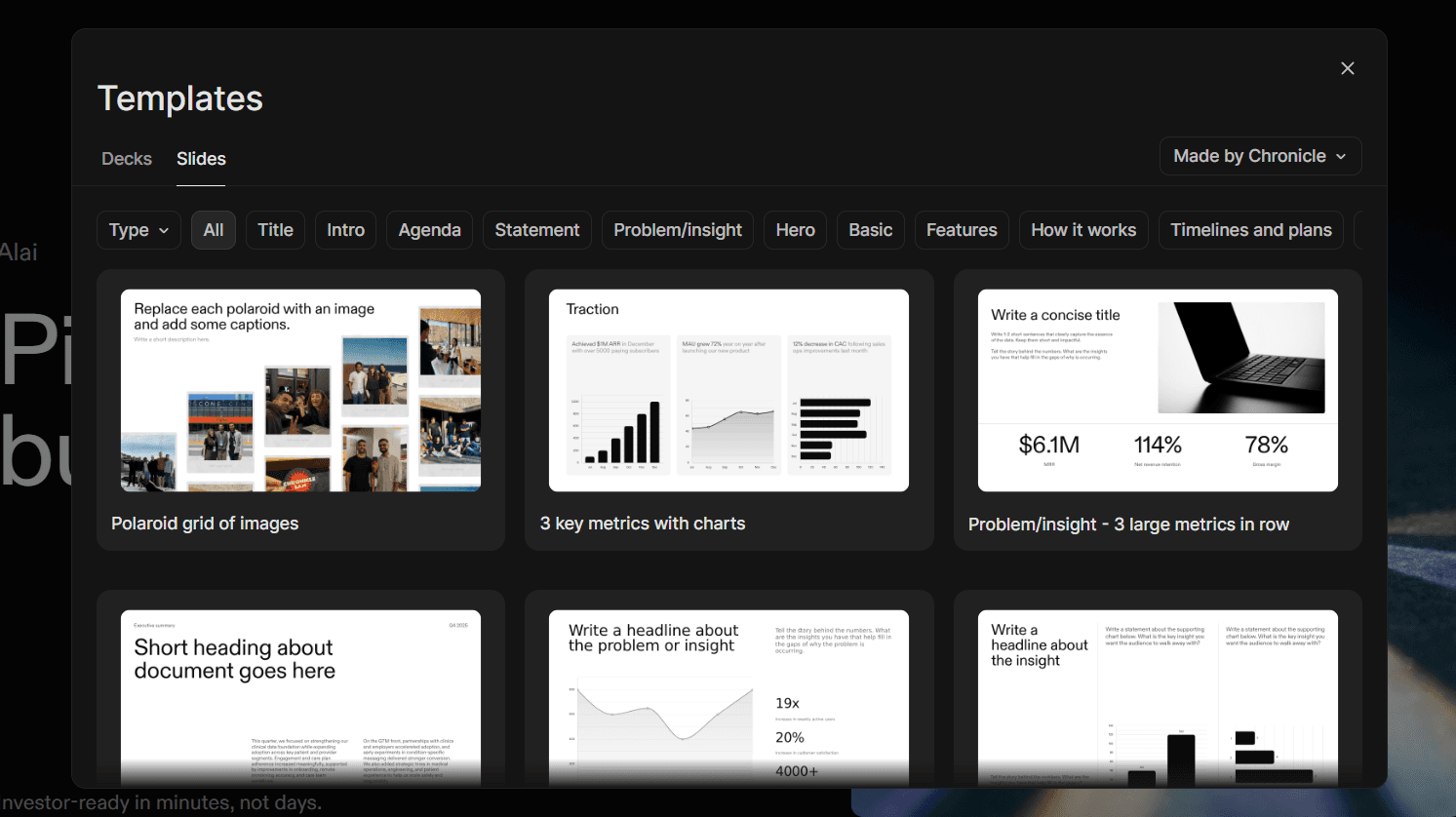
Step 3: Slides are generated, then edited on the canvas. Once the outline is confirmed, Chronicle generates the full deck. The canvas is widget-based, with content living in draggable, remixable components across images, cards, charts, tables, and mockups. The Remix feature (1 token per use) generates alternative layouts for any slide across 64 style options. Basic editing controls cover text (font, color, sizing), images, and background are available - not the deepest editing toolkit in the category.
Step 4: Export. Present directly from Chronicle using Peek and Deep Hover modes for live audiences, export to PDF, publish as a web link, or export to PPT. PPT export is rolling out gradually through 2026 and is not available on all accounts. Confirm current status before committing if this is a hard requirement.
Chronicle Features
Builds your story before it builds your slides. Most AI presentation tools take your content and fill slides with it. Chronicle does something different: before it creates a single slide, it asks you to review and approve an outline: the flow and order of your deck's story. Only once that structure is confirmed does it generate the actual slides. The result is a deck that makes sense from beginning to end, rather than one you have to reorganize after the fact..
Brand kit. Upload your fonts, colors, and visual rules once. Every deck generated in your workspace follows them automatically. For teams producing frequent external-facing presentations, this is practically mandatory - it eliminates the "frankedeck" problem where different team members produce visually inconsistent output.
64 Remix styles. Every slide can be remixed into a different layout at 1 token per remix. This is most useful when the AI generates a layout that doesn't fit the content type - a timeline where a comparison table would work better, or a text-heavy slide that would read more clearly as a visual grid. The 64 options cover most situations, though knowing which style fits which content type takes time to learn.
Real-time collaboration. Multiple editors can work simultaneously with live co-authoring. Teams can share templates, manage permissions at the workspace level, and use consolidated billing on team plans.
Interactive presenting modes. Peek (preview content without advancing the slide) and Deep Hover (surface supplementary detail on hover during live presenting) make Chronicle decks interactive in a way a static PDF or PowerPoint export can't replicate. For teams that present live rather than send and wait, these features matter.
Integrations. Beyond the 30+ native connections, Chronicle's API in early access enables automated presentation generation for recurring sales workflows, reporting pipelines, and proposal systems that need to produce decks at volume.
Chronicle Pricing
Plan | Monthly | Annual | Tokens/Month | Key Limits |
Free | $0 | $0 | 200 | 1 guest editor, basic themes, Chronicle branding on exports |
Pro | $15/user | $12/user | 750 | Custom themes, remove branding, import URL/PDF/PPT, 3 guest editors |
Plus | $30/user | $25/user | 1,1500 | Unlimited guest editors, priority support |
Enterprise | Custom | Custom | Custom | Brand governance, compliance controls, dedicated SLA |
The token system deserves more attention than the pricing page gives it. Here's what actually matters in practice:
Generating a full presentation costs approximately 10 -15 tokens plus 1 token per chapter. A standard 10-chapter deck = about 20 tokens. Each Remix (alternative layout) costs 1 token. Content rewrites cost 1 token. Tokens reset monthly with no rollover.
On the Free plan's 100 tokens, you can generate approximately 5 full decks with minimal remixing. On Pro's 750 tokens, that covers frequent use - but teams that iterate heavily on layouts (remixing 5 to 10 slides per deck across multiple rounds) can burn through tokens faster than expected. Plus at 1,500 tokens removes that anxiety entirely.
The free plan doesn't require a credit card, which makes it genuinely useful for evaluation. Contrast this with Beautiful.ai, which requires payment details for its 14-day trial.
Chronicle Pros and Cons
What Chronicle Gets Right
Clean layouts with clear structure. What Chronicle gets right on design is consistency and clarity. Slides have well-defined sections, clean text hierarchy, and deliberate spacing that makes content easy to scan. Even when individual slides feel flat, the deck reads as a coherent whole rather than a patchwork of mismatched formatting, which is more than most AI presentation tools can say on a first draft. In any Chronicle HQ review the narrative output is the standout: the outline-first approach structures a story arc before a single slide is rendered, which consistently produces decks that are easier to present without content restructuring. If you're building investor decks specifically, our AI pitch deck generators guide goes deeper on how AI presentation tools perform on that specific format.
The free plan is honest. 100 tokens per month with unlimited documents and no credit card required is a real free plan, not a bait-and-switch. You can test Chronicle on a real project - generate an actual deck for a real meeting - without spending anything or entering payment details.
Brand kit scales well for teams. Set up brand fonts, colors, and visual rules once. Every deck any team member generates in the workspace follows them. For marketing teams, agencies, and consultants managing brand standards across multiple contributors, this eliminates a significant amount of post-generation cleanup. If your primary use case is marketing decks, we've also covered AI presentation makers for marketing in depth separately.
Integrations depth. Embedding live data from Notion, Google Sheets, or Airtable directly into slides - and having it update without regenerating the deck is a real productivity gain for teams doing weekly or monthly reporting where the structure stays the same but the numbers change.
Where Chronicle Falls Short
Slide layouts get repetitive fast. The AI leans heavily on a small set of layouts for the first draft: card-based slides, image-and-text splits, and similar structures recycle across a deck more than they should. After a few slides, a pattern emerges: similar formatting, similar proportions, similar visual rhythm. For a 10-slide deck this is manageable. For a 20-slide board update it starts to feel monotonous. The 64 Remix styles exist precisely to address this, but burning tokens to break out of a template pattern the AI created is an extra step most tools don't require.
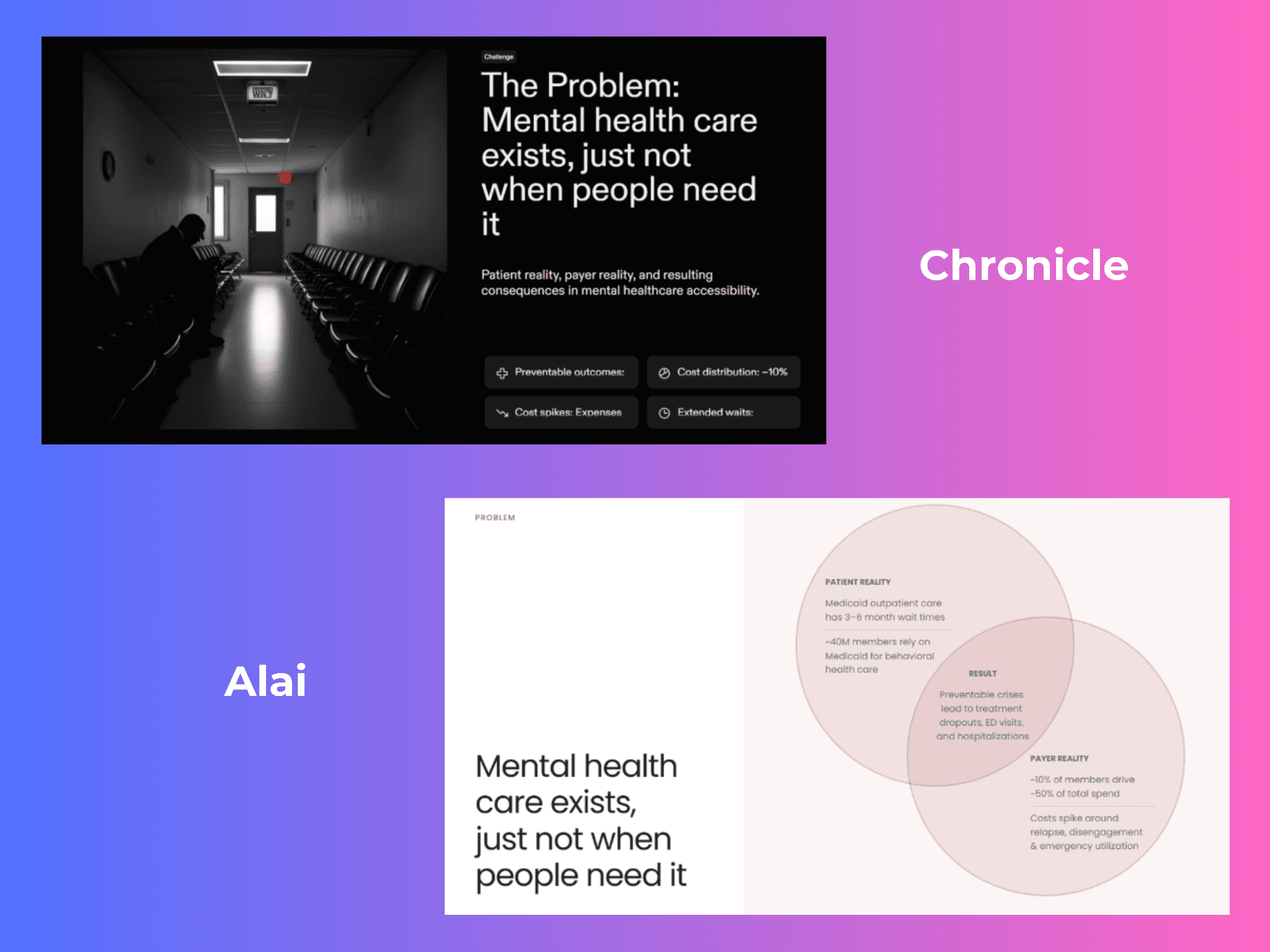
First drafts look clean but lack visual depth. Chronicle's themes do their core job well: they keep the deck visually consistent and on-brand from slide to slide without you having to enforce it manually. The limitation is that the design expression stays shallow. What's missing in the first draft is the visual weight that makes slides feel premium rather than functional: gradients, shadows, layered elements that give content dimension. Slides come out clean but flat. Compare this to Alai, which applies modern design principles from generation, or to what you'd get from a designer applying the same brand colors with actual depth. It's a good starting point, but not yet a finished one.
AI-selected images frequently miss the mark. Stock image selection is one of Chronicle's weaker points. The images the AI picks often don't connect closely enough to the slide's specific content (example given below). You get a vaguely relevant photo rather than something that reinforces the point being made. This is fixable in editing, but it's a consistent pattern worth budgeting time for, especially on decks where visuals carry meaning.

Editing controls are adequate but not deep. The canvas editor covers the basics: remix between element types, edit text (font, color, sizing), swap images, change backgrounds. That covers most day-to-day adjustments. But if you need fine-grained control over padding, alignment, element sizing, or layering, the kind of control a designer would want, Chronicle's editing toolkit runs out of options faster than you'd expect from a "freeform" canvas. For most users this is fine. For teams with exacting design standards, it's a ceiling.
PPT export is not fully available yet. PowerPoint export was announced in November 2025 and is rolling out gradually through 2026. At the time of this review, it was not universally available across all Chronicle accounts. If your workflow consistently ends in a .pptx file - for clients, for internal review processes, or for teams who present from PowerPoint - verify current availability directly with Chronicle before committing. Every alternative in this review offers fully live PPT export.
No offline mode, no mobile app. Chronicle requires an active internet connection at all times. There is no desktop application and no mobile app. For anyone who presents in environments with unreliable connectivity - planes, conference venues, rural client sites - this is a genuine operational risk. For anyone who needs to present or review decks on a phone or tablet, Chronicle doesn't support it.
Now that we’ve covered everything about Chronicle, here are 5 other AI presentation tools worth your time and money.
Editorial Disclosure: Alai Is Included in This Comparison
This review is published on GetAlai, and Alai is included in the alternatives list below. That creates a commercial interest readers should know about before using the comparison to make a buying decision. This is not an independent third-party review of Alai. The sections discussing Alai describe the publisher’s own product alongside competing presentation tools, including Chronicle.
The practical implication is straightforward: treat the Alai recommendation as publisher-provided information, and verify the product requirements that matter most to your team before choosing it. That includes the workflow you use to create a deck, the editing control you need after generation, the way collaborators review work, and the format required when a presentation must be handed off. If you want product-specific background before assessing the comparison, see Alai 101. For a broader category view that is organized around presentation-making use cases, see our guide to Gemini Canvas and other AI presentation tools.
This disclosure does not mean Chronicle should be judged by Alai’s product claims, or that Alai should be judged solely against Chronicle. Each tool should be assessed against the same concrete job: for example, creating a client proposal, preparing a board update, building a pitch deck, or producing an internal briefing. Use source material that resembles the inputs your team actually has, identify the final format your recipient needs, and review the resulting deck in the environment where it will be edited, presented, or shared.
When a statement concerns Chronicle’s current documented product information, the most appropriate starting point is Chronicle’s own material. Readers can consult Chronicle’s official product page for the company’s current product description and Chronicle’s developer documentation for its documented developer information. Those sources are controlled by Chronicle and may change as the product changes. They are useful for checking vendor-described functionality, but they do not replace a team’s own review of whether a particular workflow, account configuration, or delivery requirement is suitable.
The same standard should apply to every option in this article, including Alai: separate a vendor’s description of its product from your own acceptance criteria. Before adopting a tool, identify the non-negotiables for the deck you need to produce. Examples may include whether a collaborator can make the required changes, whether the recipient can access the finished presentation in the required way, and whether the team can complete its review process without recreating content elsewhere. Then validate those requirements directly in the product rather than relying on a ranking, a feature list, or a single generated example.
How to read the recommendations below: use them as a starting point for narrowing options by use case, not as a substitute for procurement, security, accessibility, brand, or delivery review. The comparison identifies where each tool may be relevant, while this disclosure makes clear that the publisher has a direct interest in one of those options. Readers who need a neutral internal decision should document their own criteria, test the finalists with representative source material, and record the results before committing to a workflow.
5 Best Chronicle Alternatives in 2026
How I Tested These Alternatives
Every tool below was evaluated against the same five criteria applied consistently:
Design quality. Generated a 10-slide sales pitch deck from the same 300-word brief in every tool. Rated on visual polish, layout consistency, and whether slides were client-presentable without additional manual work.
AI generation. Tested how each tool handles narrative structure, prompt fidelity, and slide-level coherence across the full deck.
Editing and iteration. How easy is it to change a layout, swap content, or adjust one slide without triggering a full regeneration or losing other slides you've already fixed?
Export reliability. PPT and PDF export tested in each tool, with specific attention to formatting fidelity after export.
Pricing value. What does the free plan actually give you, and what does the base paid tier add in practice?
1. Alai: Best Chronicle Alternative for Design Quality + Speed
Alai is built from the ground up for presentations, not adapted from a doc editor or design tool. The output applies real design principles from the first generation: visual hierarchy, depth, gradients, and layout logic that fits the content rather than defaulting to whatever template was easiest to generate. Where Chronicle produces clean, structured decks that need polishing, Alai gets closer to finished on the first try.
How Alai is better than Chronicle:
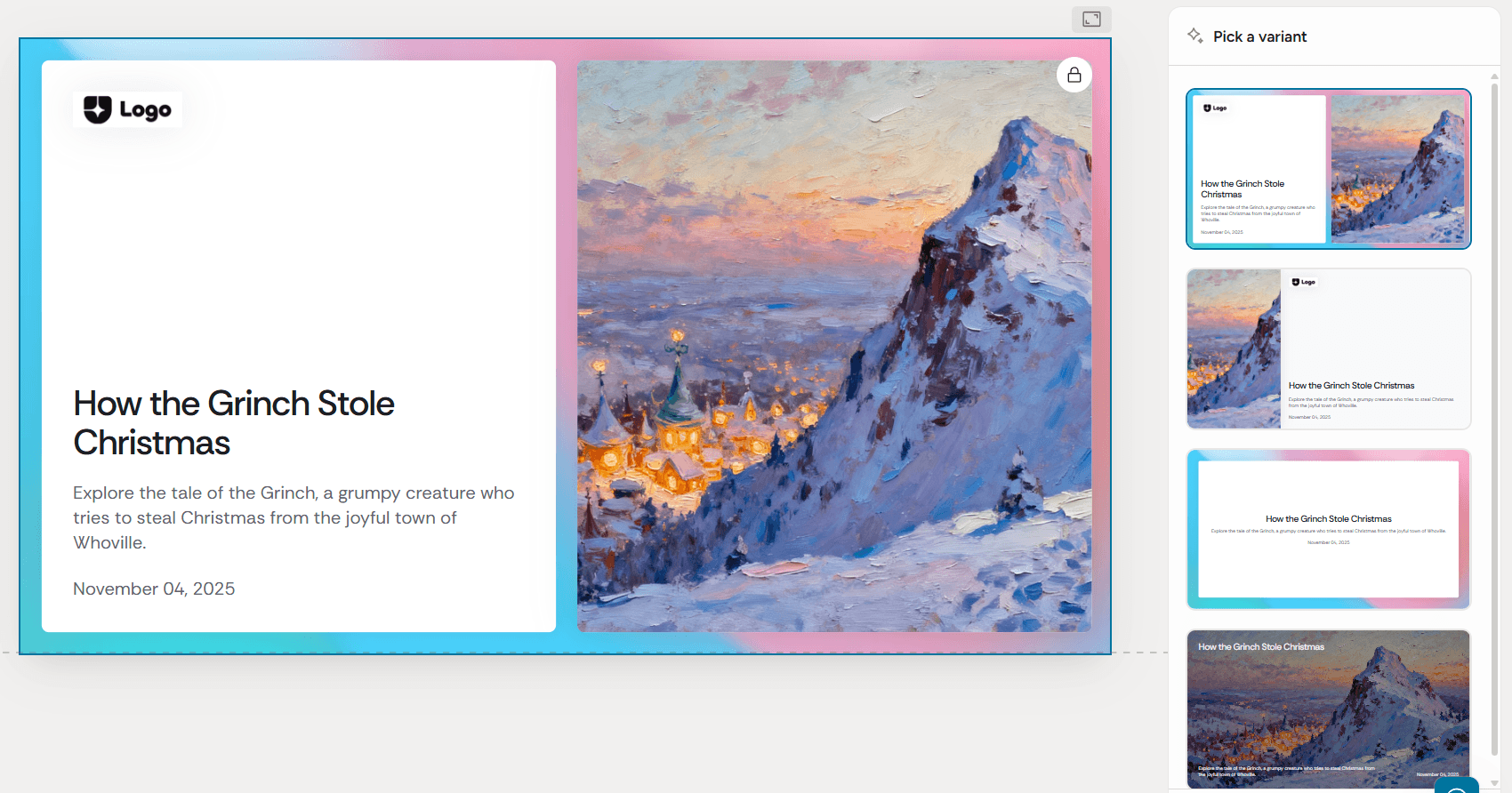
Four layout options per slide. Most tools generate one layout and ask you to regenerate until something works. Alai generates four distinct options for every slide simultaneously. You pick the one that fits and move on. It solves the same problem Chronicle's 64 Remix styles solve, but without navigating an extra panel or spending a token per attempt. The right layout is in front of you from the start.
Better design depth out of the box. Where Chronicle's first drafts come out clean but flat, Alai applies real design principles from generation: proper visual hierarchy, gradients, shadows, and depth cues that make slides feel finished rather than functional. The AI also picks the right format for the content automatically: a Venn diagram where two concepts overlap, a comparison matrix where features need to be weighed, rather than defaulting to bullets regardless of what the slide is saying.
Nano Banana Pro integration. Alai is the only presentation tool that lets you generate Nano Banana Pro image slides (Google DeepMind's latest AI image model) directly within a deck, with full editing and theme consistency. You can mix image-based slides with regular slides in the same deck, something no other tool in this category supports. Design presets handle the prompting for you, so you don't need to write a single AI prompt to get high-quality infographics, diagrams, or visual-heavy slides that match your brand.
Context-aware editing that doesn't break your deck. When you edit a slide in Alai, the rest of the deck stays exactly as it was. Change the chart on slide 8, and slides 1 through 7 are untouched. With Chronicle's Remix approach and most other AI editors, a single change can create unintended downstream effects.
MCP integration for AI-native workflows. Connect Alai directly to Claude, Cursor, or Manus and generate presentations without switching tabs. Combine with Notion, Stripe, or PostHog MCP servers to pull live data into decks automatically. Chronicle has an API in early access, but nothing at this level of integration today.
Analytics that tell you what's landing. Once a deck is sent, Alai shows you who viewed it, how long they spent on each slide, and where they dropped off. For sales and fundraising workflows where you're iterating based on what's working, this data is genuinely useful. Chronicle has no equivalent.
PPT export is fully live. Alai exports clean, high-fidelity .pptx files that hold formatting when clients or investors open, edit, or share them internally. Chronicle's PPT export is still rolling out and not available on all accounts.
Pros:
Four layout options per slide - pick the right one immediately, no regenerating
Nano Banana Pro integration: editable AI image slides, theme-consistent, mixable with regular slides
Design built on real principles: gradients, shadows, depth - not just color and font choices
Agent Mode lets you edit conversationally in plain English with no collateral changes to other slides
Analytics show who viewed the deck, time per slide, and where viewers dropped off
MCP integration: generate presentations directly from Claude, Cursor, or Manus
PPT export fully live with high-fidelity formatting
Free plan: 300 credits, PDF export, no credit card required
Context-aware AI: edits to one slide don't affect the rest of the deck
Cons:
Smaller template library than Chronicle or Gamma for non-pitch use cases
Pricing:
Plan | Monthly | Annual | Credits/Month | Key Limits |
Free | $0 | $0 | 300 | Up to 10 slides/prompt, watermark on exports |
Plus | $20/user | $16/user | 600 | Up to 20 slides/prompt, no watermark, PPT export |
Pro | $30/user | $25/user | 1,200 | Up to 50 slides/prompt, priority founder support |
Ultra | $80/user | $60/user | 5,000 | Direct feature requests to founders |
Best for: Founders and business teams looking to create professional looking decks without spending a lot of time on iteration.
2. Gamma: Best for Async Decks and Multi-Format Content
Gamma isn't just a presentation tool: it generates presentations, documents, and web pages from the same prompt. That multi-format flexibility is its real edge. The card-based format is built to be scrolled through asynchronously, not clicked through on a stage, which makes it a natural fit for teams sharing content via link rather than presenting live.
How Gamma is better than Chronicle:
Built for content that gets shared, not just presented. Gamma's card-based format is designed for async consumption. Instead of a linear deck that requires someone to sit through a live presentation, Gamma creates scrollable content that works just as well in a Slack message, an email, or a shared link. Recipients can scroll through at their own pace, on any device, without needing the presenter in the room. For internal briefings, team updates, investor updates that go out to multiple stakeholders, or any situation where your content needs to reach people without a scheduled call, this format removes the friction entirely. Chronicle's presentation format is built for live delivery. Gamma's is built for distribution.
One prompt, three formats. From a single input, Gamma can output a presentation, a long-form document, or a published webpage. The content structure stays the same; the format adapts. A product update can become a slide deck for the all-hands, a document for the wiki, and a webpage for external stakeholders, without rebuilding anything from scratch. Chronicle generates presentations only. For teams that regularly repurpose the same content across multiple surfaces, Gamma eliminates a significant amount of reformatting work.
Integrations that connect to everything. Gamma supports 8,000+ integrations via Zapier and Make, covering CRMs, project management tools, communication platforms, and data sources. You can trigger deck creation automatically, pull in live data, or push completed decks into existing workflows. Chronicle's integrations are more curated (30+ native connections), but Gamma's breadth means it fits into almost any existing tech stack without custom work.
For a full breakdown on Gamma and its pros and cons, see our Gamma review and alternatives guide.
Pros:
Card-based format built for async sharing via link, not just live presenting
Generates presentations, documents, and web pages from the same prompt
Gamma Agent enables conversational refinement across the whole deck at once
400-credit free plan with no credit card required
Supports 8,000+ integrations via Zapier and Make
Multiple export formats: PPT, PDF, PNG, Google Slides
Cons:
Design output is recognizable across heavy users - decks can start looking similar
PPT export formatting inconsistencies are a documented and recurring issue
Card-based format limits design flexibility for teams with specific visual standards
Free plan output carries Gamma branding until you upgrade to Plus
Pricing:
Plan | Monthly | Annual | Key Limits |
Free | $0 | $0 | 400 credits (one-time), Gamma branding on output |
Plus | $10/user | $8/user | Unlimited AI, no branding, up to 20 cards/deck |
Pro | $20/user | $15/user | Analytics, API access, custom fonts, up to 60 cards/deck |
Ultra | $100/user | $90/user | Advanced AI models, up to 75 cards/deck, early feature access |
Best for: Teams that share content via link rather than presenting live. Internal briefings, cross-functional updates, and any content that needs to work as a document, a webpage, and a presentation without rebuilding from scratch.
3. Beautiful AI: Best for Brand-Consistent Team Decks
Beautiful AI solves a different problem from Chronicle. It's not built for narrative-first AI generation - it's built so that every deck your team produces, regardless of who made it, looks like it came from the same company.
How Beautiful AI is better than Chronicle:
Team-level brand governance that actually scales. Beautiful.ai has 7+ years of development behind it, and the brand controls reflect that maturity. The shared template library, centralized brand kit, admin controls, and locked slide features give operations and marketing teams real enforcement over what goes out, not just guidelines but platform-level restrictions. Specific slides can be locked so contributors can update content but can't alter layout or brand elements. For a team of 20+ people all generating decks independently, this is the difference between "brand guidelines exist" and "brand guidelines are actually followed." Chronicle's brand kit is solid for a newer tool, but it relies on team members working within the system correctly. Beautiful.ai removes that dependency.
Smart Slides: no manual reformatting, ever. The Smart Slides system is worth understanding in detail because it solves one of the most persistent time sinks in deck creation. When you add content to a slide, the layout adjusts automatically (spacing, alignment, visual hierarchy) without you touching a single element. Add a seventh bullet to a six-bullet slide and the layout reflows. Remove two data points from a chart and the surrounding elements rebalance. Change the deck theme and every slide updates to match. For teams where multiple people are iterating on the same deck across multiple days, this removes the "who broke the layout" problem entirely. Compare this to Chronicle, where layout adjustments happen through Remix (1 token per attempt) or manual edits on the canvas. Smart Slides makes reformatting a non-issue by design.
CRM and workflow integrations built for sales teams. Beautiful.ai has a native Salesforce integration that embeds deck creation directly into CRM workflows. Reps can generate, update, and share decks without leaving Salesforce. It also integrates with Slack, Dropbox, and Webex, making it easier to distribute presentations inside existing team workflows. Chronicle's 30+ integrations are broad, but they skew toward content and data sources rather than sales workflow tools.
Viewer analytics. Beautiful.ai tracks who opened a deck, how long they spent on each slide, and what they clicked. For sales teams using decks as part of a pipeline, this engagement data informs follow-up timing and messaging. Chronicle has no viewer analytics.
PPT export is fully live and reliable. Formatting holds when files move from Beautiful.ai to PowerPoint. For clients or stakeholders who work in PPT, this matters: they can download, edit, and present without layout breakage. Chronicle's PPT export is still rolling out and not available on all accounts.
Pros:
Smart Slides auto-adjust layout as content changes - no manual reformatting needed
Deep team-level brand governance: centralized libraries, locked slides, admin controls
Reliable PPT export with consistently high formatting fidelity
Salesforce integration embeds deck creation directly into CRM workflows
Viewer analytics track who opened the deck and time spent per slide section
50-80% design time reduction cited in user reviews versus PowerPoint
Cons:
No permanent free plan - 14-day trial requires a credit card
AI generation is template-first; output can start looking similar across heavy users
Team plan ($40/user/month annual) is significantly more expensive at scale
Less narrative AI sophistication than Chronicle or Alai for first-generation output quality
Pricing:
Plan | Monthly | Annual | Key Limits |
Pro | $45/user | $12/user | Unlimited slides, AI generation, PPT and PDF export |
Team | $50/user | $40/user | Brand control, shared libraries, analytics, admin tools |
Enterprise | Custom | Custom | SSO, user provisioning, dedicated account management |
Best for: Marketing teams and agencies producing frequent decks across large teams who need brand consistency enforced at the platform level. Not the right fit for individual users, small teams who want a free evaluation period, or anyone who needs narrative AI quality over template reliability.
4. Pitch: Best for Collaborative Pitch Decks With Analytics
Pitch is a strong pick for sales teams and founders who need more from their presentations than a polished static file. The tool is built around what happens after you send a deck: who opened it, which slides held attention, where viewers dropped off. That data changes how you follow up - and in sales and fundraising, follow-up timing and positioning win deals. If your primary use case is sales decks specifically, our AI presentation maker for sales guide goes deeper on how Pitch fits into that workflow.
How Pitch is better than Chronicle:
Slide-level analytics that change how you follow up. Pitch tells you exactly who opened your deck, how long they spent on each individual slide, and where they dropped off. If a prospect spent four minutes on your pricing slide and skipped the team slide entirely, that's a fundamentally different follow-up conversation than if they bounced after slide two. Chronicle sends a deck with no visibility into what happens next. For any sales or fundraising workflow where timing and positioning matter, Pitch gives you signals that Chronicle simply doesn't have. Over a series of pitches, this data also helps you identify which slides consistently hold attention and which are losing the room, so you're iterating based on evidence rather than instinct.
Deal rooms that consolidate everything a prospect needs. Instead of sending a deck link and then separately attaching a one-pager, case study, and pricing sheet, Pitch lets you create a deal room: a single shareable link that surfaces all of your assets in one place. The prospect sees everything you want them to see, in the order you want them to see it, and Pitch tracks engagement across all of it. You know which assets got opened, which got ignored, and how much time was spent on each. For sales teams managing multiple touchpoints across a deal, this replaces a scattered set of email attachments with a single controlled environment.
Version control and commenting built for multi-stakeholder decks. When a founder, a COO, and an advisor are all iterating on the same pitch deck across a week of investor meetings, things get messy fast. Pitch tracks every change, makes it easy to compare versions side by side, and keeps comments attached to specific slides rather than buried in email threads or scattered across Slack. You can see exactly what changed between Tuesday's draft and Thursday's, who changed it, and why. Chronicle has real-time co-editing, but no version history or structured commenting system. For high-stakes decks with multiple contributors and a hard deadline, the difference is significant.
Collaboration features that extend beyond the deck. Pitch supports async video recordings on slides: leave a short video walkthrough on a specific slide for a stakeholder who missed the meeting, or record a full deck walkthrough to send instead of scheduling a call. Comments can be resolved, threaded, and assigned, keeping feedback organized across a long iteration cycle. For teams where not everyone is in the same timezone or meeting, this makes asynchronous review genuinely workable.
PPT export is live and reliable. Pitch exports clean .pptx files with formatting intact. For partners, clients, or investors who need to present from PowerPoint, the file works without reformatting. Chronicle's PPT export is still rolling out and not available on all accounts.
Pros:
Slide-level analytics show viewing time per slide per individual viewer
Deal rooms surface multiple assets in one shareable link with full analytics
Version control and in-context commenting for collaborative iteration
Generous free plan with real AI generation capability and no credit card required
PPT export with reliable formatting fidelity
Cons:
AI generation quality is good but not the strongest for first-draft design output
Deal room features add complexity that's unnecessary for non-sales use cases
PDF exports carry Pitch branding on the free plan
Business plan pricing requires a quote - harder to evaluate cost at scale upfront
Pricing:
Plan | Monthly | Annual | Key Limits |
Free | $0 | $0 | Unlimited decks, Pitch branding on PDF exports |
Pro | $10/user | $8/user | Custom domain, full analytics, no branding |
Business | Custom | Custom | SSO, advanced analytics, priority support |
Best for: Sales teams and founders who need engagement data to guide follow-up. Overkill for anyone who sends a deck and doesn't need to track what happens next.
5. Plus AI: Best for PowerPoint And Google Slide Users Who Aren't Switching Platforms

Plus AI is the only tool on this list that doesn't ask you to change your workflow. It works as an add-in inside PowerPoint and Google Slides, bringing AI generation into the tools your team already uses. No new platform, no migration, no export step - you generate slides, edit in PowerPoint, and send in PowerPoint.
How Plus AI is better than Chronicle:
You never leave PowerPoint or Google Slides. This is Plus AI's entire value proposition and it's a real one. Chronicle, Alai, Gamma, and every other tool on this list asks you to open a new platform, learn a new interface, and then export back to PowerPoint when you're done. Plus AI is an add-in that lives inside PowerPoint and Google Slides. You open your existing presentation, click the Plus AI sidebar, generate slides, and they appear in your deck, formatted as native slides, not imported images or converted files. There is no export step because you never left PowerPoint. For teams where presentations stay in SharePoint, Google Drive, or are shared directly from the desktop app, this removes an entire layer of friction.
Native PPTX output, not converted files. Plus AI builds a proprietary Open XML renderer to generate native .pptx files, not converted approximations. Every slide is fully editable in PowerPoint (shapes, text boxes, charts, animations) exactly as if you'd built it manually. Other tools that claim PPT export often produce files where formatting shifts, fonts substitute, or layouts break when opened in PowerPoint 365. Plus AI's output doesn't have this problem because it's built inside PowerPoint to begin with.
Generates inside your existing templates. If your organization has a PowerPoint master template with branded layouts, color schemes, fonts, and logo placements already built in, Plus AI generates new decks inside that template automatically. Chronicle's brand kit requires you to set up your brand from scratch in a new environment. Plus AI works with what you already have. Enterprise customers can get fully custom templates trained to their exact organizational standards. For any company with a mature visual identity already expressed in PowerPoint, this is a significantly faster path to brand-consistent output.
Remix and Rewrite for AI editing without regenerating. Beyond generation, Plus AI includes two editing tools worth knowing. Remix takes any existing slide and reformats it into a different layout using AI: turn a text-heavy slide into a three-column layout, or convert a bullet list into a visual grid, without rewriting the content. Rewrite adjusts tone, length, and phrasing on any slide or across the whole deck. Both work inside PowerPoint without switching tabs or touching a separate interface. Chronicle's equivalent (Remix) works similarly but costs a token per use and requires navigating to a separate panel.
Live Snapshots for auto-refreshing data. Plus AI's Live Snapshots feature keeps data slides current automatically. Connect a slide to a data source and the numbers update without you manually going in to change them. For teams that present recurring reports (weekly pipeline reviews, monthly performance updates, quarterly board decks, this removes the manual data entry step that makes recurring decks painful. Chronicle has data integrations (Notion, Google Sheets, Airtable) that update without regeneration, but Live Snapshots work natively inside PowerPoint without leaving the app.
Pros:
Works inside PowerPoint and Google Slides - zero new platform learning curve
Template-aware generation creates new decks inside your existing .pptx templates
Clean export by default - it's already PowerPoint, so no export step needed
Suitable for large organizations with existing PowerPoint governance and training
Solid AI generation for content structure within template constraints
Cons:
No free plan - paid from $15/month with no free evaluation period
Output quality ceiling is capped by your existing template quality
Not useful if improving design quality is part of the goal
Weaker narrative AI than Chronicle or Alai for first-generation output
No standalone presentation analytics or deal room features
Pricing:
Plan | Monthly | Annual | Key Features |
Basic | $15/user | $10/user | Unlimited AI generation in Google Slides and PowerPoint, single slide creation, Rewrite and Remix |
Pro | $25/user | $20/user | Everything in Basic, document uploads (PDF, docx, txt), 100K+ character prompts, AI image generation |
Team | $40/user | $30/user | Everything in Pro, custom logo/colors/fonts, custom template upload (beta), saved custom instructions, prompt history and presets |
Enterprise | Custom | Custom | Custom templates with advanced slide types, asset library integrations, workflows and automations, white-glove setup |
Best for: Teams that present in PowerPoint by default and need AI generation assistance without any workflow disruption. If you're specifically looking for AI for slide decks that works inside your existing tools rather than replacing them, Plus AI is the only option on this list that does that.
Final Verdict: Which AI Presentation Tool Should You Use?
Use Chronicle if you're comfortable spending time post-generation to get the deck where it needs to be. Chronicle's outline-first approach produces clear narrative structure, and the brand kit scales well for teams. But, the caveat is real: first drafts act only as a starting point that require a lot of rework. If you're okay with that trade-off and have the time to invest, Chronicle earns its place.
Use Alai if you want professional-quality output at faster speed. Where Chronicle gives you a clean starting point that needs work, Alai gets closer to finished on the first try - real design depth, four layout options per slide, context-aware editing that doesn't break your deck, and fully live PPT export. The strongest pick for founders and business teams who need decks that look designed without compromising on time.
Use Gamma if your content gets shared via link more than it gets presented live. The multi-format output (presentation, document, webpage from one prompt), scrollable card format, and 8,000+ integrations make it the right tool for internal briefings, cross-functional updates, and any content that needs to reach multiple stakeholders asynchronously without scheduling a call.
Use Beautiful AI if you manage a large team and need brand consistency enforced at the platform level rather than relying on individual discipline. Locked slides, centralized template libraries, and Smart Slides that auto-reformat as content changes solve the brand drift problem at scale in a way Chronicle's brand kit doesn't.
Use Pitch if your presentations are part of a sales or fundraising workflow where what happens after you send the deck matters more than the deck itself. Slide-level analytics, deal rooms, and version control are purpose-built for that use case.
Use Plus AI if your team works in PowerPoint or Google Slides and switching platforms isn't on the table. It's the only tool here that generates natively inside your existing tools, works with your current templates, and has zero migration cost.
Frequently Asked Questions
Is Chronicle free to use?
Yes. Chronicle's free plan gives you 100 tokens per month, unlimited documents and widgets, PDF and web publishing export, and 1 guest editor with no credit card required. The main constraints are the Chronicle branding on exports and the 100-token monthly cap. In practice, 100 tokens covers approximately 5 full deck generations with minimal remixing - enough to properly evaluate what this Chronicle HQ review covers before paying.
What is a token in Chronicle and how many do I need per month?
Tokens are Chronicle's unit for measuring AI usage. Generating a presentation costs approximately 10 tokens plus 1 per chapter, so a 10-chapter deck costs about 20 tokens. Each Remix (alternative layout) costs 1 token. Content rewrites cost 1 token. Tokens reset monthly with no rollover. On Pro's 250 tokens, a team generating 5-6 decks per month with moderate remixing stays within budget. Teams that remix heavily - exploring multiple layout options per slide across multiple rounds - should budget for Plus at 1,000 tokens.
Can I export Chronicle presentations to PowerPoint?
PPT export was announced in November 2025 and is rolling out gradually through 2026. It is not universally available across all Chronicle accounts as of this review. If you're evaluating Chronicle as the best AI tool for PowerPoint presentation workflows, this is the clearest current limitation. Confirm availability directly with Chronicle before signing up for a paid plan. Alai, Gamma, Beautiful.ai, and Pitch all offer fully live PPT export right now.
What are the main reasons people switch away from Chronicle?
The most commonly cited reasons are the 4-6 hour learning curve before the canvas clicks, PPT export not yet being universally available, no offline or mobile support, and the token system being less predictable than a flat monthly plan. Teams that need to ship fast and can't invest too much time in post generation clean-up tend to find Alai a better fit in the near term.
Does Chronicle work offline or on mobile?
No to both. Chronicle requires an active internet connection at all times. There is no desktop app and no mobile app. If you present in environments with unreliable connectivity - planes, conference venues, client sites - this is an operational risk worth planning for. All five alternatives in this review are browser-based; Gamma and Beautiful.ai have the most established mobile support for presenting on the go.
How does Chronicle handle data privacy?
Chronicle is SOC 2-level compliant with enterprise-grade security controls. Content is private by default. The Enterprise plan adds additional compliance and governance features for organizations with specific data handling requirements. Full details are available at Chronicle's Trust Center (security.chroniclehq.com), including subprocessor lists and privacy policy documentation.
What is Chronicle HQ?
Chronicle HQ is a storytelling and presentation workspace built around interactive blocks and narrative documents. It is strong for web-native storytelling, but less straightforward when a team needs editable PowerPoint workflows.
PAGES
Compare Tools
resources